

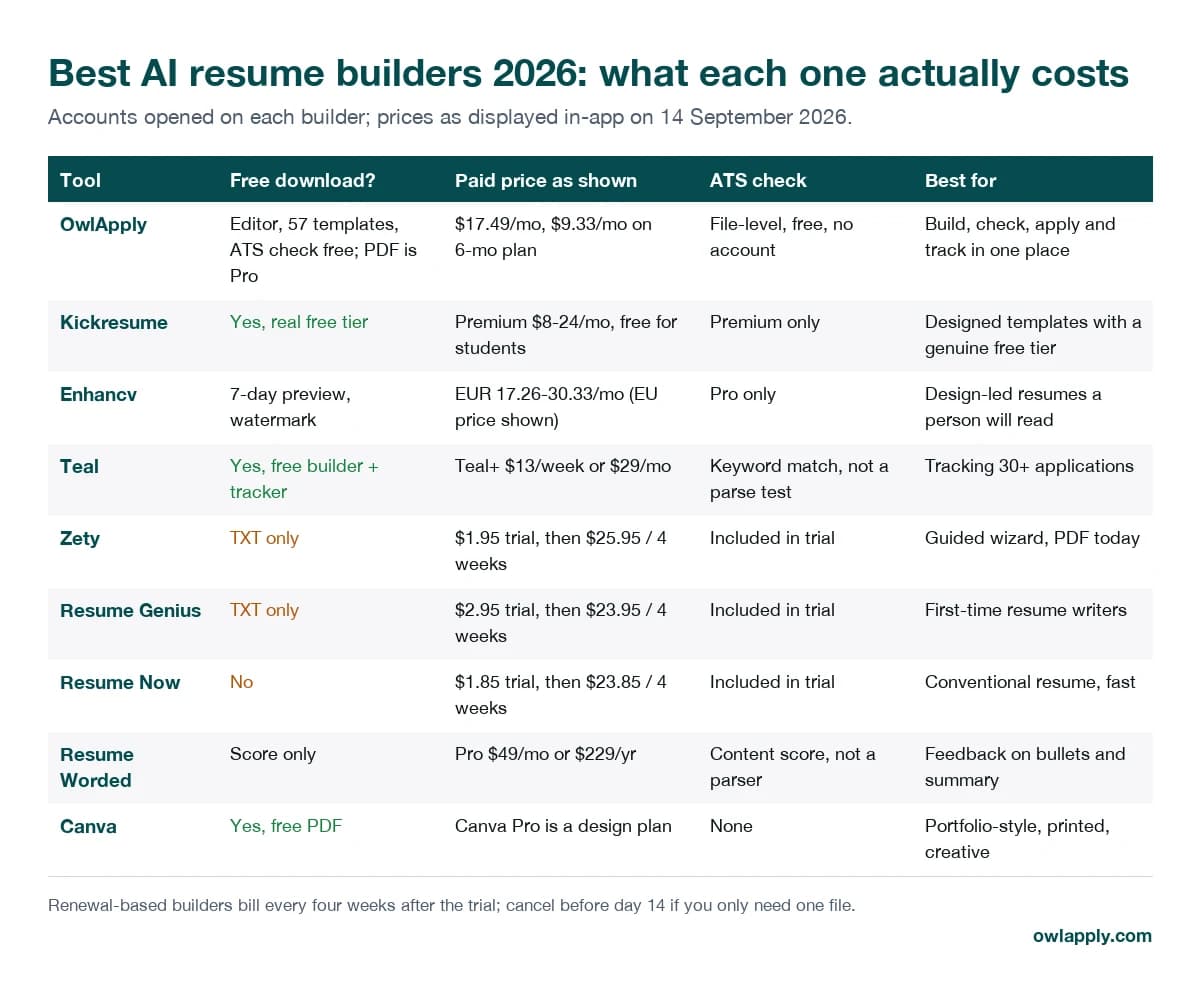
The best AI resume builders in 2026 all produce a presentable PDF. The differences that matter show up afterwards: whether the download is actually free, what the subscription renews at, whether the templates survive the applicant tracking system that reads the file before a recruiter does, and how much of the job search the tool covers once the resume exists. This page compares nine builders on exactly those points. Eight of them have a full review with in-app screenshots; the ninth is OwlApply, our own product, which we describe rather than rate.
Key takeaways
- Only three tools give you a free PDF without a trial: Kickresume, Canva and Teal. OwlApply's editor, templates and ATS check are free; the PDF download is Pro, or its $2.95 seven-day trial.
- Zety, Resume Genius and Resume Now sell a $1.85 to $2.95 trial that renews at $23.85 to $25.95 every four weeks; download PDF and Word on day one and cancel before day 14 if you only need one file. OwlApply's own trial is $2.95 for seven days and continues at $17.49 a month.
- Enhancv and Kickresume make the best-looking resumes and the most parser-hostile templates; use their single-column designs for portal applications.
- Teal and Resume Worded check keywords and content, not what a parser extracts. A file-level test is a separate step whichever builder you use.
- OwlApply is the only one that continues past the file: autofill on Workday and Greenhouse forms, a resume-ranked job board and voice interview practice.
How this comparison was done
The nine builders side by side
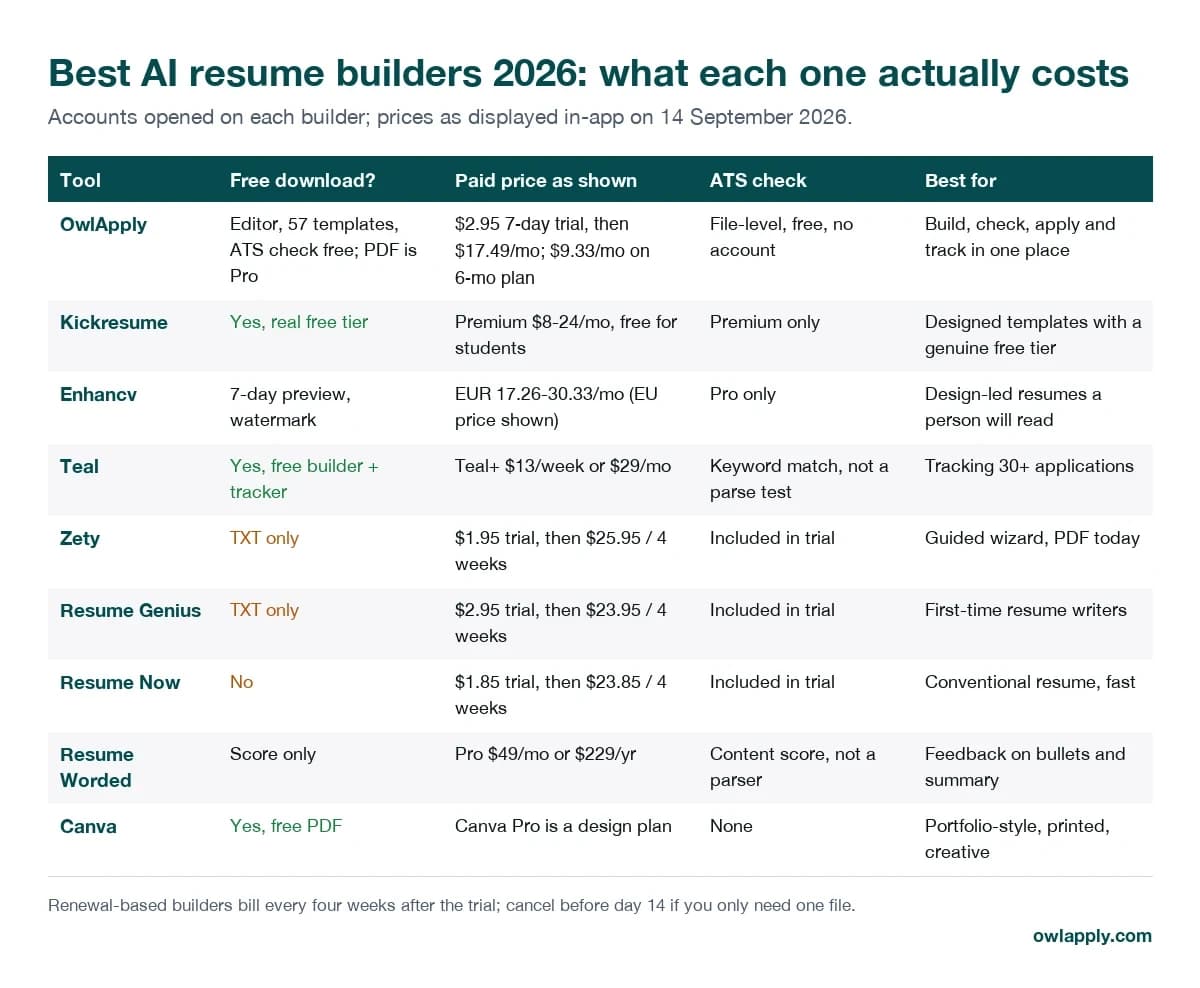
| Builder | Free download | Paid price as shown | ATS check | Full review |
|---|---|---|---|---|
| OwlApply | Editor, templates, tracker and ATS check free; PDF is Pro | $2.95 7-day trial, then $17.49/mo; $9.33/mo on 6-month plan | File-level, free, no account | this page |
| Kickresume | Yes | Premium $8-24/mo; free for students | Premium | Kickresume review |
| Enhancv | 7-day watermarked preview | €17.26-30.33/mo (EU) | Pro | Enhancv review |
| Teal | Yes | Teal+ $13/week or $29/mo | Keyword match | Teal review |
| Zety | TXT only | $1.95 trial → $25.95 / 4 weeks | In trial | Zety review |
| Resume Genius | TXT only | $2.95 trial → $23.95 / 4 weeks | In trial | Resume Genius review |
| Resume Now | No | $1.85 trial → $23.85 / 4 weeks | In trial | Resume Now review |
| Resume Worded | Score only | Pro $49/mo or $229/yr | Content score | Resume Worded review |
| Canva | Yes | Canva Pro is a design plan | None | Canva review |
The builders, one by one
1. OwlApply: best for building, checking and applying in one place
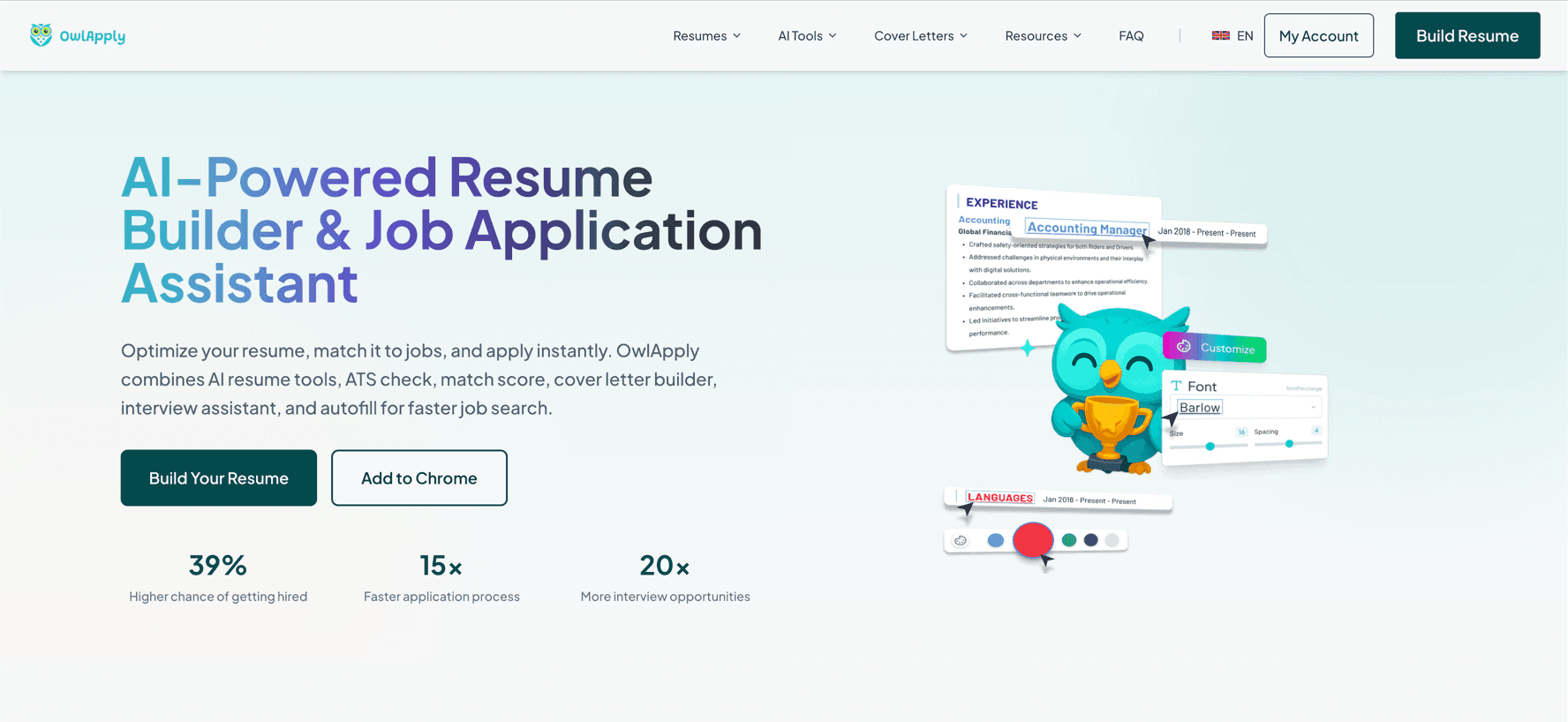
OwlApply is our own product, so read this entry as a product description rather than a review. The editor, all 57 templates, LinkedIn or PDF/DOCX import, the job tracker and a file-level ATS resume checker that needs no account are free; downloading the finished PDF, unlimited AI rewriting and the autofill extension's higher credit limit are on Pro. What none of the other builders on this list do is the loop after the file exists: the extension fills Workday, Greenhouse, Lever and iCIMS forms and drops the application into the tracker, the job board ranks listings against the resume rather than a search box, and the voice interview practice is something no resume tool here offers.
- Pricing: Free plan for the editor, templates, tracker and public ATS check. Pro: 7-day trial at $2.95, then $17.49 a month; $11.66 a month billed quarterly or $9.33 a month billed every six months. No four-weekly renewal cycle.
- ATS: The public checker shows the text a parser extracts from your file, the score and every parseability finding without an account; the content fixes (work experience, keywords, skills, education) are the Pro part of the report.
- Read more: the AI resume builder page and the pricing page.
2. Kickresume: best for designed templates with a genuine free download
Kickresume is one of the more honest deals in this group: the free tier produces a real, downloadable resume, the paid tiers are subscriptions you choose rather than trials that convert, students get Premium free, and the company is EU-hosted under GDPR. The catch is that the AI Writer's draft lands in a Premium template with Premium fonts and sections, so the resume it hands you cannot be exported as a free PDF (text export only) until you rebuild it in a free template. Many premium templates are two-column, photo-first designs that parse unevenly, and the ATS checker that would tell you is itself Premium.
- Pricing: Free tier with a real PDF download. Premium roughly $8 to $24 a month depending on term; free for students with a school email.
- ATS: Pick the single-column templates for online applications; run the export through a parser before you rely on it.
- Read more: the full Kickresume review with in-app screenshots.
3. Enhancv: best for design-led resumes that a person will read first
Enhancv makes some of the best-looking resumes of any builder and backs them with useful writing help: content suggestions as you type, a tailoring feature that reads a job posting, and an ATS check on Pro. Two things to weigh. The free plan is a seven-day preview with a watermark, so budget for Pro if you want a clean file; and the signature templates use two columns, side panels and graphical elements that parse less reliably than plain layouts. A lapsed plan locks editing but not downloading, which is fairer than most.
- Pricing: Free for seven days with Enhancv branding on the file. Pro as shown to an EU account: €30.33 monthly, €20.57 a month quarterly, €17.26 a month on a six-month plan; US readers see a different list.
- ATS: Use the template gallery's ATS filter and stay single-column for portal submissions.
- Read more: the full Enhancv review with in-app screenshots.
4. Teal: best for tracking dozens of applications and tailoring against each
Teal has the most developed job tracker of the builders here and a competent resume builder attached to it: attach a posting, see its top keywords, edit the resume against them. The free plan is genuinely useful; Teal+ lifts the AI-credit and keyword-insight caps. Know what the ATS feature is: keyword matching against the posting, not a test of what a parser extracts from your file. A free, unlimited tracker is not unique to Teal either, so judge it on the tailoring workflow.
- Pricing: Free plan with builder and tracker. Teal+ at $13 a week or $29 a month, as shown on 14 September 2026; a $179 annual option appears only inside the app.
- ATS: Keyword coverage, not parse testing. Pair it with a file-level check before you upload.
- Read more: the full Teal review with in-app screenshots.
5. Zety: best for a guided wizard and a finished PDF today
Zety is a competent builder attached to a subscription you must manage. The wizard suggests pre-written bullets by job title, the resume check catches missing sections and weak wording, and the single-column templates parse cleanly. The free download is plain text only; the trial gets you PDF and Word, provided you download both on day one and cancel before day 14.
- Pricing: $1.95 for a 14-day trial, renewing at $25.95 every four weeks unless cancelled; EU prices differ.
- ATS: Templates are mostly safe; the risk is the billing cycle, not the parser.
- Read more: the full Zety review with in-app screenshots.
6. Resume Genius: best for first-time resume writers who want the most hand-holding
Resume Genius has the most guided wizard of any major builder and a large example library that is genuinely useful for phrasing. The templates parse. It is the same commercial model as Zety: build free, download TXT free, pay a small trial fee for PDF and Word, then a four-weekly renewal you have to cancel yourself.
- Pricing: $2.95 for a 14-day trial, renewing at $23.95 every four weeks; an annual plan is offered at checkout.
- ATS: Parses fine; download PDF and Word on day one if you take the trial.
- Read more: the full Resume Genius review with in-app screenshots.
7. Resume Now: best for a conventional resume in an hour, with the ATS check and cover letter included
Resume Now's homepage says "free to use", which covers building and previewing; there is no free download at all. Once you accept that, the product is fine: single-column templates, a phrase library that speeds up a first draft, and an ATS resume check and cover letter generator that are included in the trial rather than upsold.
- Pricing: $1.85 for 14-day full access, renewing at $23.85 every four weeks; annual access at $5.85 a month billed as $70.20.
- ATS: Templates are safe; the file is never free.
- Read more: the full Resume Now review with in-app screenshots.
8. Resume Worded: best for line-by-line feedback on bullets and summaries
Resume Worded is a feedback tool more than a builder: its comments on weak bullets, missing numbers and vague summaries are specific and usually right, and the Targeted Resume comparison shows what a posting asks for that your resume does not mention. The free score is a taster; the fixes are Pro. It scores content, it does not show what an ATS extracts, so a two-column resume can score well and still lose its dates in a parser.
- Pricing: Free score. Pro at $49 a month or $229 a year, with countdown and location-based discounts shown in-app.
- ATS: A content scorer, not a parse test; combine with a file-level check.
- Read more: the full Resume Worded review with in-app screenshots.
9. Canva: best for portfolio-style, printed or creative resumes read by people
Canva gives you a genuinely free PDF and thousands of designs, and nothing else a job seeker needs: no ATS check, no keyword matching, no bullet rewriting, no tracker, and no DOCX export. Its icon-heavy, two-column layouts are the ones parsers break on. Use it when the resume will be read by a person first, and test the PDF before any portal upload.
- Pricing: Free for the resume itself; Canva Pro is a general design subscription, not a resume plan.
- ATS: The riskiest layouts in this list. Start from a single-column template, drop icons and skill bars, keep contact details in the body.
- Read more: the full Canva resume builder review with in-app screenshots.
Which one should you pick?
- You need one PDF today and will not iterate: Zety, Resume Genius or Resume Now on the trial, downloaded on day one, cancelled before day 14. Resume Genius if you want the most guidance. OwlApply's $2.95 trial works the same way with a shorter window: cancel before day 7.
- You want a free, real download: Kickresume (rebuild the AI draft in a free template) or Teal. Canva only if the reader is a person.
- The design is part of the pitch: Enhancv or Kickresume, single-column template, tested before upload.
- You are running 30 or more applications: Teal for tracking, or OwlApply if you also want the forms filled and the applications tracked automatically.
- Your resume is written and you want it critiqued: Resume Worded for the content, then a file-level parse test.
- You want the whole loop in one subscription: OwlApply, and use the free checker first to see whether you need Pro at all.
Before you send any of them: run a parse test
None of the builders above can promise that a given company's ATS will read your file the way the preview looks. The only reliable check is to upload the exported PDF and read what a parser extracts. Across the 3,313 résumé PDFs checked with OwlApply's public checker, only 27.7% came through with no layout finding at all; the most expensive common cause was a two-column or sidebar layout, in 17.2% of files, which cost those files about 15 points. The ATS resume statistics report has the full breakdown, how ATS software reads a resume explains the mechanics, and the ATS resume format guide shows the layout choices that avoid the problem. If you would rather start from a layout that already passes, the ATS-friendly resume templates are single-column by design.
Test the file your builder produced
Works on any PDF or DOCX from any builder on this page: extracted text, score and every parseability finding, no account, deleted after 24 hours.
Check my resume