

Home
  • Resumes & CVs
    Resume TemplatesView all
    Simple
    Minimal layouts that keep every recruiter focused on your content.
    Professional
    Boardroom-ready templates that spotlight experience and leadership.
    Modern
    Fresh, contemporary designs for innovative roles and companies.
    Creative
    Bold visuals and unique layouts crafted for design-forward careers.
    ATS Friendly
    Structured specifically to clear every Applicant Tracking System.
    Resume Builder
    Resume Builder
    Drag, drop, and export a job-ready resume with instant AI suggestions.
    See all resume examples
    Resume Examples
    Browse our ready-to-use resume examples and create your professional resume in minutes
  • AI Career Tools
    AI Career ToolsView all AI tools
    Keyword Optimizer
    Inject recruiter-approved keywords and rise to the top of ATS results.
    AI Resume Builder
    Generate a polished resume with AI-written bullets and proven layouts.
    Resume Translator
    Translate your resume into any language without losing nuance.
    Resume Summary
    Craft attention-grabbing summaries tailored to each role.
    Resume Bullet Point Generator
    Turn achievements into punchy bullet points in seconds.
    Cover Letter Generator
    Create pitch-perfect letters that mirror every job posting.
    Job Application Autofill
    Auto-complete repetitive application fields across top job boards.
    Resume Checker
    Audit structure, keywords, and impact with instant AI feedback.
    Resume Builder
    Resume Builder
    Drag, drop, and export a job-ready resume with instant AI suggestions.
    Chrome browser
    Firefox browser
    Opera browser
    Safari browser
    Install OwlApply Extension
    Autofill job forms, create tailored resumes, and score postings directly from Chrome.
  • Cover Letters
    Cover Letter TemplatesView all
    Simple
    Clean layouts ideal for traditional teams and entry-level roles.
    Professional
    Classic business styling that reinforces authority and credibility.
    Modern
    Sleek designs that feel right at home in tech and high-growth companies.
    Creative
    A unique canvas to showcase personality without sacrificing polish.
    Cover Letter Builder
    Cover Letter Builder
    Pair your resume with a tailored letter in minutes using guided prompts.
    Chrome browser
    Firefox browser
    Opera browser
    Safari browser
    Install OwlApply Extension
    Autofill job forms, create tailored resumes, and score postings directly from Chrome.
  • Resources
    ResourcesView all
    OwlApply Extension
    Autofill applications, generate cover letters, and track every job from your browser.
    Job Interview
    Scripts, frameworks, and confidence boosters for every interview format.
    Cover Letter
    Story-driven templates and tactics for memorable cover letters.
    Career
    Navigate negotiations, promotions, and pivots with expert advice.
    Resume
    Step-by-step guidance to craft a standout resume in any industry.
    Resume Builder
    Resume Builder
    Drag, drop, and export a job-ready resume with instant AI suggestions.
    Chrome browser
    Firefox browser
    Opera browser
    Safari browser
    Install OwlApply Extension
    Autofill job forms, create tailored resumes, and score postings directly from Chrome.
  • Pricing
EnglishBahasa IndonesiaBahasa MelayuČeštinaDanskDeutschEestiEspañolFilipinoFrançaisHrvatskiItalianoKiswahiliLatviešuLietuviųMagyarNederlandsNorskPolskiPortuguês (Brasil)Português (Portugal)RomânăSlovenčinaSlovenščinaSrpskiSuomiSvenskaTiếng ViệtTürkçeΕλληνικάБългарскиРусскийУкраїнськаעבריתالعربيةفارسیไทย日本語繁體中文한국어
My AccountBuild Resume
EnglishBahasa IndonesiaBahasa MelayuČeštinaDanskDeutschEestiEspañolFilipinoFrançaisHrvatskiItalianoKiswahiliLatviešuLietuviųMagyarNederlandsNorskPolskiPortuguês (Brasil)Português (Portugal)RomânăSlovenčinaSlovenščinaSrpskiSuomiSvenskaTiếng ViệtTürkçeΕλληνικάБългарскиРусскийУкраїнськаעבריתالعربيةفارسیไทย日本語繁體中文한국어
  • Resumes & CVs
    Simple

    Minimal layouts that keep every recruiter focused on your content.

    Professional

    Boardroom-ready templates that spotlight experience and leadership.

    Modern

    Fresh, contemporary designs for innovative roles and companies.

    Creative

    Bold visuals and unique layouts crafted for design-forward careers.

    ATS Friendly

    Structured specifically to clear every Applicant Tracking System.

    View all
  • AI Career Tools
    Keyword Optimizer

    Inject recruiter-approved keywords and rise to the top of ATS results.

    AI Resume Builder

    Generate a polished resume with AI-written bullets and proven layouts.

    Resume Translator

    Translate your resume into any language without losing nuance.

    Resume Summary

    Craft attention-grabbing summaries tailored to each role.

    Resume Bullet Point Generator

    Turn achievements into punchy bullet points in seconds.

    Cover Letter Generator

    Create pitch-perfect letters that mirror every job posting.

    Job Application Autofill

    Auto-complete repetitive application fields across top job boards.

    Resume Checker

    Audit structure, keywords, and impact with instant AI feedback.

    View all AI tools
  • Cover Letters
    Simple

    Clean layouts ideal for traditional teams and entry-level roles.

    Professional

    Classic business styling that reinforces authority and credibility.

    Modern

    Sleek designs that feel right at home in tech and high-growth companies.

    Creative

    A unique canvas to showcase personality without sacrificing polish.

    View all
  • Resources
    OwlApply Extension

    Autofill applications, generate cover letters, and track every job from your browser.

    Job Interview

    Scripts, frameworks, and confidence boosters for every interview format.

    Cover Letter

    Story-driven templates and tactics for memorable cover letters.

    Career

    Navigate negotiations, promotions, and pivots with expert advice.

    Resume

    Step-by-step guidance to craft a standout resume in any industry.

    View all
  • Pricing
My AccountBuild Resume
  1. Home
  2. Blog
  3. Resume
  4. Teal Resume Builder Review 2026: Free Plan, Pricing
Tufan Yavas
Written by Tufan Yavas

Teal Resume Builder Review 2026: Free Plan, Pricing

Check My Resume Free
Last updated: September 14, 2026
8 minute read
A job-tracker board with columns of cards beside a resume document and a browser extension icon
  • Verdict in one paragraph
  • Teal pricing (US dollars, 14 September 2026)
  • What Teal does well
  • Where it falls short
  • Is a Teal resume ATS-friendly?
  • The other builders we tested the same way
  • Teal: questions people ask
  • •Is Teal free?
  • •How much is Teal+?
  • •Is Teal's resume builder ATS-friendly?
  • •Teal vs Jobscan?
  • •Can I cancel Teal+ easily?

Teal is a job-search workspace rather than just a resume builder: a Chrome extension that saves postings, a job tracker with stages and notes, a resume builder with keyword matching against each saved job, an AI writer for bullets, summaries and cover letters, and a LinkedIn profile import. The free plan is permanent and includes unlimited resumes and unlimited job tracking; Teal+ unlocks unlimited templates, full keyword matching, unlimited AI and advanced design, priced by the week ($13), month ($29), quarter ($79) or year ($179), with no card required to start. This review covers what the free plan really includes, what Teal+ adds, where the resume builder is strong and weak, and how Teal compares to tools built around parsing rather than tracking.

Key takeaways

  • A genuinely strong free tier: unlimited resumes, unlimited job tracking, and a free download, with no card required.
  • Teal+ is $13 a week, $29 a month, $79 a quarter or $179 a year; the weekly plan is the one that quietly adds up.
  • Free caps the keyword insight at the top five terms per job and gives a small number of AI credits.
  • Teal scores content and keywords; it does not open the exported file the way a parser does.
  • Best for: running a whole search from one board, if you are happy writing your own bullets.

How this review was done

Facts below were taken from the company's own pricing and product pages on 14 September 2026; prices are quoted as displayed to us and vary by country and over time, so check the pricing page before you buy. OwlApply makes a competing resume builder and ATS checker. We have not been paid by any product reviewed here, and we link to the competitor's own page so you can verify every claim: tealhq.com/pricing.

Verdict in one paragraph

Teal has the most developed tracker of the builders reviewed here, and a competent resume builder attached to it. Worth knowing before you switch tools for it: a free, unlimited application tracker is not rare — OwlApply includes one on the free plan too — so judge Teal on the keyword matching and the writing help rather than on tracking alone. If your problem is volume, thirty applications a week and no idea which is where, Teal's free plan solves it. The resume side is solid for tailoring: attach a job, see the top keywords, edit against them. The limits are that the free plan caps AI credits and keyword insight, that Teal+ is priced weekly in a way that adds up fast if you leave it running, and that Teal's analysis scores content and keywords rather than opening the PDF the way a parser does. Pair it with a file-level ATS check before you upload the resume it helped you write.

Teal pricing (US dollars, 14 September 2026)

Weekly, monthly and quarterly prices as listed on the public pricing page; the yearly option appeared in the in-app upgrade dialog on 14 September 2026. No credit card required to start; cancel any time from account settings, effective at the end of the billing period. Refunds are considered within each plan's stated eligibility window. Prices are in US dollars as listed to us; the site may show a different price list in your country.
PlanPriceIncludes
Free Forever$0Unlimited resumes, unlimited job tracking, 10 resume templates, top 5 keyword insights per job, basic analysis, 1 email template per stage, basic design mode, 10 AI bullet credits, 2 summary credits, 2 cover letter credits
Teal+ weekly$13 every 7 daysUnlimited templates, unlimited keyword matching, unlimited analysis, unlimited AI credits, advanced design, unlimited email templates
Teal+ monthly$29 every 30 daysSame as weekly
Teal+ quarterly$79 every 90 daysSame as weekly
Teal+ yearly$179 every yearSame as weekly

The weekly plan is the one to be careful with: $13 a week is $676 a year if it runs. It exists for people in a two-week sprint; if you expect a longer search, the monthly plan ($29) or the quarterly plan ($79) costs less per week, the yearly plan ($179) is the cheapest per month, and the free plan may be enough if you write your own bullets.
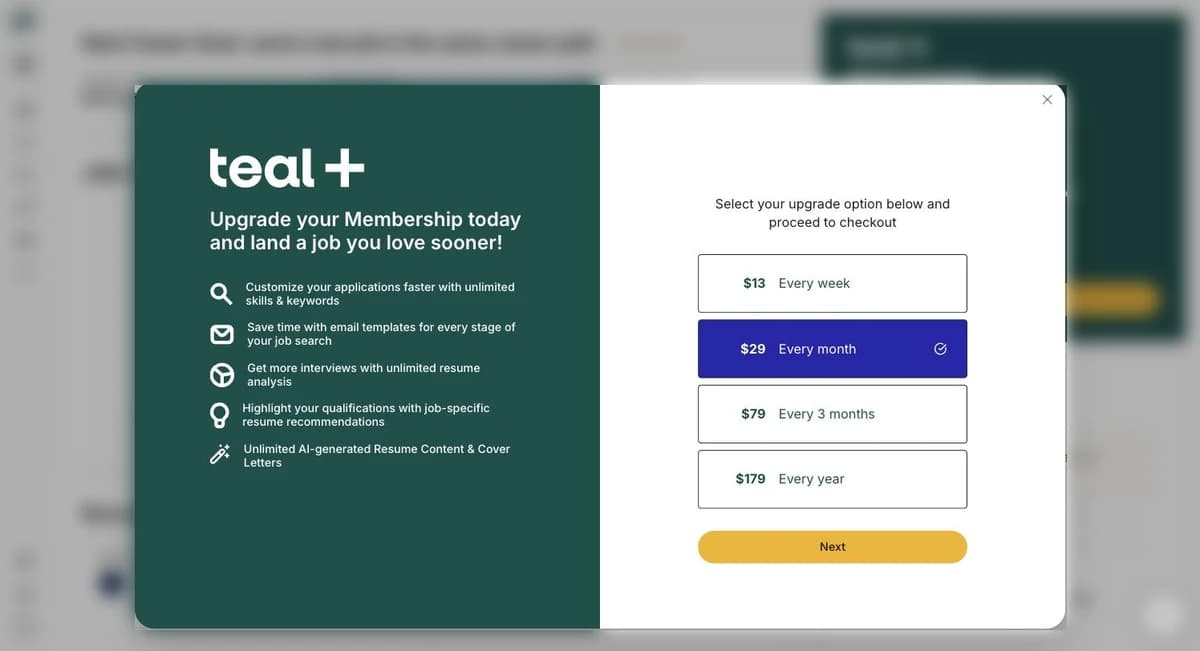
Teal+ upgrade dialog listing $13 every week, $29 every month, $79 every 3 months and $179 every year with a Next button
The Teal+ upgrade dialog inside the app on 14 September 2026; the monthly option is preselected.

What Teal does well

  • Job tracker with a browser extension. Save postings from LinkedIn, Indeed and company sites in one click; stages, notes, contacts and follow-ups in one board. Free and unlimited.
  • Resume tailoring per job. Attach a saved posting, see keyword matches, edit the resume version for that job; multiple resume versions are free.
  • AI writing. Bullets, summaries and cover letters from your own content, with credits on free and unlimited on Teal+.
  • No trial-to-subscription trap. Free is free; Teal+ is a deliberate upgrade with no card required to start.
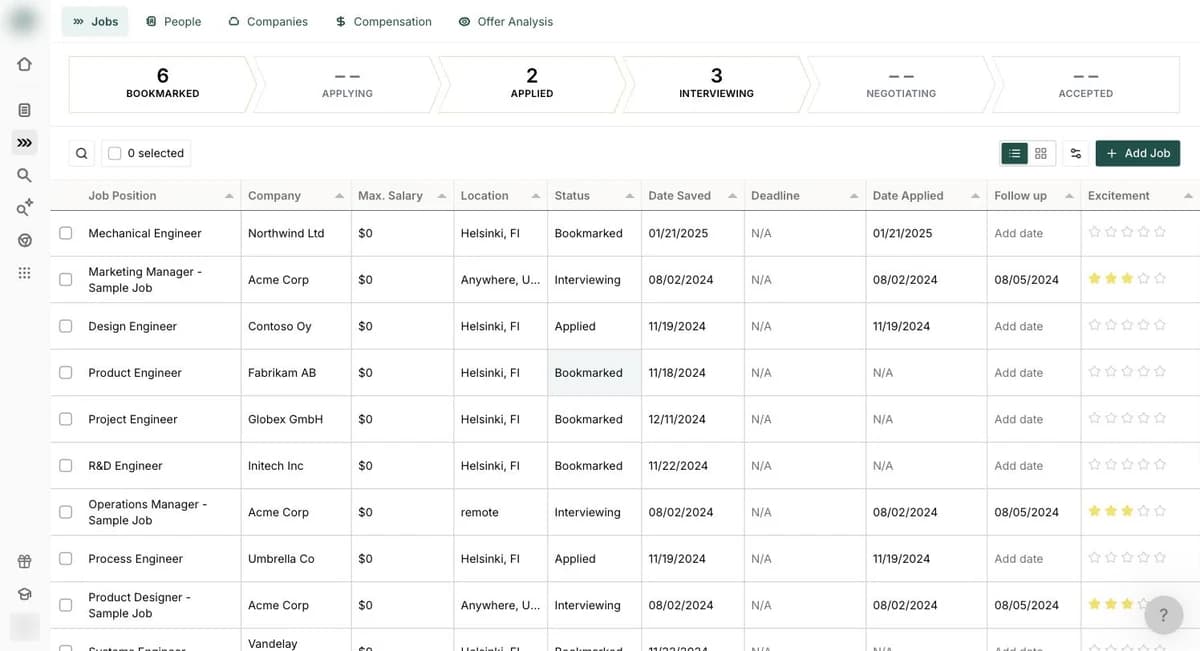
Teal job tracker showing a pipeline of Bookmarked, Applying, Applied, Interviewing, Negotiating and Accepted stages above a table of saved jobs with company, salary, location, status, dates and excitement columns
Teal's job tracker on the free plan; company names in this screenshot are placeholders.

Where it falls short

  • Weekly pricing invites forgetting. $13 a week looks small and compounds; set a reminder or choose monthly.
  • Free keyword insight is capped. The top five keywords per job are shown free; the full list is Teal+.
  • Content and keyword scoring, not parsing. Teal's analysis reads your text; it does not show what an ATS extracts from the exported PDF, so layout problems can pass unnoticed.
  • Design mode on free is basic. Fine for a clean resume, limiting if you want control over typography.

Is a Teal resume ATS-friendly?

Teal's templates are document-style and mostly single-column, which parses well, and the keyword matching helps the content side. What Teal does not do is open the exported file the way a parser does. Before uploading a Teal resume to a portal, run it through the free ATS resume checker to read the extracted text and confirm contact details, headings and dates survived; it takes a minute and catches the layout findings a content score cannot.
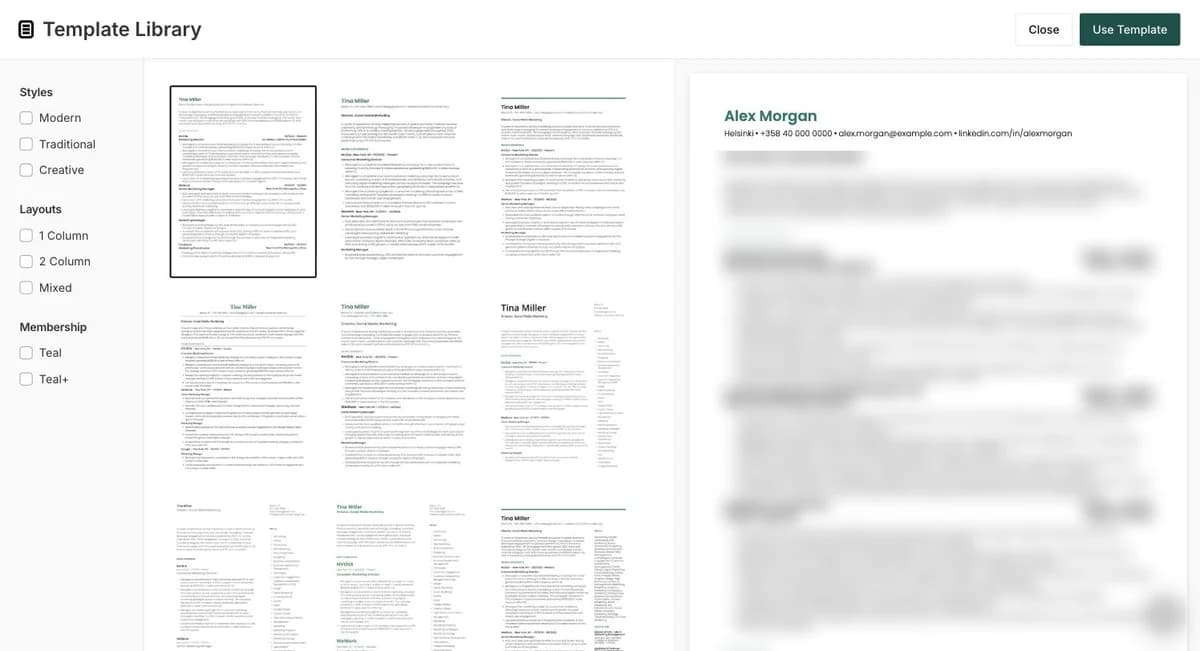
Teal template library with Styles, Layouts and Membership filters on the left, a grid of document-style templates and a live preview of the user's resume on the right, blurred
Teal's template library: Modern, Traditional and Creative styles, a Teal or Teal+ membership filter, and a live preview of your own resume (blurred here).

What OwlApply does differently (and what it does not)

  • •Both have a free job tracker. Teal’s free plan and OwlApply’s job tracker are both unlimited and both free, so tracking is not the thing to choose between them on. Teal’s real free-tier edge is the download: its free plan exports the resume, ours does not.
  • •The extensions are not the same tool. Teal’s saves a posting into your tracker. Ours, the autofill extension, reads the posting first: it recognises a job page, summarises it into requirements, responsibilities and skills, marks each one CRITICAL, IMPORTANT or NICE-TO-HAVE, and rates your resume against every line as excellent, good, fair, poor or not mentioned. Then it fills the application — standard fields, enterprise widgets on Workday, Lever, Greenhouse, iCIMS and Taleo, custom dropdowns, multi-selects and file uploads — answers the screening questions from your stored answers, and drops the application into the job tracker. The posting analysis is free on any signed-in account; AI-assisted form filling is 10 a month on the free plan and 500 on paid.
  • •Analysis level. Teal scores content and keywords. The free ATS resume checker opens the exported file, shows what a parser extracts and reports 17 file-level findings, free and without an account, whichever builder produced the PDF.
  • •Practice, not just paperwork. OwlApply includes 6 to 36 spoken AI mock interview sessions per plan and a job board that ranks openings against your resume; Teal has no equivalent of either. $17.49 a month against Teal+ at $29.

The other builders we tested the same way

We opened an account on each of these and checked the price it showed on the same day, so the numbers can be compared against one another: Zety (trial-then-subscription), Resume Now (trial-then-subscription), Resume Genius (trial-then-subscription), Kickresume (free download tier), Enhancv (seven-day free plan), Canva (free design tool), Resume Worded (feedback tool, not a builder).

Check the file Teal exported before you upload it

Read the parser’s extracted text and the 17 file-level findings. Free, no account, deleted after 24 hours.

Check my resume

Teal: questions people ask

Is Teal free?
Yes. The Free Forever plan includes unlimited resumes, unlimited job tracking, 10 templates, limited keyword insights and a small number of AI credits. Teal+ removes the limits.
How much is Teal+?
$13 every 7 days, $29 every 30 days or $79 every 90 days as listed on the pricing page, plus a $179 yearly option shown in the in-app upgrade dialog, with no credit card required to start and cancellation from account settings effective at the end of the billing period.
Is Teal's resume builder ATS-friendly?
The templates are document-style and mostly single-column, which parses well. Teal's analysis checks content and keywords rather than the exported file's layout; test the PDF with a file-level ATS checker before uploading it to a portal.
Teal vs Jobscan?
Jobscan is a keyword-match scanner first; Teal is a tracker and builder with keyword matching attached. For matching one resume to one posting in depth, Jobscan; for running a whole search, Teal.
Can I cancel Teal+ easily?
Yes, from account settings under Teal+ Subscription. Cancellation takes effect at the end of the current billing period, and Teal's FAQ asks you to confirm the cancellation banner appears; refunds depend on the plan's eligibility window.
Share article

Launch your resume in 15 minutes

Pick a proven layout, let AI suggest winning bullet points, and export a polished resume before your coffee cools.

Build my resume

Launch your resume in 15 minutes

Pick a proven layout, let AI suggest winning bullet points, and export a polished resume before your coffee cools.

Build my resume

Connect with OwlApply

Follow on LinkedInWatch on YouTubePin on PinterestJoin us on InstagramLike on FacebookFollow on XFollow on MediumFollow on TikTok
Build Resume
EnglishBahasa IndonesiaBahasa MelayuČeštinaDanskDeutschEestiEspañolFilipinoFrançaisHrvatskiItalianoKiswahiliLatviešuLietuviųMagyarNederlandsNorskPolskiPortuguês (Brasil)Português (Portugal)RomânăSlovenčinaSlovenščinaSrpskiSuomiSvenskaTiếng ViệtTürkçeΕλληνικάБългарскиРусскийУкраїнськаעבריתالعربيةفارسیไทย日本語繁體中文한국어

JOB SEEKERS

  • Build Resume
  • Resume Examples
  • Resume Templates
  • Cover Letter Templates
  • Job Search Helper
  • Job Tracker

CAREER RESOURCES

  • Resume Help
  • Job Interview
  • Career
  • Cover Letter
  • OwlApply Extension
  • Blog

AI TOOLS

  • Cover Letter Builder
  • AI Resume Optimizer
  • Job Application Autofill
  • AI Resume Builder
  • ATS Resume Checker
  • All AI Tools

SUPPORT

  • Pricing
  • FAQ
  • Contact Us
  • Terms of Service
  • Privacy Policy
  • Cookie Policy
  • Right of Withdrawal

Copyright 2026 OwlApply. All rights reserved.

Launched on Fazier