
Home
  • Resumes & CVs
    Resume TemplatesView all
    Simple
    Minimal layouts that keep every recruiter focused on your content.
    Professional
    Boardroom-ready templates that spotlight experience and leadership.
    Modern
    Fresh, contemporary designs for innovative roles and companies.
    Creative
    Bold visuals and unique layouts crafted for design-forward careers.
    ATS Friendly
    Structured specifically to clear every Applicant Tracking System.
    Resume Builder
    Resume Builder
    Drag, drop, and export a job-ready resume with instant AI suggestions.
    See all resume examples
    Resume Examples
    Browse our ready-to-use resume examples and create your professional resume in minutes
  • AI Career Tools
    AI Career ToolsView all AI tools
    Keyword Optimizer
    Inject recruiter-approved keywords and rise to the top of ATS results.
    AI Resume Builder
    Generate a polished resume with AI-written bullets and proven layouts.
    Resume Translator
    Translate your resume into any language without losing nuance.
    Resume Summary
    Craft attention-grabbing summaries tailored to each role.
    Resume Bullet Point Generator
    Turn achievements into punchy bullet points in seconds.
    Cover Letter Generator
    Create pitch-perfect letters that mirror every job posting.
    Job Application Autofill
    Auto-complete repetitive application fields across top job boards.
    Resume Checker
    Audit structure, keywords, and impact with instant AI feedback.
    Resume Builder
    Resume Builder
    Drag, drop, and export a job-ready resume with instant AI suggestions.
    Chrome browser
    Firefox browser
    Opera browser
    Safari browser
    Install OwlApply Extension
    Autofill job forms, create tailored resumes, and score postings directly from Chrome.
  • Cover Letters
    Cover Letter TemplatesView all
    Simple
    Clean layouts ideal for traditional teams and entry-level roles.
    Professional
    Classic business styling that reinforces authority and credibility.
    Modern
    Sleek designs that feel right at home in tech and high-growth companies.
    Creative
    A unique canvas to showcase personality without sacrificing polish.
    Cover Letter Builder
    Cover Letter Builder
    Pair your resume with a tailored letter in minutes using guided prompts.
    Chrome browser
    Firefox browser
    Opera browser
    Safari browser
    Install OwlApply Extension
    Autofill job forms, create tailored resumes, and score postings directly from Chrome.
  • Resources
    ResourcesView all
    OwlApply Extension
    Autofill applications, generate cover letters, and track every job from your browser.
    Job Interview
    Scripts, frameworks, and confidence boosters for every interview format.
    Cover Letter
    Story-driven templates and tactics for memorable cover letters.
    Career
    Navigate negotiations, promotions, and pivots with expert advice.
    Resume
    Step-by-step guidance to craft a standout resume in any industry.
    Resume Builder
    Resume Builder
    Drag, drop, and export a job-ready resume with instant AI suggestions.
    Chrome browser
    Firefox browser
    Opera browser
    Safari browser
    Install OwlApply Extension
    Autofill job forms, create tailored resumes, and score postings directly from Chrome.
  • Pricing
EnglishBahasa IndonesiaBahasa MelayuČeštinaDanskDeutschEestiEspañolFilipinoFrançaisHrvatskiItalianoKiswahiliLatviešuLietuviųMagyarNederlandsNorskPolskiPortuguês (Brasil)Português (Portugal)RomânăSlovenčinaSlovenščinaSrpskiSuomiSvenskaTiếng ViệtTürkçeΕλληνικάБългарскиРусскийУкраїнськаעבריתالعربيةفارسیไทย日本語繁體中文한국어
My AccountBuild Resume
EnglishBahasa IndonesiaBahasa MelayuČeštinaDanskDeutschEestiEspañolFilipinoFrançaisHrvatskiItalianoKiswahiliLatviešuLietuviųMagyarNederlandsNorskPolskiPortuguês (Brasil)Português (Portugal)RomânăSlovenčinaSlovenščinaSrpskiSuomiSvenskaTiếng ViệtTürkçeΕλληνικάБългарскиРусскийУкраїнськаעבריתالعربيةفارسیไทย日本語繁體中文한국어
  • Resumes & CVs
    Simple

    Minimal layouts that keep every recruiter focused on your content.

    Professional

    Boardroom-ready templates that spotlight experience and leadership.

    Modern

    Fresh, contemporary designs for innovative roles and companies.

    Creative

    Bold visuals and unique layouts crafted for design-forward careers.

    ATS Friendly

    Structured specifically to clear every Applicant Tracking System.

    View all
  • AI Career Tools
    Keyword Optimizer

    Inject recruiter-approved keywords and rise to the top of ATS results.

    AI Resume Builder

    Generate a polished resume with AI-written bullets and proven layouts.

    Resume Translator

    Translate your resume into any language without losing nuance.

    Resume Summary

    Craft attention-grabbing summaries tailored to each role.

    Resume Bullet Point Generator

    Turn achievements into punchy bullet points in seconds.

    Cover Letter Generator

    Create pitch-perfect letters that mirror every job posting.

    Job Application Autofill

    Auto-complete repetitive application fields across top job boards.

    Resume Checker

    Audit structure, keywords, and impact with instant AI feedback.

    View all AI tools
  • Cover Letters
    Simple

    Clean layouts ideal for traditional teams and entry-level roles.

    Professional

    Classic business styling that reinforces authority and credibility.

    Modern

    Sleek designs that feel right at home in tech and high-growth companies.

    Creative

    A unique canvas to showcase personality without sacrificing polish.

    View all
  • Resources
    OwlApply Extension

    Autofill applications, generate cover letters, and track every job from your browser.

    Job Interview

    Scripts, frameworks, and confidence boosters for every interview format.

    Cover Letter

    Story-driven templates and tactics for memorable cover letters.

    Career

    Navigate negotiations, promotions, and pivots with expert advice.

    Resume

    Step-by-step guidance to craft a standout resume in any industry.

    View all
  • Pricing
My AccountBuild Resume
  1. Home
  2. Blog
  3. Resume
  4. Enhancv Review 2026: 7-Day Free Plan, Pro Pricing, ATS Notes
Tufan Yavas
Written by Tufan Yavas

Enhancv Review 2026: 7-Day Free Plan, Pro Pricing, ATS Notes

Build My Resume Free
Last updated: September 14, 2026
7 minute read
A modern two-column resume design beside a plain single-column one, with a small clock icon over a watermark
  • Verdict in one paragraph
  • Enhancv pricing (EU figures, 14 September 2026)
  • What Enhancv does well
  • Where it falls short
  • Are Enhancv resumes ATS-friendly?
  • The other builders we tested the same way
  • Enhancv: questions people ask
  • •Is Enhancv free?
  • •How much is Enhancv Pro?
  • •Are Enhancv templates ATS-friendly?
  • •Can I download my Enhancv resume as Word?
  • •Enhancv vs Kickresume?
  • •What happens when my Enhancv plan expires?

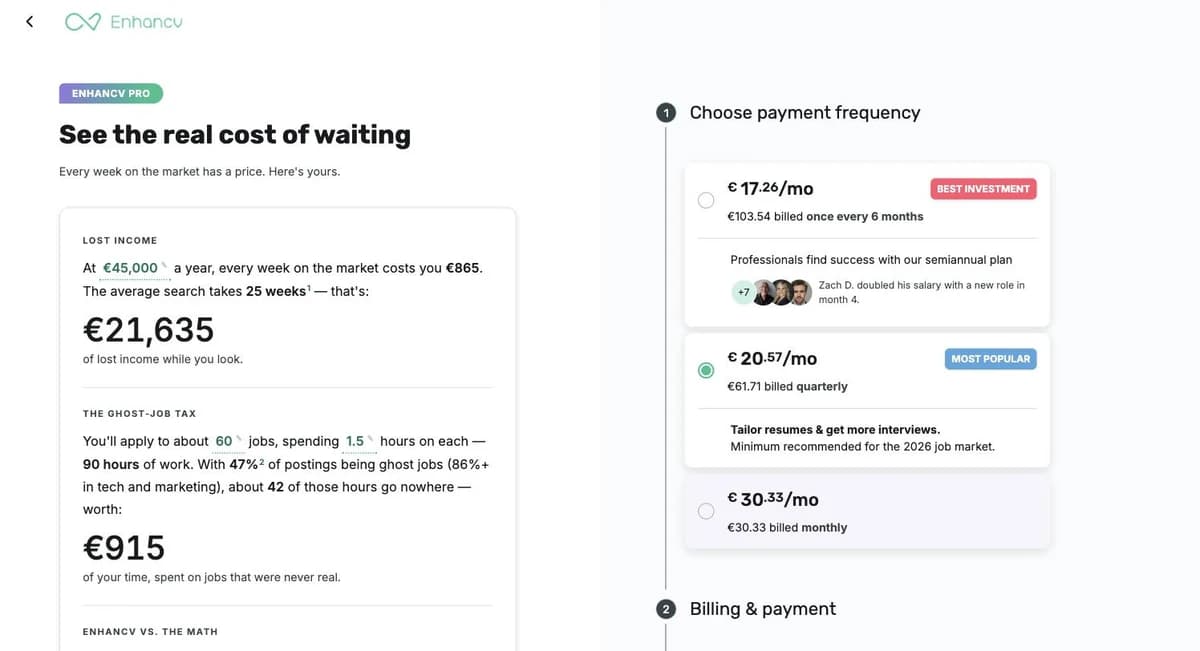
Enhancv is a design-led resume builder known for modern, visually distinctive templates, real-time content suggestions and a large library of resume examples and tool reviews. Its free plan is unusual: it is valid for seven days, includes all templates but adds Enhancv branding and caps each section at twelve items. Pro removes the branding, adds the ATS check, tailoring to a job posting and unlimited items, on monthly, quarterly and semiannual plans (shown to us in the app at €30.33 monthly, €20.57 a month billed quarterly or €17.26 a month billed every six months; the page title advertises pricing from $16.50). This review covers what the free week gets you, what Pro costs and includes, how Enhancv's templates behave in an ATS, and how it compares with builders whose free tier does include a download.

Key takeaways

  • The free plan is a seven-day trial with Enhancv branding on the file and a 12-item cap per section.
  • In-app Pro pricing: €30.33 monthly, €20.57 a month quarterly, €17.26 a month on six months.
  • A lapsed plan locks editing, not downloading: your resumes stay readable but you cannot change them.
  • Best-looking templates in this comparison, and the ones most likely to need a parse test before you send them.
  • Best for: a resume that a human will look at, from someone who will use it for months rather than once.

How this review was done

Facts below were taken from the company's own pricing and product pages on 14 September 2026; prices are quoted as displayed to us and vary by country and over time, so check the pricing page before you buy. OwlApply makes a competing resume builder and ATS checker. We have not been paid by any product reviewed here, and we link to the competitor's own page so you can verify every claim: enhancv.com/pricing.

Verdict in one paragraph

Enhancv makes some of the best-looking resumes of any builder and backs them with useful writing help: content suggestions as you type, a tailoring feature that reads a job posting, and an ATS check on Pro. Two things to weigh. The free plan is a seven-day preview with a watermark, so budget for Pro if you want a clean file; and the signature templates use two columns, side panels and graphical elements that parse less reliably than plain layouts, so choose the single-column designs for online applications and test the export. For a resume that a person will look at, Enhancv is a strong choice; for a resume that a portal will parse first, pick the template carefully.

Enhancv pricing (EU figures, 14 September 2026)

Prices as displayed inside the app to an EU account on 14 September 2026, in euros. Enhancv prices per region and its public page advertises plans "starting from $16.50", so a US or Indian reader will see different numbers in their own currency; the plan structure (7-day free, then monthly, quarterly or 6-month) is the same. Check the pricing page from your own connection.
PlanPrice shownIncludes
Free€0, valid for 7 daysAll resume templates, basic sections, Enhancv branding on the file, maximum 12 items per section, all design tools
Pro Monthly€30.33 billed monthly300 resumes and cover letters, all templates, real-time content suggestions, ATS check, Pro sections, no branding, unlimited items, thousands of design options
Pro Quarterly€20.57 per month, €61.71 billed every 3 months (marked "most popular")Same feature set
Pro Semiannual€17.26 per month, €103.54 billed every 6 months (marked "best investment")Same feature set
Enhancv Pro checkout page listing €17.26 per month billed every 6 months, €20.57 per month billed quarterly and €30.33 billed monthly next to a lost-income calculator
Enhancv's in-app plan chooser as displayed to an EU account on 14 September 2026, with the "cost of waiting" calculator that frames the price.

What Enhancv does well

  • Design quality. Templates that look current without looking like a template; extensive colour, font and layout controls.
  • Writing help while you type. Content suggestions, a grammar and cliché check, and section-level prompts.
  • Tailoring. Paste a posting and see what to include; on Pro this ties to the ATS check.
  • Examples and guides. A very large library of resume examples and honest-looking reviews of competing tools, which is why Enhancv ranks for so many searches.
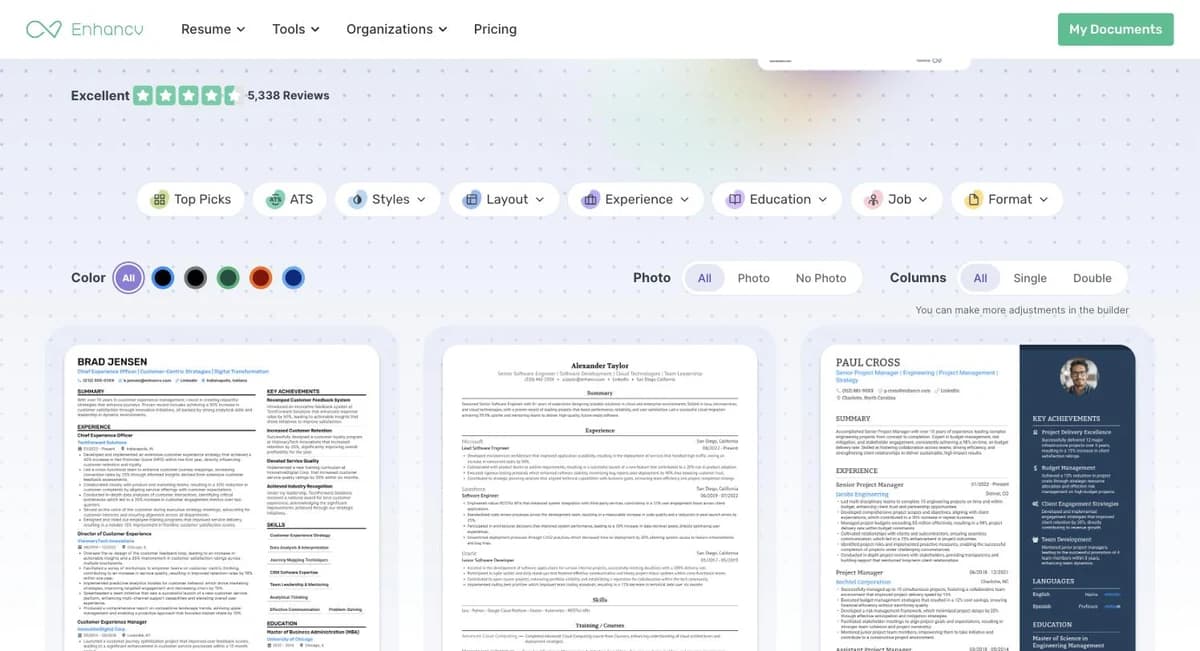
Enhancv resume template gallery with filters for Top Picks, ATS, Styles, Layout, Experience, Education, Job and Format, showing single- and two-column designs
Enhancv's template gallery has an ATS filter and a Columns switch; the single-column designs are the ones to use for online applications.

Where it falls short

  • The free plan expires and watermarks. Seven days with Enhancv branding is a trial, not a free tier.
  • Pro is priced for a job search, not a single download. Reasonable if you use it for months; expensive for one file.
  • Signature layouts are the risky ones. Two columns, side panels, icons and graphical skill displays are exactly the elements our parser data flags most often (two-column 8.8% of files, icons 48.9%, skills in images 16.3%).
  • A lapsed plan locks editing, not only downloading. On an account whose plan had ended, the dashboard opened with a modal reading "Your plan has expired. You can download your resumes, but not edit them." Keep a copy of your content outside Enhancv if you might let the plan lapse.
  • Twelve-item section cap on free. Enough for a fresher, tight for a mid-career resume.
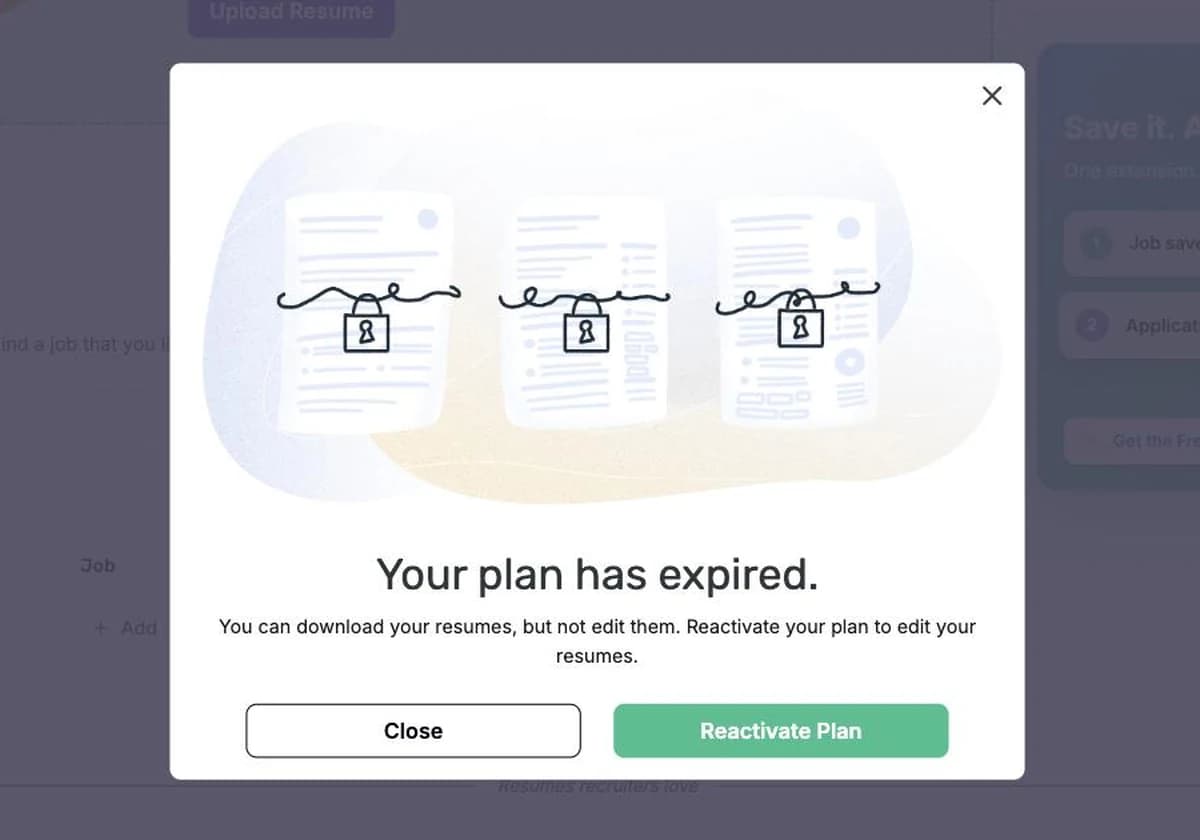
Enhancv modal reading Your plan has expired, you can download your resumes but not edit them, with Close and Reactivate Plan buttons
What Enhancv shows once a Pro plan lapses: downloads still work, editing is locked (screenshot, 14 September 2026).

Are Enhancv resumes ATS-friendly?

Enhancv says its templates are ATS-friendly and offers an ATS check on Pro. Our reading: the single-column templates parse well; the two-column designs depend on how the PDF's reading order is generated, and the safest way to know is to test the actual file. Upload the export to the free ATS resume checker and read the extracted text: if the side panel's skills are interleaved with the experience bullets, switch to a single-column template before you apply through a portal.

What OwlApply does differently (and what it does not)

  • •Neither free plan gives you the file. Enhancv’s expires after seven days and watermarks what you make; OwlApply’s does not expire and adds no watermark, but the PDF download is on the paid plan. Be clear on that before you choose between them.
  • •The checker is the honest difference. Enhancv’s ATS check is a Pro feature inside its own builder. Ours is the free ATS resume checker, free and account-free, works on a file from any builder including Enhancv’s, and shows the extracted text and the 17 file-level findings.
  • •Price and scope: Enhancv Pro was €30.33 monthly or €17.26 a month on the six-month plan when we checked. OwlApply is $17.49 monthly or $9.33 a month on six months, and the plan includes the job board that ranks openings against your resume, the autofill extension, the job tracker and AI mock interview sessions.
  • •Where Enhancv wins: design range and content coaching. Its templates look better than ours, and that is deliberate on both sides: ours are plain and single-column because that is what survives extraction.

The other builders we tested the same way

We opened an account on each of these and checked the price it showed on the same day, so the numbers can be compared against one another: Zety (trial-then-subscription), Resume Now (trial-then-subscription), Resume Genius (trial-then-subscription), Kickresume (free download tier), Canva (free design tool), Teal (free tracker plus builder), Resume Worded (feedback tool, not a builder).

Test the file your builder produced

Works on any PDF or DOCX, including an Enhancv export: extracted text, 17 file-level findings, no account, deleted after 24 hours.

Check my resume

Enhancv: questions people ask

Is Enhancv free?
There is a free plan valid for seven days that includes all templates but adds Enhancv branding and limits each section to twelve items. A clean, unbranded download requires Pro.
How much is Enhancv Pro?
Three plans were shown to us inside the app from the EU on 14 September 2026: €30.33 billed monthly, €20.57 a month billed quarterly (€61.71) or €17.26 a month billed every six months (€103.54). The site advertises pricing from $16.50 in the page title and prices vary by region; check the pricing page before you buy.
Are Enhancv templates ATS-friendly?
The single-column templates are. The two-column and side-panel designs are the ones to test, because parsers read across columns and can interleave sections. Enhancv offers an ATS check on Pro; a free file-level checker will show the same thing without a subscription.
Can I download my Enhancv resume as Word?
Enhancv addresses Word export in its pricing FAQ; PDF is the primary format. If a posting requires .docx, confirm the export option on your plan before you rely on it.
Enhancv vs Kickresume?
Both are design-led European builders. Kickresume has a permanent free download tier; Enhancv's free plan is a seven-day watermarked trial. Enhancv's writing assistance is stronger; both catalogues favour designed layouts that need a parse test before online applications.
What happens when my Enhancv plan expires?
Your resumes stay in the account and can still be downloaded, but editing is locked until you reactivate: the dashboard shows a "Your plan has expired" modal with a Reactivate Plan button. Export a PDF and a copy of the text before the plan ends if you are not renewing.
Share article

Launch your resume in 15 minutes

Pick a proven layout, let AI suggest winning bullet points, and export a polished resume before your coffee cools.

Build my resume

Launch your resume in 15 minutes

Pick a proven layout, let AI suggest winning bullet points, and export a polished resume before your coffee cools.

Build my resume

Connect with OwlApply

Follow on LinkedInWatch on YouTubePin on PinterestJoin us on InstagramLike on FacebookFollow on XFollow on MediumFollow on TikTok
Build Resume
EnglishBahasa IndonesiaBahasa MelayuČeštinaDanskDeutschEestiEspañolFilipinoFrançaisHrvatskiItalianoKiswahiliLatviešuLietuviųMagyarNederlandsNorskPolskiPortuguês (Brasil)Português (Portugal)RomânăSlovenčinaSlovenščinaSrpskiSuomiSvenskaTiếng ViệtTürkçeΕλληνικάБългарскиРусскийУкраїнськаעבריתالعربيةفارسیไทย日本語繁體中文한국어

JOB SEEKERS

  • Build Resume
  • Resume Examples
  • Resume Templates
  • Cover Letter Templates
  • Job Search Helper
  • Job Tracker

CAREER RESOURCES

  • Resume Help
  • Job Interview
  • Career
  • Cover Letter
  • OwlApply Extension
  • Blog

AI TOOLS

  • Cover Letter Builder
  • AI Resume Optimizer
  • Job Application Autofill
  • AI Resume Builder
  • ATS Resume Checker
  • All AI Tools

SUPPORT

  • Pricing
  • FAQ
  • Contact Us
  • Terms of Service
  • Privacy Policy
  • Cookie Policy
  • Right of Withdrawal

Copyright 2026 OwlApply. All rights reserved.

Launched on Fazier