
Home
  • Resumes & CVs
    Resume TemplatesView all
    SimpleMinimal layouts that keep every recruiter focused on your content.ProfessionalBoardroom-ready templates that spotlight experience and leadership.ModernFresh, contemporary designs for innovative roles and companies.CreativeBold visuals and unique layouts crafted for design-forward careers.ATS FriendlyStructured so applicant tracking systems read every section correctly.
    Resume BuilderDrag, drop, and export a job-ready resume with instant AI suggestions.
    Resume ExamplesBrowse our ready-to-use resume examples and create your professional resume in minutes
  • AI Career Tools
    AI Career ToolsView all AI tools
    Resume CheckerAudit structure, keywords, and impact with instant AI feedback.Resume Job MatchScore your resume against any job posting and see what is missing.AI Resume BuilderGenerate a polished resume with AI-written bullets and proven layouts.AI Mock InterviewPractice a live voice interview and get scored feedback.Resume TranslatorTranslate your resume into any language without losing nuance.Job Application AutofillAuto-complete repetitive application fields on any job site.Cover Letter GeneratorCreate pitch-perfect letters that mirror every job posting.Keyword OptimizerInject recruiter-approved keywords and rise to the top of ATS results.Resume SummaryCraft attention-grabbing summaries tailored to each role.Resume Bullet Point GeneratorTurn achievements into punchy bullet points in seconds.
    Resume BuilderDrag, drop, and export a job-ready resume with instant AI suggestions.
    Install OwlApply ExtensionAutofill job forms, create tailored resumes, and score postings directly from Chrome.
  • Cover Letters
    Cover Letter TemplatesView all
    SimpleClean layouts ideal for traditional teams and entry-level roles.ProfessionalClassic business styling that reinforces authority and credibility.ModernSleek designs that feel right at home in tech and high-growth companies.CreativeA unique canvas to showcase personality without sacrificing polish.
    Cover Letter BuilderPair your resume with a tailored letter in minutes using guided prompts.
    Install OwlApply ExtensionAutofill job forms, create tailored resumes, and score postings directly from Chrome.
  • Resources
    ResourcesView all
    OwlApply ExtensionAutofill applications, generate cover letters, and track every job from your browser.Job InterviewScripts, frameworks, and confidence boosters for every interview format.Cover LetterStory-driven templates and tactics for memorable cover letters.CareerNavigate negotiations, promotions, and pivots with practical advice.ResumeStep-by-step guidance to craft a standout resume in any industry.Career pay & requirementsPay, skills and experience from US job postingsJob market researchReports and methodology behind our data
    Resume BuilderDrag, drop, and export a job-ready resume with instant AI suggestions.
    Install OwlApply ExtensionAutofill job forms, create tailored resumes, and score postings directly from Chrome.
  • Pricing
EnglishBahasa IndonesiaBahasa MelayuČeštinaDanskDeutschEestiEspañolFilipinoFrançaisHrvatskiItalianoKiswahiliLatviešuLietuviųMagyarNederlandsNorskPolskiPortuguês (Brasil)Português (Portugal)RomânăSlovenčinaSlovenščinaSrpskiSuomiSvenskaTiếng ViệtTürkçeΕλληνικάБългарскиРусскийУкраїнськаעבריתالعربيةفارسیไทย日本語繁體中文한국어
My AccountBuild Resume
EnglishBahasa IndonesiaBahasa MelayuČeštinaDanskDeutschEestiEspañolFilipinoFrançaisHrvatskiItalianoKiswahiliLatviešuLietuviųMagyarNederlandsNorskPolskiPortuguês (Brasil)Português (Portugal)RomânăSlovenčinaSlovenščinaSrpskiSuomiSvenskaTiếng ViệtTürkçeΕλληνικάБългарскиРусскийУкраїнськаעבריתالعربيةفارسیไทย日本語繁體中文한국어
  • Resumes & CVs
    SimpleMinimal layouts that keep every recruiter focused on your content.ProfessionalBoardroom-ready templates that spotlight experience and leadership.ModernFresh, contemporary designs for innovative roles and companies.CreativeBold visuals and unique layouts crafted for design-forward careers.ATS FriendlyStructured so applicant tracking systems read every section correctly.View all
  • AI Career Tools
    Resume CheckerAudit structure, keywords, and impact with instant AI feedback.Resume Job MatchScore your resume against any job posting and see what is missing.AI Resume BuilderGenerate a polished resume with AI-written bullets and proven layouts.AI Mock InterviewPractice a live voice interview and get scored feedback.Resume TranslatorTranslate your resume into any language without losing nuance.Job Application AutofillAuto-complete repetitive application fields on any job site.Cover Letter GeneratorCreate pitch-perfect letters that mirror every job posting.Keyword OptimizerInject recruiter-approved keywords and rise to the top of ATS results.Resume SummaryCraft attention-grabbing summaries tailored to each role.Resume Bullet Point GeneratorTurn achievements into punchy bullet points in seconds.View all AI tools
  • Cover Letters
    SimpleClean layouts ideal for traditional teams and entry-level roles.ProfessionalClassic business styling that reinforces authority and credibility.ModernSleek designs that feel right at home in tech and high-growth companies.CreativeA unique canvas to showcase personality without sacrificing polish.View all
  • Resources
    OwlApply ExtensionAutofill applications, generate cover letters, and track every job from your browser.Job InterviewScripts, frameworks, and confidence boosters for every interview format.Cover LetterStory-driven templates and tactics for memorable cover letters.CareerNavigate negotiations, promotions, and pivots with practical advice.ResumeStep-by-step guidance to craft a standout resume in any industry.Career pay & requirementsPay, skills and experience from US job postingsJob market researchReports and methodology behind our dataView all
  • Pricing
My AccountBuild Resume
  1. Home
  2. AI Career Tools
  3. Resume Bullet Point Generator

Resume Bullet Point Generator

A resume bullet point generator turns a duty into an achievement line: an action verb, what you did, the number or scope, and the result. In OwlApply you hover any bullet in your resume, press AI and get three rewrites of that exact line, each 10 to 25 words and opening with a strong verb. Aim them at a job with its keywords or one of its requirements. The generator keeps the numbers you wrote and never invents new ones, so every bullet stays one you can defend in an interview.
Generate Bullet Points
app.owlapply.com/resume-builder
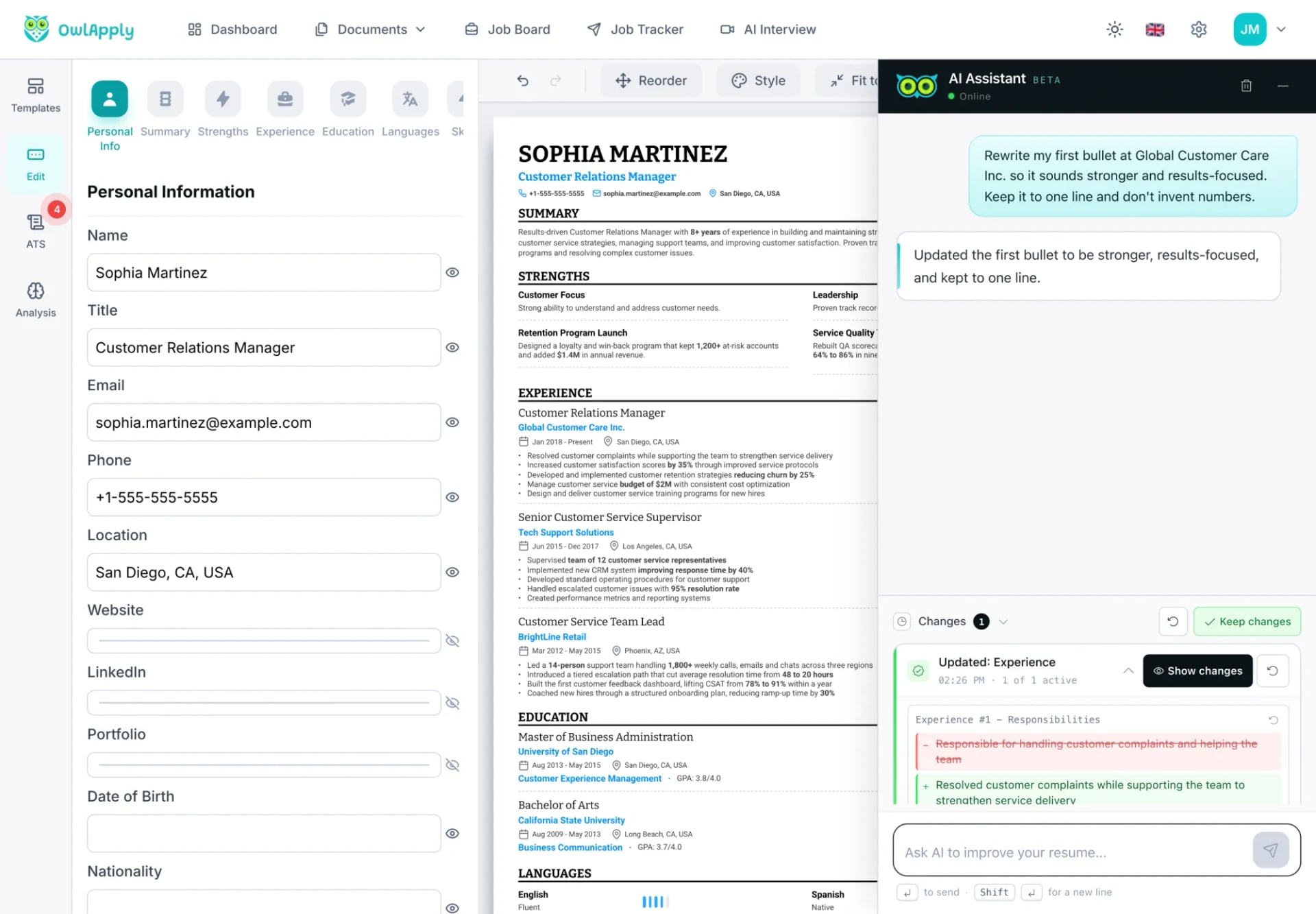
The AI assistant rewriting a resume bullet and listing the change to keep

What makes a good resume bullet point?

A good resume bullet point is one line, under 25 words, that starts with a past-tense action verb, names what you did, and ends with the number or result it produced. "Handled month-end close" is a duty; "Cut month-end close from 9 days to 5 with zero audit corrections" is an achievement, and it is the second kind recruiters read for.
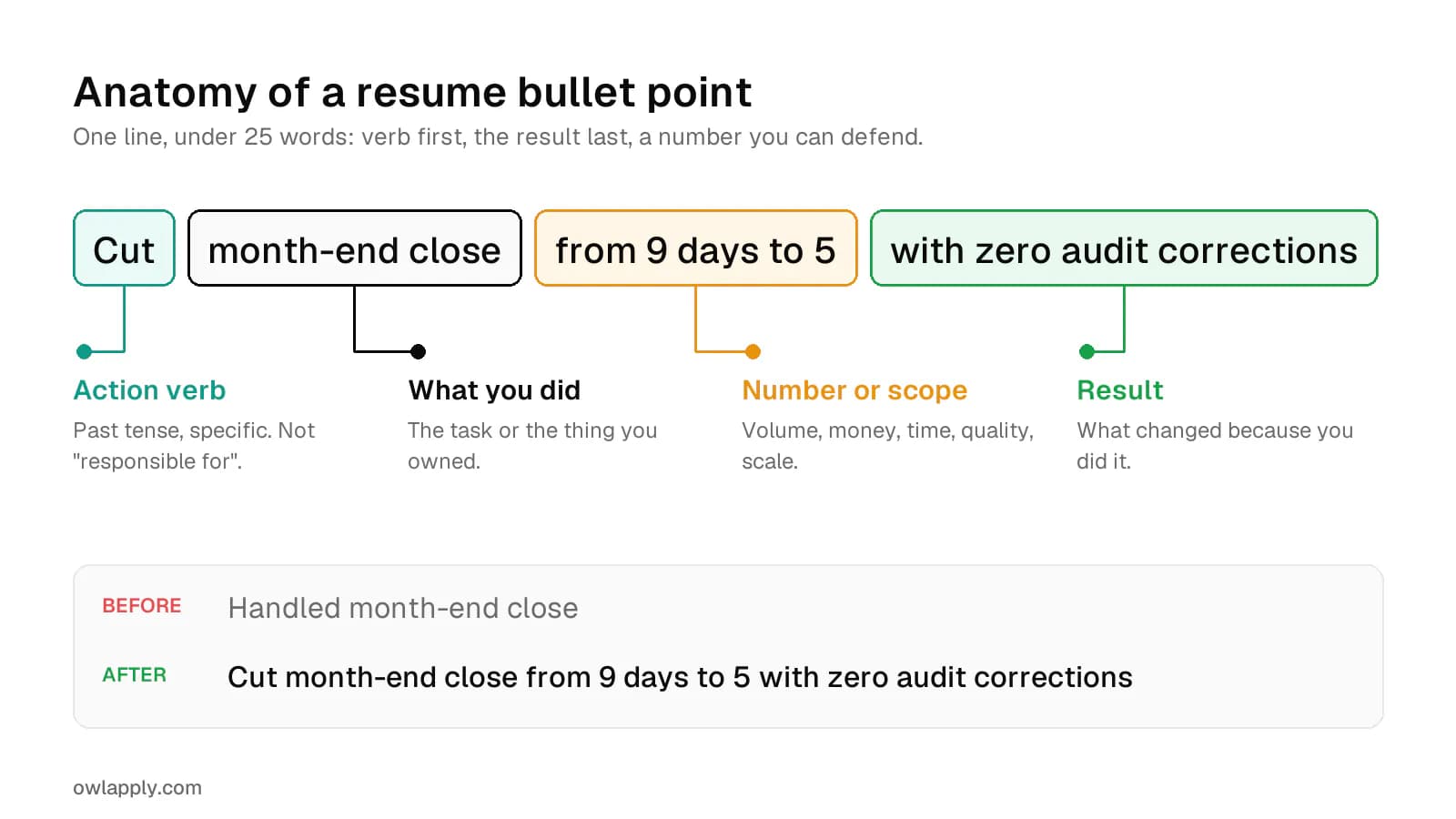
Anatomy of a resume bullet point: action verb, what you did, number or scope, result, with a before and after example
The four parts of a strong bullet. Not every bullet has a number; every bullet should have a result or a scope.

Most resumes miss on exactly these parts. In 33,746 resumes scored by our checker, work-experience writing was the weakest of all content categories, with an average of 76.4 out of 100:

Bullet problems in 33,746 resumes (OwlApply resume checker, re-scored September 2026)

88.6%
had at least one finding in their experience bullets
58.2%
were told to add quantified achievements
43.9%
had bullets that describe a duty with no result
19.8%
had bullets opening with a weak verb

How the bullet point generator works

  • Three rewrites of the line you pick

    Hover a bullet on your resume and press AI. You get three versions of that line, each 10 to 25 words, opening with a strong past-tense verb, in active voice and in the same language as the original. Weak openers such as "responsible for", "helped" and "worked on" are replaced, and buzzwords are left out. Pick one and press Apply.
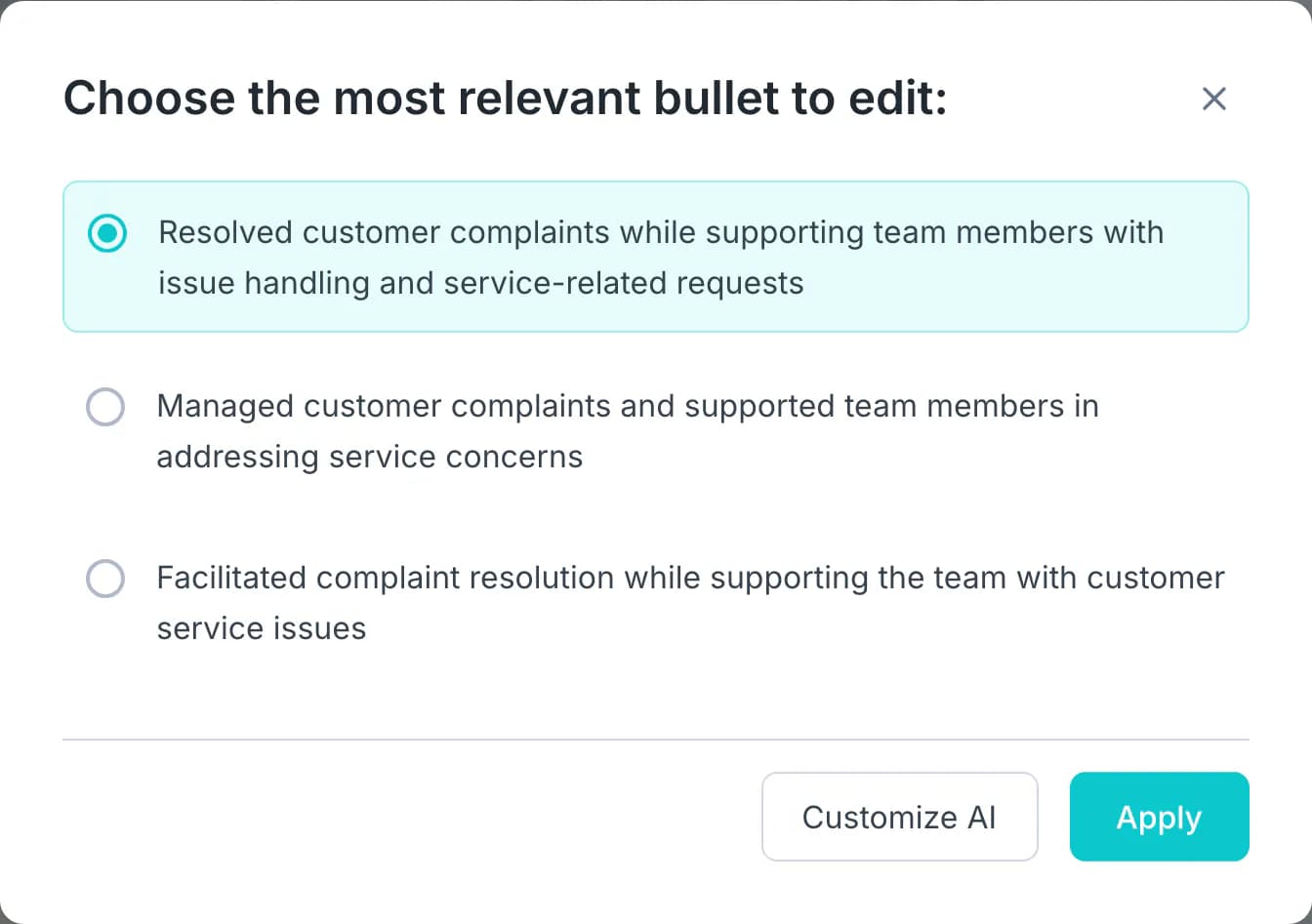
    Three AI rewrites of one resume bullet with Customize AI and Apply buttons
  • Aimed at the job you want

    Paste a job description and Customize AI offers its keywords as chips. Pick up to three, or one responsibility or requirement from the posting, and the three rewrites are built around them. The generator only claims what your line shows; it will not add a duty because the job ad mentions it.
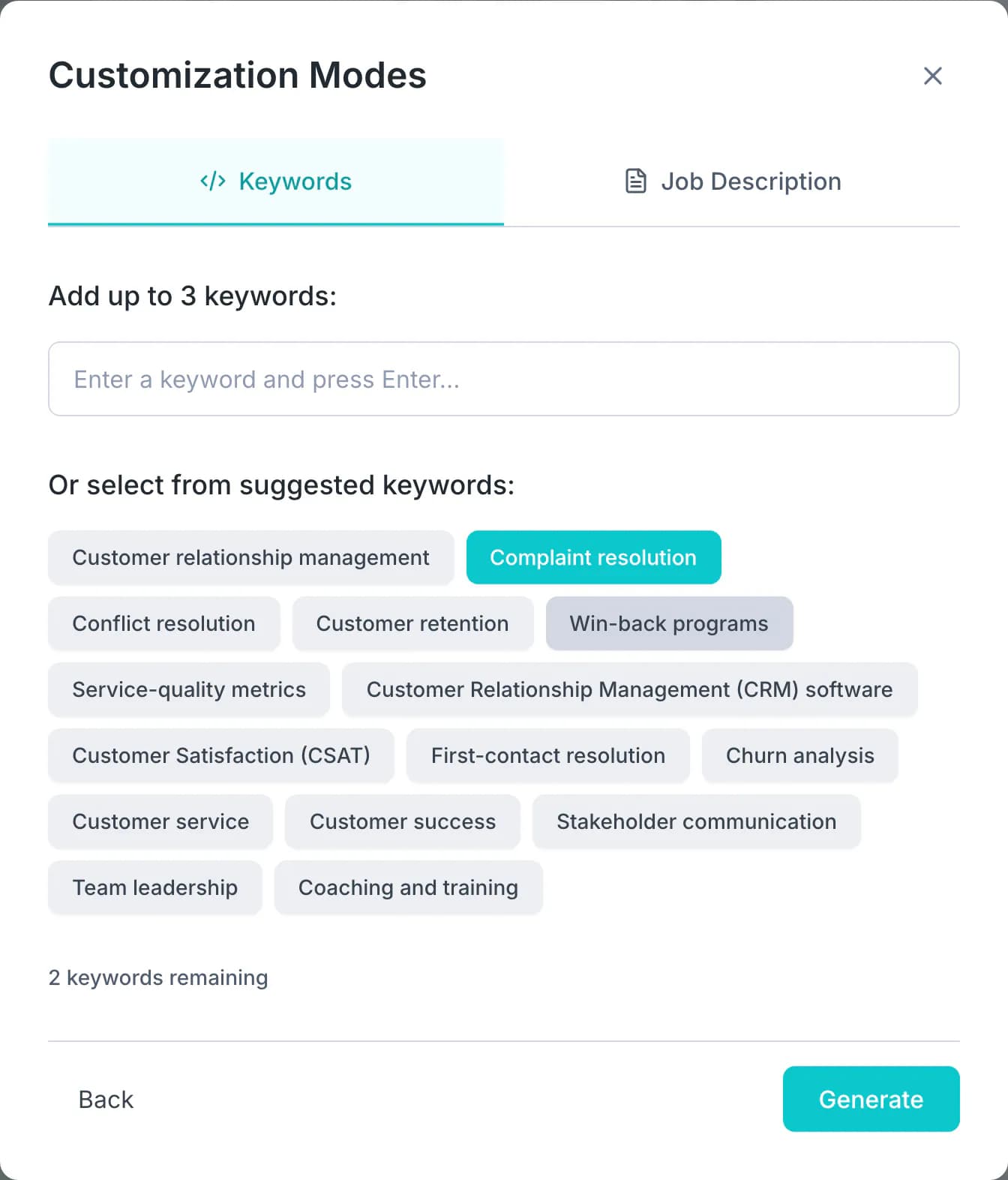
    Customize AI panel with keywords suggested from a job description; complaint resolution is selected
  • No invented numbers

    If your line has a number, the rewrite keeps it exactly. If it has none, the rewrite adds none and names the scope or outcome instead. We built it this way after measuring that, given a line without figures, AI models routinely invent percentages, and those end up as interview questions you cannot answer.
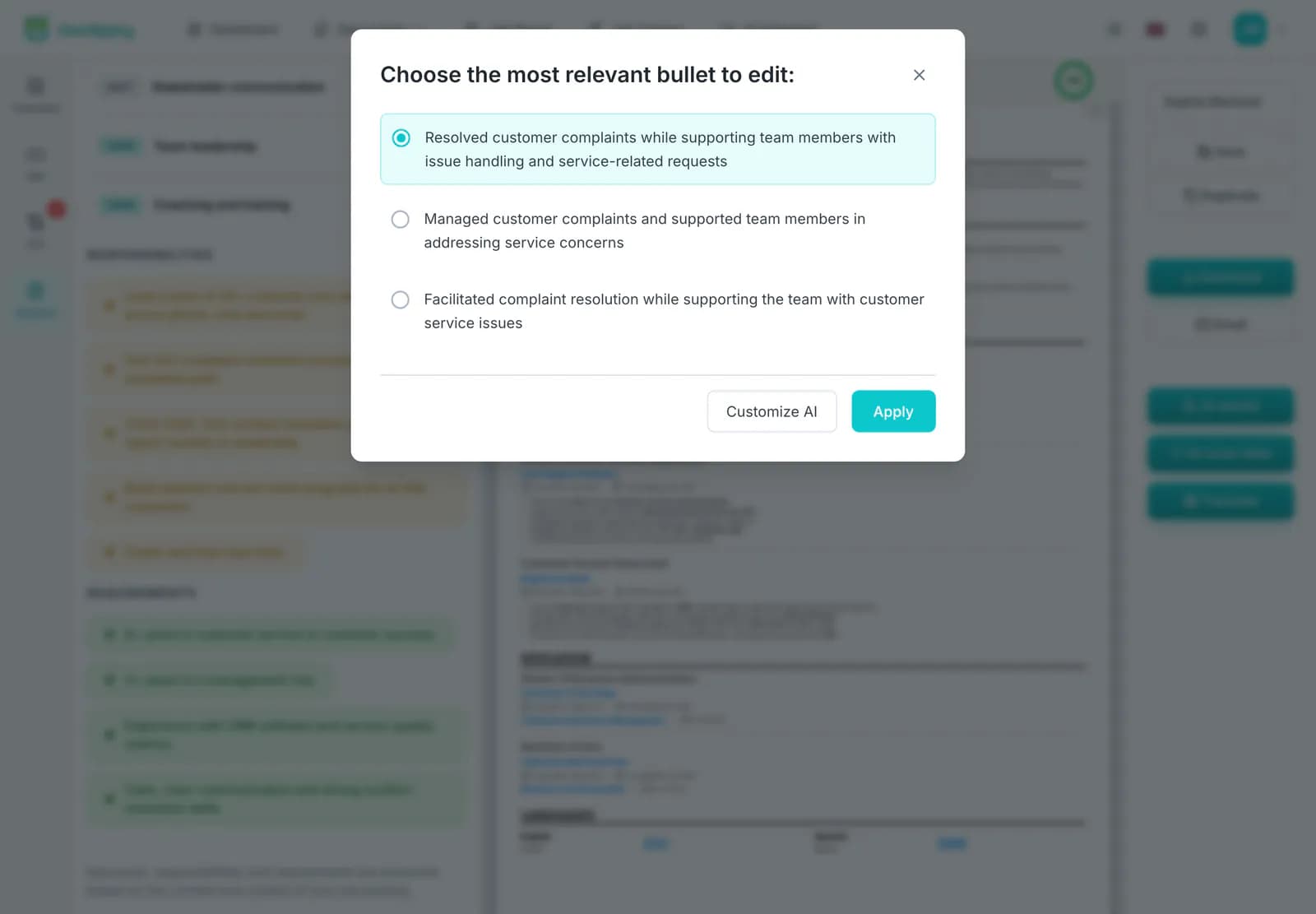
    Bullet rewrite dialog opened from a bullet in the resume builder
Rewrite My Bullets

How to write resume bullet points: the formula and ten before-and-after examples

The formula is action verb + what you did + the number or scope + the result, in one line under 25 words. Numbers come from five places: volume (calls, orders, tickets), money (budget, revenue, savings), time (hours saved, days cut), quality (error rate, satisfaction score, uptime) and scale (team size, users, locations).

Ten resume bullet points, rewritten from duties to results (fictional examples)
Duty (before)Achievement bullet (after)
Responsible for customer support emailsResolved 60 to 80 support tickets a day at 4.7/5 CSAT; cut repeat contacts 18% by rewriting the top-20 macro library
Managed social media accountsGrew Instagram from 800 to 2,600 followers in 8 months on a 3-posts-a-week schedule; engagement rate 4.1% vs 1.8% category average
Worked on the billing migrationOwned the integration layer of a 4-month billing migration for 1.2M accounts; delivered on the original date after recovering a 3-week vendor slip
Handled month-end closeCut month-end close from 9 days to 5 for a $40M manufacturer; zero audit corrections in FY2025
Trained new employeesOnboarded and trained 14 new hires with a 2-week program I wrote; time to first sale fell from 6 weeks to 3
Wrote SQL queries for the marketing teamWrote the SQL that identified 18,000 dormant-but-eligible accounts; the campaign it fed reactivated 9.6%
Helped with the annual budgetBuilt the driver-based forecast model for a $120M budget; variance to actuals within 2% for 8 consecutive quarters
Maintained the CI pipelineCut CI build time from 41 to 12 minutes by caching dependencies and parallelizing the test suite across 4 runners
Taught 9th-grade mathRaised 9th-grade average assessment scores 12 points in one year with a redesigned unit plan now used by 3 other teachers
Did inventory countsRan weekly cycle counts on 4,000 SKUs; inventory accuracy rose from 91% to 98.5% and stockouts fell 30%

How do you quantify a bullet when you think you have no numbers?

Ask what would have been different if you had done the job badly; the answer is usually the metric. Then work through this list:

  • Count it. How many customers, tickets, patients, students, orders or reports a day, week or month? "Answered customer emails" becomes "Answered 50+ customer emails a day".
  • Time it. How long did the task take before and after you changed it? "Improved the onboarding process" becomes "Cut new-hire setup from 3 days to 1".
  • Price it. What budget did you manage, what did you save, what revenue did your work touch? "Managed vendor contracts" becomes "Managed 14 vendor contracts worth $2.1M a year".
  • Use a range. If you do not know the exact figure, an honest range such as "40 to 60 calls a day" is fine; career advisers such as The Muse recommend exactly this. Be ready to explain how you got it.
  • Name the scope. When there truly is no number, say how big the thing was: "for a 12-person team", "across 3 clinics", "for the company's largest client".
  • Compare. First, fastest, only, the most in the region: "First of 9 associates for add-on sales" is a result even without a percentage.
  • Quote the outcome. A promotion, an award, a process others adopted or a client who renewed: "adopted by 3 other teams" proves impact without a metric.

Resume bullet examples for jobs without obvious metrics

Six roles where the number is hiding in plain sight (fictional examples)
RoleDuty (before)Achievement bullet (after)
Registered nurseCared for patients on a busy wardCared for 5 to 6 patients a shift on a 32-bed surgical unit; trained 4 new nurses on the unit's discharge checklist
ReceptionistAnswered phones and greeted visitorsHandled 80+ calls and 40 visitors a day at a 3-doctor practice; moved appointment reminders to text and cut no-shows
Retail associateHelped customers on the sales floorRanked first of 9 associates for add-on sales two quarters running; ran the weekly restock for 2 departments
Student / internWorked on a group projectLed a 4-person capstone team that built an inventory tracker for a local food bank, now used for its weekly stock count
TeacherPlanned lessonsWrote a 10-week reading unit for 3 classes of 28 students; adopted by the 9th-grade team the following year
Software engineerFixed bugs in the appClosed 120 production bugs in 6 months and added the regression tests that kept 3 of the most frequent ones from returning

Writing your first resume? Resume with no experience shows how to build bullets from school, volunteering and part-time work.

Can you generate resume bullet points from a job description?

Yes, but the job description should steer your bullets, not replace them. In OwlApply you paste the posting in the Analysis tab, and the AI lists its 8 to 18 most important keywords plus its responsibilities and requirements. When you open a bullet's rewrites, Customize AI lets you pick up to three of those keywords, or one responsibility or requirement, and the three new versions are built around them. A bullet copied from the job ad describes the employer's wish list, not your work, so the generator keeps your facts and only borrows the job's vocabulary. To tailor a whole resume rather than single lines, use the AI resume optimizer.

Bullet point generator vs a ChatGPT prompt

Same goal, different amount of setup
OwlApply bullet generatorGeneral chatbot prompt
Works onThe bullet already in your resume, in placeText you paste in
OutputThree versions of 10 to 25 words, verb firstAs many as you ask for, any length
NumbersKeeps yours, adds noneOften invents figures unless you forbid it
Job targetingPick keywords or a requirement analyzed from the postingPaste the job description and explain what you want
FormattingStays in your templateCopy and paste back, then reformat

If you prefer a chatbot, this prompt avoids the two usual failures, invented numbers and copied job-ad wording:

Prompt for rewriting resume bullet points
Rewrite each resume bullet below into 3 versions. Rules: 10-25 words, start with a strong past-tense action verb, active voice, no buzzwords. Keep every number that is in my bullet exactly as written. If a bullet has no number, do NOT invent one; name the scope or the result instead. Do not add tools, duties or achievements the bullet does not mention. Use these keywords from the job description only where my bullet supports them: [keywords]. Bullets: [paste your bullets]

Stuck for numbers? This second prompt makes the chatbot interview you instead of guessing:

Prompt for finding the numbers in your bullets
I will paste my resume bullets. For each bullet, ask me up to 3 short questions that would uncover a real number or result (how many, how often, how much, how long, compared with what). Do not rewrite anything yet and do not guess any figures. After I answer, rewrite each bullet in one line of 10-25 words, starting with a past-tense action verb, using only the numbers I gave you. Bullets: [paste your bullets]

Rewrite all your bullets at once by chat
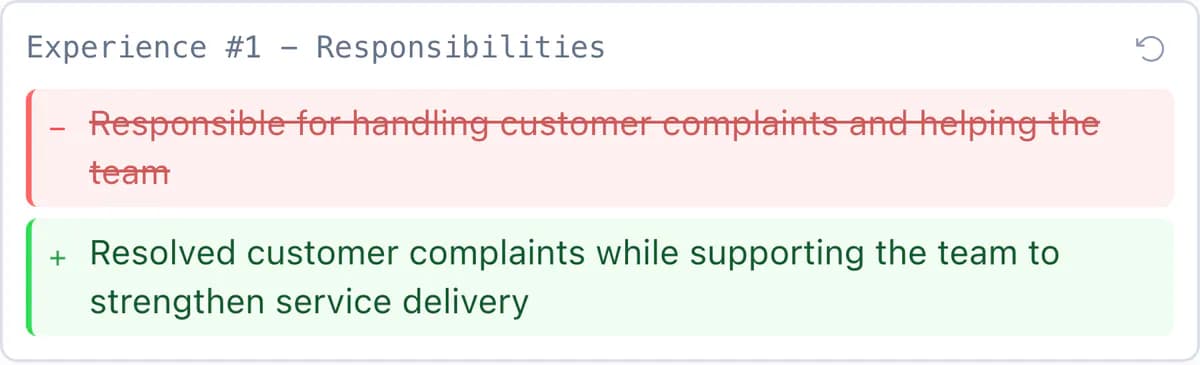
Resume assistant change card: the old bullet struck through in red and the rewritten bullet in green
The resume assistant lists every bullet it changes as a removed and an added line, each one undoable.

The AI button works one line at a time, which is the right pace for the bullets that matter most. To tighten every bullet in a role, or the whole experience section, ask the resume assistant in the builder: "make my bullets more concise", "start every bullet with a different verb", "rewrite my first bullet at my current job without inventing numbers". It edits the resume directly and shows each change as a removed and an added line that you keep or undo. More on the assistant on the AI resume optimizer page.

How long should a resume bullet be, and how many per job?

  • Length: one line, two at most; 10 to 25 words. If a bullet carries two results, split it.
  • How many: three to five for recent roles, two or three for older ones, one line for roles more than fifteen years back.
  • Order: the bullet most relevant to the job you are applying for goes first in each role. The resume keywords finder shows which of the posting's keywords your resume already covers.
  • Punctuation: periods or no periods both work; pick one and use it on every bullet.
  • Verbs: past tense for past roles, present tense for the job you hold now, and no verb used twice in the same role.
  • Where skills go: a skill in your Skills list is more convincing when a bullet proves it; skills to put on a resume explains which belong where.

Resume Bullet Point Generator: FAQ

How does the AI rewrite my bullet points?
It takes the exact line you picked and returns three versions of 10 to 25 words. Each starts with a strong past-tense verb, uses active voice, avoids buzzwords and weak openers like "responsible for", keeps the meaning of your original, and is written in the same language. You choose one and press Apply, or keep your own.
Is the resume bullet point generator free?
Building and editing your resume in OwlApply, in any of the resume templates, costs nothing, and you can use the formula and examples on this page without an account. The AI rewrites themselves are part of the Pro plan.
Will the generator invent numbers for my bullets?
No. If your line contains a number, the rewrite keeps it exactly. If it contains none, the rewrite adds none and makes the bullet concrete with scope or outcome instead. Add a real figure yourself afterwards if you have one.
Can I generate bullet points from a job description?
Yes. Paste the job description in the Analysis tab, then use Customize AI on any bullet to aim the rewrites at up to three of the job's keywords, or at one of its responsibilities or requirements. The generator borrows the job's vocabulary but keeps your facts.
How many bullet points should each job have?
Three to five for recent roles, two or three for older ones, and one line for roles more than fifteen years back. Each bullet should carry one result; if a bullet has two numbers, split it.
Should every resume bullet point have a number?
Most should. A role with five bullets and no numbers reads like a job description; three bullets with numbers and two without is a normal, credible mix. Where there is genuinely no metric, name the scope instead ("for a 12-person team", "across 3 markets").
How long should a resume bullet point be?
One line, two at most: roughly 10 to 25 words. Longer bullets usually hide two achievements; split them so each one gets its own line.
Should resume bullet points end with a period?
Either is correct. What matters is consistency: use periods on every bullet or on none.
Can I edit or undo a generated bullet?
Yes. The rewrite only replaces your line when you press Apply, you can edit it on the page like any other text, and the builder's undo restores the previous version. Changes made by the resume assistant can be undone one by one.
Are the generated bullets ATS-friendly?
They are plain text with no symbols or tables, so applicant tracking systems read them as written. ATS-friendliness also depends on the file and layout: check yours with the ATS resume checker and use an ATS-friendly resume template if you apply through online portals.
Generate Bullet Points

From blank page to submitted application

Build the resume, see the openings that actually match it, and send the application without filling the same form twice.

Build your resumeAdd to Chrome
  • 50+ ATS-ready templates
  • Autofill on 50+ job platforms
  • Resumes in 50+ languages
  • Build an ATS-ready resume

    Start from a proven template or import the resume you already have, then sharpen every bullet point with AI.

  • Find jobs that match your resume

    Live openings are scored against your resume, so the roles that fit your experience come to the top.

  • Apply without retyping

    The Chrome extension fills applications on Workday, Lever, Greenhouse and 50+ other platforms and attaches your documents.

HomeBuild Resume

Connect with OwlApply

Follow on LinkedInWatch on YouTubeFollow on PinterestFollow on InstagramLike on FacebookFollow on XFollow on MediumFollow on TikTok

JOB SEEKERS

  • Build Resume
  • Resume Examples
  • Resume Templates
  • Cover Letter Templates
  • Job Search Helper
  • Job Tracker

CAREER RESOURCES

  • Resume Help
  • Job Interview
  • Career
  • Cover Letter
  • OwlApply Extension
  • Blog
  • Career Pay & Requirements
  • Job Market Research

AI TOOLS

  • Cover Letter Builder
  • AI Resume Optimizer
  • Job Application Autofill
  • AI Resume Builder
  • ATS Resume Checker
  • All AI Tools

SUPPORT

  • About
  • Pricing
  • FAQ
  • Contact Us
  • Terms of Service
  • Privacy Policy
  • Cookie Policy
  • Right of Withdrawal

Copyright 2026 OwlApply. All rights reserved.

EnglishBahasa IndonesiaBahasa MelayuČeštinaDanskDeutschEestiEspañolFilipinoFrançaisHrvatskiItalianoKiswahiliLatviešuLietuviųMagyarNederlandsNorskPolskiPortuguês (Brasil)Português (Portugal)RomânăSlovenčinaSlovenščinaSrpskiSuomiSvenskaTiếng ViệtTürkçeΕλληνικάБългарскиРусскийУкраїнськаעבריתالعربيةفارسیไทย日本語繁體中文한국어
Launched on Fazier