

Home
  • Resumes & CVs
    Resume TemplatesView all
    Simple
    Minimal layouts that keep every recruiter focused on your content.
    Professional
    Boardroom-ready templates that spotlight experience and leadership.
    Modern
    Fresh, contemporary designs for innovative roles and companies.
    Creative
    Bold visuals and unique layouts crafted for design-forward careers.
    ATS Friendly
    Structured specifically to clear every Applicant Tracking System.
    Resume Builder
    Resume Builder
    Drag, drop, and export a job-ready resume with instant AI suggestions.
    See all resume examples
    Resume Examples
    Browse our ready-to-use resume examples and create your professional resume in minutes
  • AI Career Tools
    AI Career ToolsView all AI tools
    Keyword Optimizer
    Inject recruiter-approved keywords and rise to the top of ATS results.
    AI Resume Builder
    Generate a polished resume with AI-written bullets and proven layouts.
    Resume Translator
    Translate your resume into any language without losing nuance.
    Resume Summary
    Craft attention-grabbing summaries tailored to each role.
    Resume Bullet Point Generator
    Turn achievements into punchy bullet points in seconds.
    Cover Letter Generator
    Create pitch-perfect letters that mirror every job posting.
    Job Application Autofill
    Auto-complete repetitive application fields across top job boards.
    Resume Checker
    Audit structure, keywords, and impact with instant AI feedback.
    Resume Builder
    Resume Builder
    Drag, drop, and export a job-ready resume with instant AI suggestions.
    Chrome browser
    Firefox browser
    Opera browser
    Safari browser
    Install OwlApply Extension
    Autofill job forms, create tailored resumes, and score postings directly from Chrome.
  • Cover Letters
    Cover Letter TemplatesView all
    Simple
    Clean layouts ideal for traditional teams and entry-level roles.
    Professional
    Classic business styling that reinforces authority and credibility.
    Modern
    Sleek designs that feel right at home in tech and high-growth companies.
    Creative
    A unique canvas to showcase personality without sacrificing polish.
    Cover Letter Builder
    Cover Letter Builder
    Pair your resume with a tailored letter in minutes using guided prompts.
    Chrome browser
    Firefox browser
    Opera browser
    Safari browser
    Install OwlApply Extension
    Autofill job forms, create tailored resumes, and score postings directly from Chrome.
  • Resources
    ResourcesView all
    OwlApply Extension
    Autofill applications, generate cover letters, and track every job from your browser.
    Job Interview
    Scripts, frameworks, and confidence boosters for every interview format.
    Cover Letter
    Story-driven templates and tactics for memorable cover letters.
    Career
    Navigate negotiations, promotions, and pivots with expert advice.
    Resume
    Step-by-step guidance to craft a standout resume in any industry.
    Resume Builder
    Resume Builder
    Drag, drop, and export a job-ready resume with instant AI suggestions.
    Chrome browser
    Firefox browser
    Opera browser
    Safari browser
    Install OwlApply Extension
    Autofill job forms, create tailored resumes, and score postings directly from Chrome.
  • Pricing
EnglishBahasa IndonesiaBahasa MelayuČeštinaDanskDeutschEestiEspañolFilipinoFrançaisHrvatskiItalianoKiswahiliLatviešuLietuviųMagyarNederlandsNorskPolskiPortuguês (Brasil)Português (Portugal)RomânăSlovenčinaSlovenščinaSrpskiSuomiSvenskaTiếng ViệtTürkçeΕλληνικάБългарскиРусскийУкраїнськаעבריתالعربيةفارسیไทย日本語繁體中文한국어
My AccountBuild Resume
EnglishBahasa IndonesiaBahasa MelayuČeštinaDanskDeutschEestiEspañolFilipinoFrançaisHrvatskiItalianoKiswahiliLatviešuLietuviųMagyarNederlandsNorskPolskiPortuguês (Brasil)Português (Portugal)RomânăSlovenčinaSlovenščinaSrpskiSuomiSvenskaTiếng ViệtTürkçeΕλληνικάБългарскиРусскийУкраїнськаעבריתالعربيةفارسیไทย日本語繁體中文한국어
  • Resumes & CVs
    Simple

    Minimal layouts that keep every recruiter focused on your content.

    Professional

    Boardroom-ready templates that spotlight experience and leadership.

    Modern

    Fresh, contemporary designs for innovative roles and companies.

    Creative

    Bold visuals and unique layouts crafted for design-forward careers.

    ATS Friendly

    Structured specifically to clear every Applicant Tracking System.

    View all
  • AI Career Tools
    Keyword Optimizer

    Inject recruiter-approved keywords and rise to the top of ATS results.

    AI Resume Builder

    Generate a polished resume with AI-written bullets and proven layouts.

    Resume Translator

    Translate your resume into any language without losing nuance.

    Resume Summary

    Craft attention-grabbing summaries tailored to each role.

    Resume Bullet Point Generator

    Turn achievements into punchy bullet points in seconds.

    Cover Letter Generator

    Create pitch-perfect letters that mirror every job posting.

    Job Application Autofill

    Auto-complete repetitive application fields across top job boards.

    Resume Checker

    Audit structure, keywords, and impact with instant AI feedback.

    View all AI tools
  • Cover Letters
    Simple

    Clean layouts ideal for traditional teams and entry-level roles.

    Professional

    Classic business styling that reinforces authority and credibility.

    Modern

    Sleek designs that feel right at home in tech and high-growth companies.

    Creative

    A unique canvas to showcase personality without sacrificing polish.

    View all
  • Resources
    OwlApply Extension

    Autofill applications, generate cover letters, and track every job from your browser.

    Job Interview

    Scripts, frameworks, and confidence boosters for every interview format.

    Cover Letter

    Story-driven templates and tactics for memorable cover letters.

    Career

    Navigate negotiations, promotions, and pivots with expert advice.

    Resume

    Step-by-step guidance to craft a standout resume in any industry.

    View all
  • Pricing
My AccountBuild Resume
  1. Home
  2. Blog
  3. Resume
  4. ATS Resume Format: 12 Rules That Parse (Free Template)
Tufan Yavas
Written by Tufan Yavas

ATS Resume Format: 12 Rules That Parse (Free Template)

See ATS-Friendly Templates
Last updated: September 14, 2026
8 minute read
A single-column resume layout with standard section headings and a green check beside each ATS format rule
  • The ATS resume format, rule by rule
  • Section order for an ATS-friendly resume
  • ATS friendly CV format outside the US: two pages, photos, declarations
  • The two-minute test for your current resume
  • Converting a designed resume to an ATS format without losing the content
  • What an ATS format does not require
  • ATS resume format: questions people ask
  • •What is the best resume format for ATS?
  • •Is a PDF or a Word document better for ATS?
  • •Do ATS systems read two-column resumes?
  • •Which fonts are ATS-friendly?
  • •Can I use an ATS resume format for a CV with a photo?
  • •How do I know if my resume is ATS-friendly?
  • •Does an ATS-friendly format guarantee my resume gets through?

An ATS resume format is a layout whose text an applicant tracking system can extract completely and in order: one column, standard section headings, contact details in the body, real text instead of icons, images or tables, and dates written one way throughout. It is not a special design and it does not have to look plain. It has to parse. In 44,255 resumes we ran through our own parser, only 5.8% of PDFs came through with no layout finding; the rest lost something on the way in, most often because of a table (32.7%), a non-standard heading (39.2%) or contact details in the page header (22.1%). This guide is the format that avoids every one of those, field by field, with the evidence for each rule, an ATS friendly resume format you can copy, and the two-minute test that tells you whether your current file passes. The layout underneath it is almost always reverse-chronological, which is the order parsers are built to read. This guide is about the rules themselves; if you want a file that already follows them, the free ATS-friendly resume templates are the faster route.

What breaks in resume files: 22,901 PDFs analysed

32.7%
table used for layout (critical: cells are read row by row)
39.2%
non-standard section headings (major: the block is not mapped)
22.1%
contact details in the header/footer band (major: often not extracted)
8.8%
two-column or sidebar layout (critical: columns read across each other)

Source: ATS resume statistics, our first-party report. How the extraction itself works, step by step, is in how an ATS reads your resume.

The ATS resume format, rule by rule
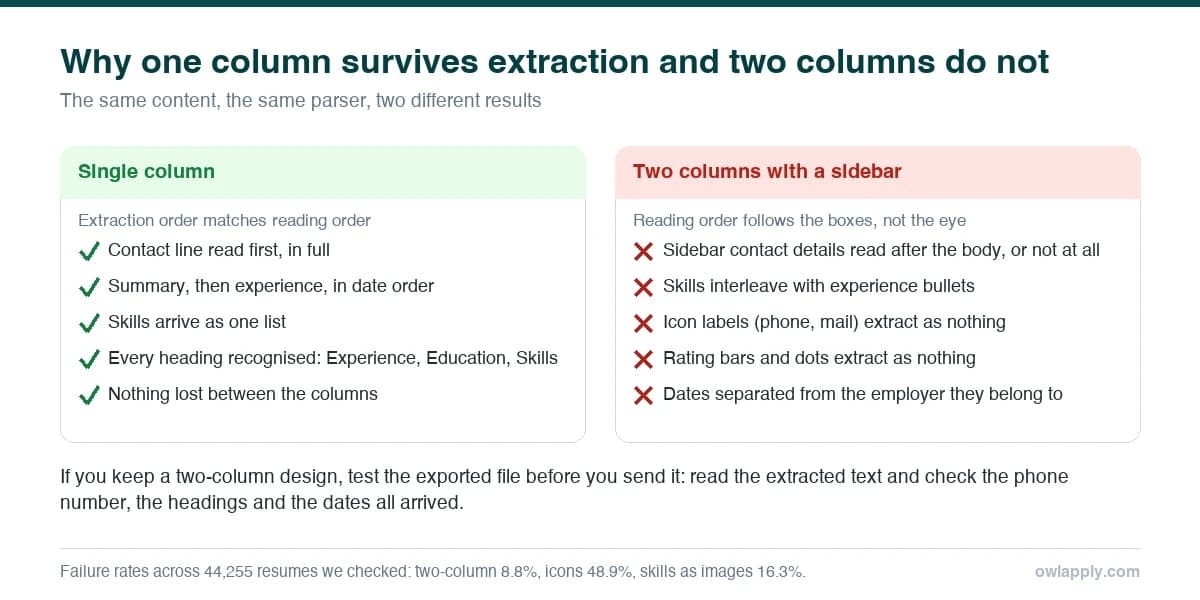
Comparison of a single-column resume where extraction order matches reading order and a two-column resume where the sidebar and skills interleave
The same content in two layouts: what a parser returns from each. Failure rates are from the 44,255 resumes checked with our ATS checker.
The ATS friendly resume format in twelve rules
ElementRuleWhy (from the data)
ColumnsOne. Full-width sections, top to bottomTwo-column files (8.8%) are read left to right across both columns, gluing sections together
Section headingsSummary, Experience (or Work Experience), Education, Skills, Certifications, Projects39.2% of resumes use a heading the parser's whitelist does not know ("Professional Journey", "Where I've Worked") and the whole block is misfiled
Contact detailsName, city, phone, email, LinkedIn on the first two lines of the body22.1% put them in the header band; many parsers extract the body layer only, and the phone number vanishes
Tables and text boxesNone. Not for dates, not for skills, not for the headerTable cells are read row by row; a job title in one cell and its dates in the next arrive merged or out of order (32.7% of files)
FontsOne standard, embedded font at 10.5-12 pt: Calibri, Arial, Helvetica, Georgia, Garamond, Cambria46% of files had a font risk: non-embedded, decorative, or under 9 pt, where extraction becomes unreliable
BulletsPlain round or square bullets, or hyphens48.9% used icons, emoji or decorative glyphs that tokenise as unknown characters and can break section detection
DatesOne format everywhere: Jan 2024 - Mar 2026, or 01/2024 - 03/202631.4% mixed formats; parsers infer the pattern from the first date and blank later ones that do not match
SkillsPlain text, grouped, comma-separated16.3% put skills in bars or rating dots; the image is stripped and the skill with it
Images and photosNone, unless the posting asks for a photo; then a real image in the body, not a text boxImages carry no text; a photo in a text box often forces a two-column layout
LinksVisible URL text (linkedin.com/in/name), not just a hyperlinked word32.5% hid URLs behind link text; the target survives in PDF but is lost on print
LengthOne page under ten years of experience, two aboveNot an ATS rule, a reader rule; parsers handle any length
File typePDF exported from Word, Google Docs or a builder; .docx only if asked4.0% were image-only PDFs (scanned or exported as pictures) with no text layer at all

Section order for an ATS-friendly resume

Contact line, summary (or objective for freshers), experience, education, skills, then certifications, projects and anything optional. Parsers map sections by heading and expect this order; recruiters read in this order. Two exceptions: freshers and students put education and projects above experience, and academic CVs put publications after education. The heading text matters more than its styling: bold 12-pt "Experience" is fine, a 16-pt "Professional Journey" in a coloured band is not.

ATS resume format (copy and fill)
FIRST LAST City, Country | +1 555 000 0000 | [email protected] | linkedin.com/in/firstlast SUMMARY [Title] with [X] years in [field], [one result with a number], [one result with a number]. Seeking [role] to [outcome]. EXPERIENCE Job Title - Company, City - Jan 2024 - Present - [Verb] [what] [number/result] - [Verb] [what] [number/result] - [Verb] [what] [number/result] Job Title - Company, City - Jun 2021 - Dec 2023 - [Verb] [what] [number/result] - [Verb] [what] [number/result] EDUCATION Degree, Major - University, City - 2021 SKILLS Tools: [tool], [tool], [tool] Methods: [method], [method] Languages: English (fluent), [language] (level) CERTIFICATIONS Certification - Issuer - 2025

That skeleton is exactly what the free ATS-friendly resume templates are built on, with typography added; each template was uploaded to Workday, Greenhouse, Lever and Taleo and came back with every section in place.

ATS friendly CV format outside the US: two pages, photos, declarations

The parsing rules do not change by country; the conventions around them do. A two-page CV in India, the UK or Germany parses as well as a one-page resume. A photo, expected in parts of Europe and the Gulf and optional in India, should be a real image placed in the body at the top right, never inside a text box or a table cell. A declaration line at the end of an Indian resume is harmless if it stays in the body; the same line in the page footer disappears. Personal details such as date of birth or nationality, where an employer requires them, go in a plain "Personal Details" section with one item per line. In every country, the four things that actually break extraction are the same four: tables, columns, headers and non-standard headings. the EU’s own Europass CV shows the convention these markets grew out of: two pages, a photo field that is optional, and personal details the US format leaves out.

The two-minute test for your current resume

  1. Open the PDF, select all, copy, paste into a plain-text editor. If nothing pastes, the file is an image. If your sections arrive out of order or your phone number is missing, the layout is losing data.
  2. Read the pasted text for symbols. "oce" for "office" means a ligature or font-mapping problem; blocks of unknown characters mean icon bullets.
  3. Check the dates. Every date should be in the same form. A parser that reads "Jan 2024" first may blank "2024-06" later.
  4. Upload it to the free ATS resume checker. It shows the extracted text line by line, names each of the 34 findings, and tells you the fix and the points it costs. The plain-text test catches the crude problems; the checker catches the header, font and hidden-text ones.

Converting a designed resume to an ATS format without losing the content

Do not fight the template. Open a blank document, paste the plain text from the test above, restore the headings from the list, and re-enter dates in one format. Rebuild the skills list as text. Add the contact line at the top of the body. Then set one font and one size. The whole conversion takes twenty minutes for a two-page CV, and the result usually parses cleanly on the first upload. If you want the typography back, load the text into the free resume builder, which keeps every template single-column.

What an ATS format does not require

  • It does not require a boring design. Colour in headings, a bold name, a horizontal rule: all fine. What matters is that text is text and columns are one.
  • It does not require .docx. Modern parsers read PDF as well as Word; send PDF unless the posting asks otherwise.
  • It does not require keyword stuffing. 17.8% of resumes repeat terms beyond natural use; the checker reports it as a finding, and recruiters see it.
  • It does not require one page. Parsers do not care about length; readers do.
  • It does not require removing your LinkedIn or portfolio link. Write the URL out so it survives print, and keep the hyperlink.

Get the format without rebuilding by hand

Every template in the library is single-column, standard-heading and tested on four major ATS platforms. Edit online, download as PDF or Word.

See the ATS-friendly templates

ATS resume format: questions people ask

Reverse-chronological, single column, with standard headings and contact details in the body, saved as a text-based PDF. It is the format every major parser was built around. Functional resumes parse but hide the timeline recruiters want; combination formats work if the sections keep standard names.

Either, if the PDF has a text layer. Send PDF by default because the layout is fixed; send .docx when the posting asks for it or when a recruiter will edit the file. Never send an image, a scan or a Canva export saved as a picture.

Badly. The text is extracted left to right across both columns, so a sidebar of skills is interleaved with experience bullets. 8.8% of the resumes we check are two-column and almost all of them arrive scrambled. Use one column.

Any standard font that is embedded in the PDF: Calibri, Arial, Helvetica, Georgia, Garamond, Cambria, Times New Roman, at 10.5-12 pt. The risk is not the typeface but non-embedded, decorative or very small fonts, which caused a font finding on 46% of the files we analysed.

Yes. Place the photo as a real image at the top of the body, not in a header, text box or table cell, and keep the text single-column beside or below it. The parser skips the image and reads the text normally.

Run the plain-text test (select all, copy, paste) and check that sections, dates and contact details arrive intact, then upload the file to the free ATS resume checker, which shows the extracted text and each layout finding with its fix.

No. It guarantees the document can be read, which is the part decided before a human is involved. Whether you are shortlisted depends on the content matching the role. Format first, then keywords with evidence, then everything else.

Test your file against the same 34 checks

Upload your resume, read the extracted text, and see which of the twelve format rules it breaks. Free, no account.

Check my resume
Share article

Launch your resume in 15 minutes

Pick a proven layout, let AI suggest winning bullet points, and export a polished resume before your coffee cools.

Build my resume

Launch your resume in 15 minutes

Pick a proven layout, let AI suggest winning bullet points, and export a polished resume before your coffee cools.

Build my resume

Connect with OwlApply

Follow on LinkedInWatch on YouTubePin on PinterestJoin us on InstagramLike on FacebookFollow on XFollow on MediumFollow on TikTok
Build Resume
EnglishBahasa IndonesiaBahasa MelayuČeštinaDanskDeutschEestiEspañolFilipinoFrançaisHrvatskiItalianoKiswahiliLatviešuLietuviųMagyarNederlandsNorskPolskiPortuguês (Brasil)Português (Portugal)RomânăSlovenčinaSlovenščinaSrpskiSuomiSvenskaTiếng ViệtTürkçeΕλληνικάБългарскиРусскийУкраїнськаעבריתالعربيةفارسیไทย日本語繁體中文한국어

JOB SEEKERS

  • Build Resume
  • Resume Examples
  • Resume Templates
  • Cover Letter Templates
  • Job Search Helper
  • Job Tracker

CAREER RESOURCES

  • Resume Help
  • Job Interview
  • Career
  • Cover Letter
  • OwlApply Extension
  • Blog

AI TOOLS

  • Cover Letter Builder
  • AI Resume Optimizer
  • Job Application Autofill
  • AI Resume Builder
  • ATS Resume Checker
  • All AI Tools

SUPPORT

  • Pricing
  • FAQ
  • Contact Us
  • Terms of Service
  • Privacy Policy
  • Cookie Policy
  • Right of Withdrawal

Copyright 2026 OwlApply. All rights reserved.