

Fastest way to stop guessing
Run a simulation, get a score, then apply targeted fixes. Try our ATS Resume Scanner, see your Resume Score, or get Layout + Impact Feedback.
Run an ATS SimulationWhat is an ATS? (ATS full form and a one-paragraph definition)
ATS stands for Applicant Tracking System: the software an employer uses to receive applications, extract the text of each resume into fields (name, titles, employers, dates, skills), store candidates in a searchable database, and help recruiters filter and shortlist. Workday, Greenhouse, Lever, Taleo, iCIMS, SmartRecruiters and SAP SuccessFactors are the ones you meet most often on company career sites; Naukri and LinkedIn run their own parsers in front of the same process. An ATS does not decide who is hired. It decides what a recruiter sees when they search, which is why a resume the parser reads badly is invisible before anyone has judged it. How badly that goes in practice: of 44,255 resumes run through our own parser, only 5.8% of PDFs produced no layout finding at all; the full numbers are in the ATS resume statistics report, and the format that avoids the problems is in the ATS resume format guide.
What an ATS Actually Does (Parsing vs Ranking)
1) Parsing: turning your resume into fields
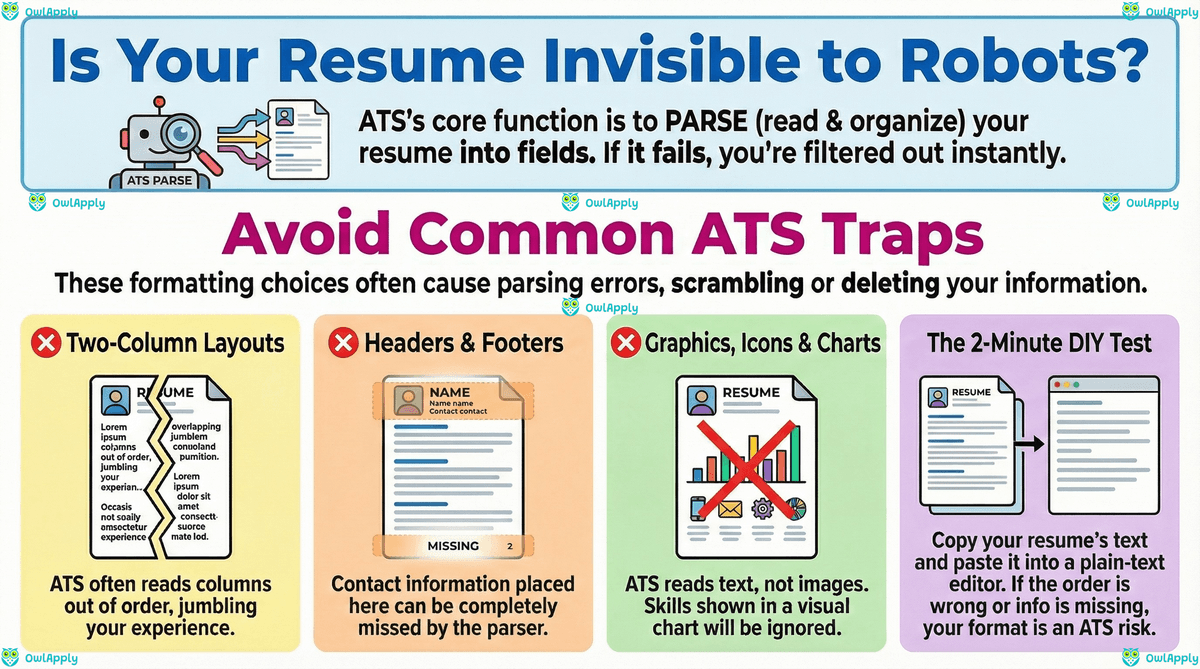
Parsing is the "read and organize" step. The ATS (or a parsing component inside it) tries to extract plain text and map it into categories like Contact Info, Work Experience, Education, job titles, employers, dates, and skills. If parsing fails, you can end up with missing dates, scrambled sections, or experience that lands in the wrong field.
- Text extraction: converts your file to readable text.
- Section detection: identifies headings like "Work Experience" and "Education."
- Entity extraction: pulls titles, company names, locations, dates, and skills.
- Normalization: standardizes common patterns (date formats, job titles, locations).
Layout choice decides how cleanly that extraction runs. A reverse-chronological template is what these parsers are built for, because dates and employers sit where the section detector expects them; a functional resume groups skills instead of jobs and regularly loses its work history in the process, which is worth knowing before you pick one to hide a gap.
2) Ranking/filtering: deciding what recruiters see first
Ranking is the "sort and surface" step. Once parsing produces structured fields, the ATS calculates a relevance score for each candidate and arranges the queue from highest to lowest. Recruiters then triage from the top, filtering by must-have requirements first and skimming the rest. Modern ATSs let recruiters slice this queue by:
- Minimum requirements: work authorization, location, degree/cert requirements, years of experience.
- Keyword relevance: skills/tools/terms that match the job description.
- Job title and level fit: whether your titles align with the role's seniority and function.
- Recency and context: where and how you used the skills (not just whether a word appears).
Important: the ATS doesn't "hire" you. It helps recruiters manage volume and find likely fits. The goal is to parse cleanly, then communicate relevance in the same language as the job posting.
Why parsing has to be fixed before anything else
- •If the ATS cannot extract your name, dates, and job titles cleanly, the ranking step is scoring garbage. No amount of keyword work will rescue an unparseable file.
- •Parsing failures are silent, there is no error message. Your resume just ends up at position 220 of 230 candidates.
- •Two-thirds of "the ATS lost my resume" stories are actually parsing failures on a designed template that looked great visually but produced scrambled output.
- •The fix takes ten minutes (switch to a single-column template and re-export). The cost of skipping it is months of silent rejections.
Why "ATS Score" Isn't Universal
"ATS score" is a convenient shorthand, but it's not a standardized metric across the hiring industry. Different systems and tools evaluate different signals, weight them differently, and score against different baselines.
What changes from vendor to vendor (and tool to tool)
- What counts as a "match": exact phrase matching vs synonyms vs concept matching.
- Weighting: some models overweight hard skills; others overweight titles, recency, or role keywords.
- Job specificity: a "match score" depends on the job description you compare against.
- Formatting tolerance: some parsers handle PDFs/complex layouts better than others.
How to use scores without overfitting
- Treat scores as directional: use them to find gaps and parsing errors, not as a final verdict.
- Improve the top missing requirements first (skills/tools, core responsibilities).
- Keep content human-readable. If it reads like a keyword dump, you've gone too far.
How to use a score without overfitting to it
- •Run the score before and after every change so you can tell which edits actually moved the number.
- •If a rewrite did not move the score, it was cosmetic, revert and try something else.
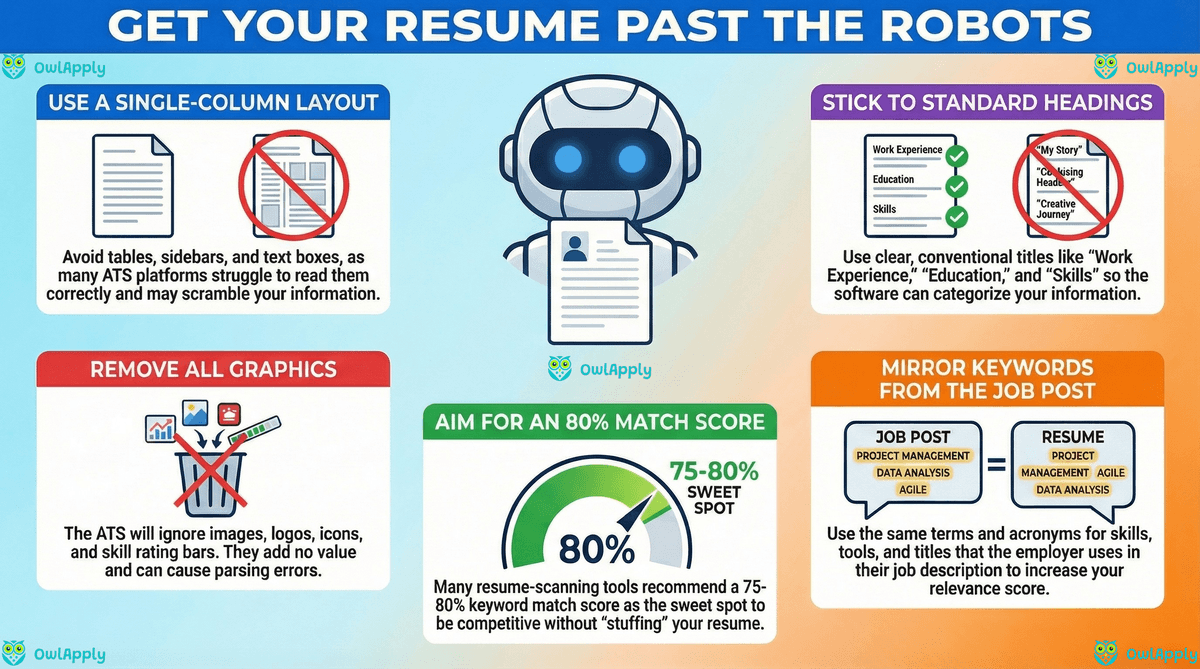
- •Aim for a 75-80% match. Above 85% on a single posting usually means the resume now reads as keyword-stuffed.
- •Score on at least two scanners before drawing conclusions. A single tool's score can mislead, agreement across two tools is the reliable signal.
What ATS Can and Can't Read (fonts, headers/footers, symbols)
Generally safe (high parse reliability)
- Standard fonts: readable, common fonts and consistent sizing.
- Single-column layout: predictable reading order.
- Standard headings: "Work Experience," "Education," "Skills," "Certifications."
- Simple bullets: • or hyphen (-) with consistent indentation.
Common trouble spots (low parse reliability)
- Headers/footers: important info can be missed if it lives there.
- Tables, columns, text boxes: content can be read out of order or dropped.
- Icons and graphics: ATS is still primarily text-based; visuals are often ignored.
- Non-standard symbols: custom bullets, special characters, and heavy decoration can break parsing.
PDF vs DOCX (US reality check)
Many ATS setups can handle standard PDFs, but you should still follow the employer's instructions and test your file. If the posting doesn't specify, keep a DOCX version ready, because DOCX is widely compatible for parsing and editing.
Fonts and characters that pass without surprises
- •Stick to common fonts: Arial, Calibri, Helvetica, Times New Roman, Garamond. ATSs read everything as text regardless of the font, but unusual fonts sometimes get substituted on the recruiter's screen and break layout.
- •Avoid characters that are visually decorative but unusual in ASCII: typographic dashes (em-dash, en-dash), curly quotes versus straight quotes, custom bullet symbols (, , ▶).
- •Avoid icons rendered as fonts (Font Awesome, glyph icons), they extract as garbage characters or nothing at all.
- •Header/footer text is invisible to some ATSs. Never put your phone number or email only in the header.
The Resume Sections ATS Expects (US norms)
ATS is trained on common resume structures. The closer you are to US norms, the fewer "best guess" decisions the parser has to make.
Recommended US structure (ATS + recruiter friendly)
- Contact info: Name, phone, email, city/state, LinkedIn/portfolio (optional)
- Summary (optional): 2–3 lines tailored to the target role
- Skills: grouped, job-relevant skills (tools, methods, domain terms)
- Work Experience: reverse-chronological; consistent job title/company/date formatting
- Education: degree, school, year (optional for experienced candidates)
- Optional: Certifications, Projects, Publications, Volunteer (only if relevant)
Make the ATS's "mapping" easy
- Use "Work Experience" (not "Where I've Been")
- Put dates in a consistent format (e.g., 03/2023–11/2026)
- Spell out key acronyms once (e.g., "Amazon Web Services (AWS)")
Quick Self-Check: Signs Your Resume Isn't ATS-Friendly
Before you start rewriting bullets or hunting for keywords, audit your resume for the structural issues that quietly tank parsing. These six show up in 80% of resumes that score below 50% on first scan, and all six are fixable in under 15 minutes.
- Your resume uses two columns (sidebar layout, skills column, etc.).
- Contact info is in a header/footer or split across multiple areas.
- Skills are shown as charts/bars instead of text.
- Job titles/dates are misaligned or inconsistent across roles.
- Section headings are unusual (ATS may not recognize them).
- You can't copy/paste cleanly into plain text without scrambled order.
Fast DIY test (2 minutes)
- Copy your resume content and paste into a plain-text editor (like Notepad).
- If the order looks wrong or key info disappears, your formatting is a risk.
- Then run an ATS simulation to confirm what's actually extracted.
What a quick self-check tells you that a scanner does not
- •The copy-paste test surfaces formatting problems instantly, you see scrambled order, missing sections, and merged columns in seconds.
- •Scanners simulate parsing but they cannot tell you whether the recruiter scanning the parsed output will understand it. Read the plain-text version once and ask: "Would I hire this person?"
- •If your most recent role title is unclear in plain text, your strongest accomplishment is buried, or your bullets read as duties instead of outcomes, fix that before optimizing keywords.
- •Plain-text review takes two minutes and catches the issues that score-based tools miss.
A Simple Workflow (Scan → Score → Feedback)
Use this loop for each serious application. It's faster than rewriting blindly, and it keeps changes aligned to what the ATS can read and what the job requires.
Step 1: Scan (parsing + red flags)
- Confirm section detection, dates, and reading order.
- Fix layout issues first (columns/tables/headers/footers).
Step 2: Score (baseline strength)
- Identify weak sections (summary, skills, bullets, coverage).
- Prioritize issues that improve both ATS clarity and recruiter readability.
Step 3: Feedback (layout + impact)
- Improve bullet quality (actions + tools + outcomes).
- Remove vague phrasing and replace with scope/metrics.
- Confirm your edits didn't introduce new formatting risks.
Run the full Scan → Score → Feedback loop
OwlApply's ATS Scanner runs all three steps from one upload, parsing check, baseline score, and bullet-level feedback. Each step takes under a minute and tells you exactly what to change before submitting.
Open the ATS ScannerATS Myths and Frequently Asked Questions
Does the ATS automatically reject my resume if I score low?
If I just add more keywords from the posting, will I rank higher?
Should I use ATS-friendly templates instead of designed resumes?
What file format is safest for ATS uploads, PDF or DOCX?
Is the ATS "score" I see in scanners the same as what recruiters see?
Do recruiters actually look at every resume the ATS keeps?
How can I check if my resume is ATS-readable in two minutes?
Related Reading
This article focused on the mechanics, how the ATS reads your resume and what it does with the parsed output. Three companion pieces go deeper on the editorial decisions that follow: a complete step-by-step formatting playbook, a catalog of the specific mistakes that cost callbacks, and a keyword strategy guide for tailoring each application.
ATS-Friendly Resume Guide 2026: Format, Keywords, Fixes
The ATS-friendly resume format for 2026: exact layout rules, keyword strategy and section-by-section fixes that survive a parser.
