

This is original research from the free OwlApply résumé checker, and it covers two samples. The writing is re-scored here across every person who has ever run a public check, one résumé each: 33,746 people. The file itself — fonts, columns, extraction — is measured on the 3,313 PDFs uploaded between 8 and 26 September 2026, again one per person. A follow-up study splits the file checks by language: see how résumé problems differ across 16 languages. Every figure below is a count across a whole sample. We report totals only; no individual résumé is examined or quoted anywhere in this article.
The headline numbers
One résumé per person, scored by the checker running today
- 85.9
- average overall score out of 100
- 40.6%
- scored an A or A+ overall
- 27.7%
- of PDFs had no file level finding at all
- 22.5%
- had at least one major or critical file level finding
If you have read that most résumés fail an applicant tracking system, this data does not support it. Most files parse acceptably. The useful question is not how many fail but which specific problems are common, which are rare, and which are expensive, because those three lists are not the same list and the popular advice mixes them up.
What is a typical ATS score?
The average overall score was 85.9 and the median was 87.6. The distribution leans to the top, which is what you would expect from people who care enough to run a check in the first place:
| Grade | Score | Share of people |
|---|---|---|
| A+ | 95 and above | 12.5% |
| A | 90 to 94 | 28.0% |
| B | 80 to 89 | 37.3% |
| C | 68 to 79 | 17.4% |
| D | 52 to 67 | 4.3% |
| F | under 52 | 0.5% |
So two in five land in A territory and one in 200 lands in F. The file level sub-score, which measures only how cleanly the document comes apart when a parser reads it, averaged 88.0. Files with nothing flagged at that level averaged 89.4 overall, and that number is the reference point for every gap quoted further down.
What formatting problems do parsers actually find?
Measured across the 3,313 analysed PDFs, one per person. A single file can trigger more than one of these.
| Finding | Share of PDFs | Severity | What it means |
|---|---|---|---|
| Hyperlink with no printed address | 41.2% | Info | The text says "GitHub" and the address only exists as a click, so on paper it is gone |
| Font risk | 24.9% | Minor | An unusual or non-embedded face, or body text set below 9pt |
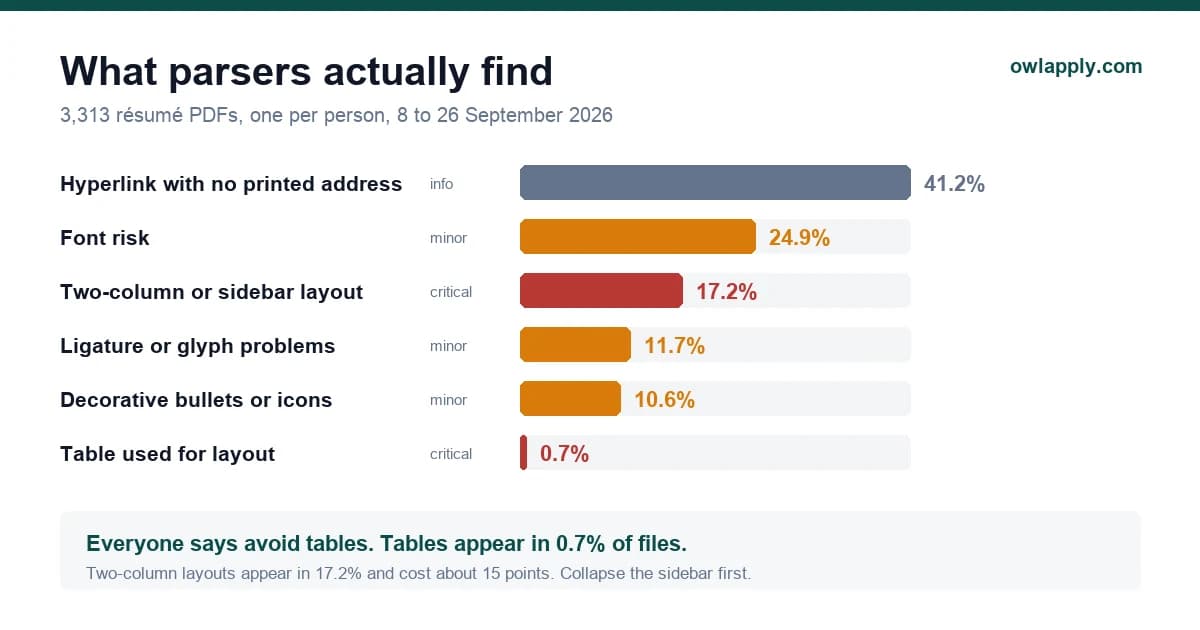
| Two-column or sidebar layout | 17.2% | Critical | Columns interleave when read left to right, gluing unrelated sections together |
| Ligature or private-use glyphs | 11.7% | Minor | "office" can extract as "oce" |
| Decorative bullets, icons or emoji | 10.6% | Minor | Tokenise as unknown characters |
| Contact details in the header or footer band | 4.1% | Major | Many parsers read only the body layer, so the phone number never arrives |
| Non-standard section headings | 3.0% | Minor | "Professional Journey" can hide the experience block |
| Unsafe or inconsistent date formats | 1.5% | Major | Later entries inherit the pattern the parser guessed from the first one |
| Table used for layout | 0.7% | Critical | Cells are read in storage order, not visual order |
| Charts or rating bars in the skills area | 0.5% | Major | Extract as nothing at all |
| No text layer, the page is an image | 0.4% | Critical | Nothing can be read without OCR |
| Text below the legible threshold | 0.4% | Major | Shrunk to fit, at the cost of extraction |
| Text layer present but unreadable | 0.2% | Critical | Encoding is broken, the words come out as noise |
The table advice is aimed at the wrong target
Which problems are expensive?
Frequency on its own is misleading, because the most common finding is also the cheapest. This is the average overall score of the files carrying each finding, against 89.4 for files with no file level finding at all:
| Finding | Average score | Gap | How often |
|---|---|---|---|
| No file level finding | 89.4 | reference | 27.7% |
| Hyperlink with no printed address | 86.5 | about 3 points | 41.2% |
| Ligature or glyph problems | 84.8 | about 5 points | 11.7% |
| Decorative bullets or icons | 83.7 | about 6 points | 10.6% |
| Font risk | 83.3 | about 6 points | 24.9% |
| Non-standard section headings | 82.9 | about 6 points | 3.0% |
| Unsafe date formats | 81.3 | about 8 points | 1.5% |
| Table used for layout | 76.9 | about 12 points | 0.7% |
| Contact details in the header band | 76.3 | about 13 points | 4.1% |
| Two-column or sidebar layout | 74.6 | about 15 points | 17.2% |
| Charts or rating bars for skills | 70.5 | about 19 points | 0.5% |
| Text below the legible threshold | 68.6 | about 21 points | 0.4% |
| No text layer at all | 60.5 | about 29 points | 0.4% |
| Unreadable text layer | 50.6 | about 39 points | 0.2% |
Read the two right-hand columns together. The single most common finding costs about three points. The one that costs fifteen sits on one file in six. That combination — common and expensive — is what makes the sidebar the first thing to fix, and it is the reason a résumé can look immaculate on screen and still score in the seventies.
The font problem is mostly a type-size problem
Font risk fires on 24.9% of files, and it is worth splitting that number because the two halves call for opposite fixes. 11.0% of files used a typeface that may not survive the parser. 15.2% had body text set below 9pt, whatever the face was. The second group is larger, and nothing about it is a font choice: it is someone shrinking type to hold a second page down to one.
Of the small-text samples we recorded, 939 were at 8pt and 231 at 7pt, with a long tail below that. If you are reaching for 8pt to make something fit, cut a bullet instead. A résumé that says 90% as much and extracts completely beats one that says everything and arrives in fragments.
For the other half, these are the families that most often triggered a font finding. None of them is a bad typeface; they are simply faces a parser may not have, usually arriving from a design tool rather than a word processor. We looked at which fonts are safe, and at what size to set each part of the page, in a companion study of the same sample.
| Family | Where it usually comes from |
|---|---|
| DM Sans | Google Fonts, the default in many design-tool templates |
| Garet | Template marketplace font |
| Alegreya | Google Fonts serif, popular in academic templates |
| Aileron | Free Helvetica alternative bundled with templates |
| Gotham | Licensed brand font, common in designer-made templates |
| Public Sans | Open-source US government typeface |
| Barlow | Google Fonts grotesque, common in modern templates |
| Canva Sans | Canva's own default face |
| Glacial Indifference | Canva template staple |
What content problems show up?
Separately from the file, the checker scores the writing. Because that does not depend on an uploaded document, this part is measured across every person who has ever run a public check, one résumé each: 33,746 people. These are the category averages, weakest first, with the share of résumés that drew at least one finding in that category.
| Category | Average score | Share with a finding |
|---|---|---|
| Work experience, content | 76.4 | 88.6% |
| Work experience, structure | 82.4 | 52.4% |
| Keyword optimisation | 84.0 | 79.4% |
| Summary | 86.7 | 80.0% |
| Awards and achievements | 90.1 | 52.4% |
| Readability and format | 91.0 | 51.0% |
| Date consistency | 91.2 | 32.4% |
| Education | 91.6 | 25.7% |
| Projects | 93.3 | 60.1% |
| Languages | 94.3 | 21.9% |
| Skills | 94.6 | 12.1% |
| Personal information | 96.5 | 22.9% |
| Location format | 99.3 | 9.5% |
| Certificates | 99.6 | 4.4% |
| Section titles | 99.6 | 3.6% |
Work experience content is both the weakest category and the one that matters most, at 76.4, and 88.6% of résumés drew a finding there. The specific complaint is almost always the same one: 43.9% of résumés have bullets that describe duties with no result, outcome or number attached, and 42.7% have a summary with no figure in it either. Section titles, by contrast, sit at 99.6 — the thing the guides warn about loudest is the thing almost nobody gets wrong.
What does the checker recommend most often?
The most frequently raised recommendations, as a share of those 33,746 people:
| Recommendation | Share of résumés |
|---|---|
| Demonstrate the skills you list, in context | 80.9% |
| Work specific unmapped skills into the text | 74.0% |
| Add quantified achievements | 58.2% |
| Spread keywords across sections rather than one list | 55.0% |
| Trim an over-long skills list | 54.5% |
| Add project dates | 35.9% |
| Simplify dense bullets | 33.8% |
| Add a country code to the phone number | 28.9% |
| Mention key skills in the summary | 27.7% |
| Standardise work experience dates | 26.2% |
The top of that list is one idea stated three ways, and it is the clearest single result in this study. On 80.9% of résumés, fewer than half of the listed skills appear anywhere in the experience, projects or summary. The skills section says "Python, stakeholder management, Tableau" and the bullets underneath it never mention any of them. A recruiter reads that as a list of hopes; a keyword search finds the word once and cannot tell whether you used it for a week or a decade. Naming the skill inside the sentence that proves it fixes both readings at once, and it costs you nothing but a rewrite.
What the clean 27.7% look like
The files with no file level finding at all are not sophisticated documents. They share a short list of traits, and every one of them is a decision rather than a skill:
The profile of a file that parses perfectly
- One column, read top to bottom
- A common, embedded font at 10 to 12pt, with nothing below 9pt anywhere
- Contact details in the first lines of the body, not in the header band
- Standard section names: Experience, Education, Skills, Projects
- Plain round bullets, no icons and no rating bars
- One date format used throughout
- Link text that also prints the address
That description is achievable in an afternoon with a word processor, which is the honest summary of this whole study: the file side is nearly solved by a handful of dull choices, and the interesting work is all in the writing.
Is the '75% of résumés are rejected by an ATS' figure true?
No, and it never had a source. The claim is usually traced to a vendor blog post with no study behind it, and it has been repeated ever since because it makes a good headline and nobody has to check it.
What this data can say is narrower and more useful. A tracking system is a database with a search over it, not a gate that deletes files. It can certainly mis-read a document, and 22.5% of the PDFs we saw carried a major or critical parsing finding that could plausibly cause one. That is a real risk and it is worth an hour of your time. It is not 75%, and a parsing problem is not a rejection, because a person still decides.
Run your own résumé through the same checks
Upload a PDF and see every file level finding, the text the parser extracted, and your score. No account needed.
Methodology, sample and limitations
Samples. The writing figures come from 33,746 people, counting each person's first public check only, re-scored by the checker running today so that no historical scoring version is mixed in. The file level figures come from the 3,313 PDFs uploaded between 8 and 26 September 2026 whose layout could be analysed, again one per person. Counting repeat uploads instead would weight the result towards people who kept re-testing the same document: 36% of all checks in that window came from someone who had already run one. Public checks require no account. All figures are counts across a whole sample; no individual résumé is examined or quoted.
Why the file window starts on 8 September 2026. The layout detectors were revised on that date, and aggregating across a detector change measures the change rather than the subject. The writing figures do not have that problem, because they are all produced by one engine on one day. We checked that the two eras agree on the writing anyway: category averages from the older records and from the September window differ by at most 3.7 points, in both directions, which is what sampling noise looks like rather than drift.
- Selection bias. These are people who chose to check a résumé. That over-represents job seekers who already suspect something is wrong, and under-represents both the careless and the already-confident.
- File types. Effectively the entire file sample is PDF, so DOCX-specific problems are not represented here.
- A parsing finding is not a rejection. We measure what a parser is likely to do with a document. We cannot see what a recruiter then did.
- Rare findings are indicative. Three weeks is plenty for stable rates on common findings and thin for the ones under 1%. Treat those as directional.
- One parser. These are our checks. Other systems differ in the details, though the failure modes are common to all of them.
- All languages pooled. The file figures mix every language the checker saw. Split by language over a longer window, the two-column rate runs from 7.2% in Arabic to 29.7% in German CVs: ATS résumé problems by language.