


Data analyst interview questions in 2026 come in five groups: SQL (joins, GROUP BY, window functions), Excel (lookups, pivot tables, SUMIFS), statistics (mean versus median, hypothesis tests, A/B tests), Python with pandas, and business case questions such as "sales fell 15%, how would you investigate?". A behavioral round checks how you explain findings to people who do not read SQL.
This page answers them properly: 12 SQL questions with queries you can copy and run, Excel formulas, statistics with a worked A/B test, pandas code, case questions with a step-by-step framework, behavioral STAR answers, a fresher section for first jobs (including campus placements in India), and the questions to ask at the end. All SQL is written for PostgreSQL and notes where MySQL or SQL Server differ.
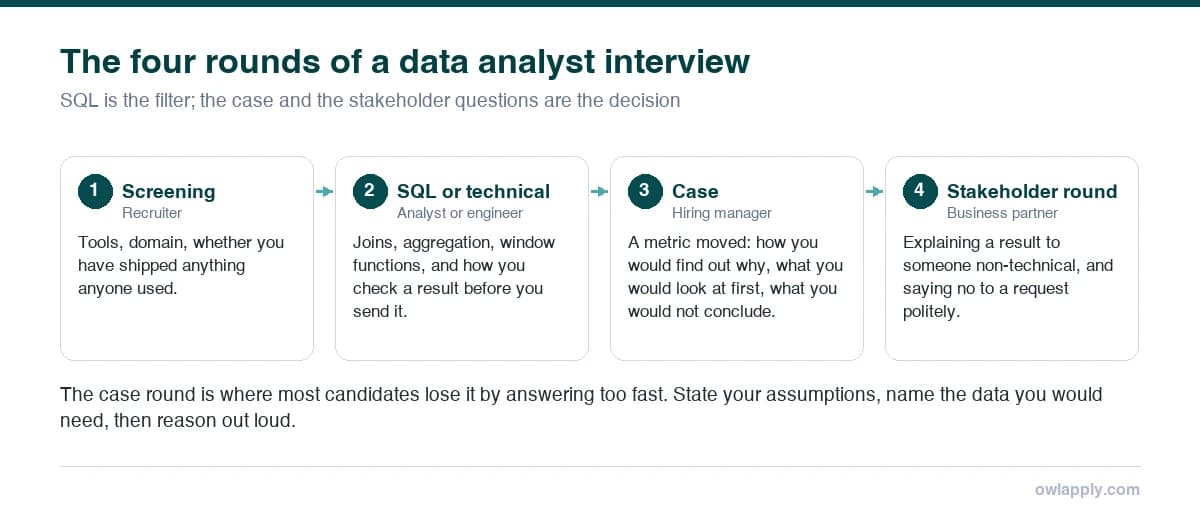
How data analyst interviews are structured
| Round | What you will be asked | How to prepare |
|---|---|---|
| Recruiter or HR screen | Background, tools, notice period, salary expectation | A 60-second summary and a clear list of tools you have actually used |
| Technical test (SQL, often Excel) | Write queries live or on a test platform; Excel tasks on a sample file | Practice joins, GROUP BY, window functions and lookups until they are automatic |
| Case study or take-home | Investigate a metric drop, define KPIs, analyze a dataset and present | A repeatable framework and two or three clean charts |
| Hiring manager or behavioral | Past projects, mistakes, stakeholders, explaining results | Four STAR stories with numbers |
What are the 5 main data analyst interview questions?
If you prepare only five, make them these: tell me about yourself and your tools, walk me through a project from question to recommendation, write a SQL query that joins two tables and aggregates (often with a window function), how would you investigate a sudden drop in a key metric, and how do you explain a finding to a non-technical stakeholder. Each is answered below.
- Tell me about yourself. Sample answer
- Walk me through a data analysis project. Sample answer
- Write a query to find the top customers by revenue. Query
- Sales dropped 15% last month. How would you investigate? Framework
- How do you explain results to non-technical people? Sample answer
SQL interview questions for data analysts (with queries)
SQL is the part of the interview you cannot talk your way through. Interviewers watch how you think as much as whether the query runs, so say your plan before you type: which table, which filter, what grain the result should be at. Every query below uses these three tables:
1. What is the difference between INNER, LEFT, RIGHT and FULL OUTER JOIN?
An INNER JOIN returns only rows that match in both tables. A LEFT JOIN returns every row from the left table and the matches from the right, with NULLs where there is no match; RIGHT JOIN is the mirror image. A FULL OUTER JOIN returns all rows from both, matched where possible. MySQL does not support FULL OUTER JOIN directly; you combine a LEFT and a RIGHT join with UNION.
| Join | Keeps | Typical use |
|---|---|---|
| INNER JOIN | Only rows matching in both tables | Orders with their customer details |
| LEFT JOIN | All left rows, matching right rows or NULL | All customers, including those with no orders |
| RIGHT JOIN | All right rows, matching left rows or NULL | Rarely used; rewrite as a LEFT JOIN |
| FULL OUTER JOIN | All rows from both tables | Reconciling two systems to find records missing in either |
| CROSS JOIN | Every combination of rows | Building a date × product grid to fill gaps |
2. Find customers who have never placed an order
Mention the trap: avoid NOT IN (SELECT customer_id FROM orders) if that column can contain NULL, because one NULL makes the whole condition return no rows.
3. Find the second-highest salary
Explain why you chose DENSE_RANK: if two people share the top salary, RANK would skip to 3 and return nothing for rank 2, while DENSE_RANK still returns the next distinct salary.
4. ROW_NUMBER vs RANK vs DENSE_RANK
All three number rows in order inside a window; they differ only on ties. ROW_NUMBER always gives unique numbers, RANK gives ties the same number and skips the next ones, DENSE_RANK gives ties the same number without gaps. See the PostgreSQL window functions tutorial for the full syntax.
| Salary | ROW_NUMBER() | RANK() | DENSE_RANK() |
|---|---|---|---|
| 95,000 | 1 | 1 | 1 |
| 95,000 | 2 | 1 | 1 |
| 88,000 | 3 | 3 | 2 |
| 80,000 | 4 | 4 | 3 |
5. Find the highest-paid employee in each department
Change rn = 1 to rn <= 3 for the top three. Use RANK instead of ROW_NUMBER if ties should all be returned, and say so out loud: it shows you thought about ties.
6. Find repeat customers in the last 30 days and rank them by revenue
Points to say out loud: you excluded cancelled and refunded orders, you defined "repeat" as two or more orders, and you would confirm both definitions with the business. In MySQL the date filter is CURDATE() - INTERVAL 30 DAY; in SQL Server, DATEADD(day, -30, CAST(GETDATE() AS date)).
7. What is the difference between WHERE and HAVING?
WHERE filters rows before they are grouped; HAVING filters groups after aggregation. So WHERE status = 'completed' removes individual orders, and HAVING COUNT(order_id) >= 2 removes customers with fewer than two orders. You cannot use an aggregate such as SUM in a WHERE clause.
8. In what order does SQL process a query?
Logically, a query is processed in this order: FROM and JOIN, WHERE, GROUP BY, HAVING, SELECT (including window functions), DISTINCT, ORDER BY, then LIMIT or OFFSET. That is why a column alias defined in SELECT cannot be used in WHERE, but can be used in ORDER BY. (The database's optimizer may execute it differently; the logical order is what determines the result.)
9. Find and remove duplicate rows
In an interview, selecting the rows you would delete is usually the right answer. Say you would check with the data owner and back up the table before running a DELETE, and that you would look at why duplicates are created upstream.
10. Calculate monthly revenue, a running total and month-over-month growth
11. Calculate a 7-day rolling average of daily orders
The follow-up question is usually about gaps: if some days have no orders, they are missing from daily, and "6 preceding rows" covers more than seven calendar days. Fix it by joining to a full calendar of dates (for example with generate_series in PostgreSQL) and treating missing days as zero.
12. COUNT(*) vs COUNT(column), and how NULL behaves
COUNT(*) counts rows; COUNT(column) counts rows where that column is not NULL; COUNT(DISTINCT column) counts distinct non-NULL values. NULL means unknown, so column = NULL is never true: use IS NULL, and COALESCE(column, 0) to replace NULLs in a result. Averages also ignore NULLs, which can change an answer: AVG(discount) is the average among orders that have a discount value, not across all orders.
| Other SQL questions | Short answer |
|---|---|
| UNION vs UNION ALL? | UNION removes duplicate rows (slower); UNION ALL keeps all rows. Use UNION ALL unless you need de-duplication. |
| What is a CTE? | A named temporary result defined with WITH, used to make a query readable and to reuse a step. |
| Subquery vs JOIN? | Both can answer many questions; a JOIN is often clearer for combining columns, EXISTS for checking presence. |
| What is an index? | A structure that speeds up lookups on a column at the cost of slower writes and extra storage. |
| Primary key vs foreign key? | A primary key uniquely identifies a row; a foreign key references a primary key in another table. |
| DELETE vs TRUNCATE vs DROP? | DELETE removes chosen rows; TRUNCATE removes all rows quickly; DROP removes the table itself. |
| Normalization vs denormalization? | Normalization splits data to reduce redundancy; denormalization combines it to make reporting queries faster. |
| OLTP vs OLAP? | OLTP systems handle many small transactions; OLAP systems are built for analytical queries over large history. |
Excel interview questions for data analysts
Excel questions are usually practical: you get a file and a task. Know lookups, conditional sums, pivot tables and basic cleaning without searching for the syntax.
VLOOKUP vs XLOOKUP vs INDEX/MATCH
Three ways to return the customer's city (column C of the Customers sheet) for the customer ID in A2:
VLOOKUP looks only to the right and breaks if someone inserts a column, because the column number is fixed; it also needs FALSE for an exact match. XLOOKUP looks in any direction, defaults to an exact match, and can return a message when nothing is found; Microsoft lists it for Excel 2021, Excel 2024 and Microsoft 365, not for Excel 2016 or 2019. INDEX/MATCH works in every version and is the answer when the company is on an older Excel.
SUMIFS, COUNTIFS and AVERAGEIFS
Revenue for the North region since 1 January 2026, the number of completed North orders, and the average North order value:
What is a pivot table, and when would you use one?
A pivot table summarizes a large table by grouping and aggregating it without formulas: revenue by region and month, or average order value by channel. Mention that you check the source range includes new rows (or use an Excel Table so it grows automatically), refresh after the data changes, and use slicers for filtering in a shared report.
How do you clean data in Excel?
- Duplicates: Remove Duplicates on the key columns, after checking which copy to keep.
- Extra spaces and text numbers: TRIM, CLEAN and VALUE, or Text to Columns.
- Inconsistent categories: a lookup table that maps variants ("Bengaluru", "Bangalore") to one value.
- Errors: IFERROR around lookups, but only after you know why the error appears.
- Repeatable cleaning: Power Query, so the same steps run on next month's file.
| Other Excel questions | Short answer |
|---|---|
| Absolute vs relative references? | $A$1 stays fixed when copied; A1 shifts. Mixed references ($A1, A$1) fix only the column or the row. |
| What is conditional formatting for? | Highlighting values that meet a rule, such as negative growth or the top 10%, so problems stand out. |
| How do you handle a file too big for Excel? | A worksheet holds 1,048,576 rows; beyond that use Power Query or the Data Model, or move to SQL or Python. |
| What is a slicer? | A visual filter for pivot tables and charts, useful in dashboards for non-technical users. |
Statistics interview questions for data analysts
Mean vs median: which would you report?
Report the median when the data is skewed or has outliers, such as salaries, house prices or order values, because one very large value pulls the mean up. Report the mean when the data is roughly symmetric or when you need totals to add up. Saying you would look at both, plus a histogram, is the strongest answer.
How do you detect and treat outliers?
Detect them visually (box plot, histogram, scatter plot) and with a rule: values below Q1 − 1.5 × IQR or above Q3 + 1.5 × IQR, or more than about 3 standard deviations from the mean for roughly normal data. Then decide based on the cause: correct or remove data-entry errors, keep genuine extreme values (a bulk order is real revenue), and report results with and without them if the decision depends on it.
What are Type I and Type II errors? What is a p-value?
| Term | Meaning | Plain-English example |
|---|---|---|
| Type I error (false positive) | Rejecting a true null hypothesis; its probability is α, often set at 0.05 | Declaring a new checkout page better when it is not |
| Type II error (false negative) | Failing to reject a false null hypothesis; its probability is β | Missing a checkout page that really is better |
| Power | 1 − β: the chance of detecting a real effect | Larger samples give more power |
| p-value | The probability of a result at least this extreme if the null hypothesis were true | Not the probability that the hypothesis is true |
Walk me through an A/B test (worked example)
State the hypothesis and the primary metric before the test, calculate the sample size you need, randomize users, run for the planned duration (full weeks, so weekday patterns are included), then test for significance and look at the size of the effect, not just the p-value. A worked example:
| Control (A) | Variant (B) | |
|---|---|---|
| Visitors | 10,000 | 10,000 |
| Conversions | 400 | 460 |
| Conversion rate | 4.0% | 4.6% |
How to explain it: "B converted 0.6 percentage points better, and the result is significant at the 5% level. But the confidence interval runs from almost nothing to about 1.2 points, so I would check that the lift is worth the cost of the change, and that nothing else, such as a marketing campaign, hit one group more than the other."
Correlation vs causation
Correlation means two variables move together; causation means one changes the other. Ice cream sales and sunburn are correlated because both rise in summer. To argue causation you need a controlled experiment (an A/B test) or careful methods that account for confounders; otherwise, report it as an association.
| Other statistics questions | Short answer |
|---|---|
| Standard deviation vs variance? | Variance is the average squared deviation from the mean; standard deviation is its square root, in the data's own units. |
| What is a normal distribution? | A symmetric bell curve; about 68% of values fall within 1 standard deviation of the mean, 95% within 2, 99.7% within 3. |
| What is a confidence interval? | A range built so that, over repeated samples, a set share (for example 95%) of such ranges contain the true value. |
| What is sampling bias? | When the sample is not representative, such as surveying only app users about a website change. |
| Discrete vs continuous data? | Discrete data is counted (orders); continuous data is measured (time on page). |
| Bar chart vs histogram? | A bar chart compares categories; a histogram shows the distribution of one numeric variable in bins. |
Python and pandas interview questions
Python questions for analyst roles focus on pandas: loading, cleaning, grouping and joining data. You are rarely asked about algorithms. The pandas groupby guide covers the split-apply-combine pattern most questions are built on.
| pandas question | Short answer |
|---|---|
| loc vs iloc? | loc selects by label (row index and column names); iloc selects by integer position. |
| How do you handle missing values? | Find them with isna().sum(), then drop, fill (fillna with 0, the median, or a forward fill for time series) or flag them, depending on why they are missing. |
| merge vs concat? | merge joins tables on keys like SQL; concat stacks DataFrames vertically or side by side. |
| apply vs vectorized operations? | Vectorized column operations are much faster; use apply only when no vectorized method exists. |
| How do you make a pivot table? | df.pivot_table(index="region", columns="month", values="amount", aggfunc="sum"). |
| What is the difference between a list and a DataFrame? | A list is a general Python sequence; a DataFrame is a labelled table with typed columns and fast column operations. |
Business case and scenario questions
Case questions test whether you can turn a vague business question into an analysis. Interviewers care more about your structure and the questions you ask than about a final number. Think out loud.
"Sales dropped 15% last month. How would you investigate?"
- Check the data first. Is the drop real? Look for tracking changes, a broken pipeline, a late data load, or a change in how sales are defined (refunds, cancellations).
- Put it in context. Compare with the same month last year and the trend over the last 12 months to rule out seasonality.
- Break the number down. Revenue = traffic × conversion rate × average order value. Find which part moved.
- Segment. Region, channel, device, product category, new versus returning customers. A 15% total drop is often a 60% drop in one segment.
- Look for events. Price changes, a site release, a competitor promotion, stock-outs, a payment provider outage, a marketing budget cut.
- Recommend. State the most likely cause with evidence, what to do about it, and what you would monitor next.
"Which KPIs would you track for a new subscription feature?"
Organize them by funnel stage and name one primary metric. Acquisition: trial starts, conversion from trial to paid. Engagement: weekly active subscribers, feature usage per subscriber. Retention: monthly churn, cohort retention at 30, 60 and 90 days. Revenue: monthly recurring revenue, average revenue per user, customer lifetime value. Guardrails: refund rate, support tickets. Then say which one you would put at the top of the dashboard and why.
"How many cups of tea does a busy railway station sell in a day?" (guesstimate)
Guesstimates appear in many campus and consulting-style analyst interviews, especially in India. The number does not matter; the structure does. State each assumption, multiply, and sanity-check:
"Design a dashboard for the sales team."
Start with the decisions the team makes, not the charts. Ask who uses it and how often, then propose three to five headline numbers (revenue against target, pipeline, win rate), one trend chart, one breakdown by region or rep, and filters. Mention data freshness, definitions in a footnote, and that you would test it with two users before rolling it out.
Behavioral data analyst interview questions with sample answers
Use STAR (Situation, Task, Action, Result) and finish with what changed because of your analysis. For more examples, see behavioral interview questions and STAR answers.
"Tell me about yourself."
More structures: tell me about yourself sample answers.
"Walk me through a data analysis project."
"Tell me about a time you got unexpected results."
"How do you explain a finding to a non-technical stakeholder?"
"Tell me about a mistake in your analysis."
"Tell me about a time you had to deliver under a tight deadline."
"Tell me about a disagreement with a stakeholder about the data."
Data analyst interview questions for freshers
Freshers are asked the basics more often and expected to show projects instead of job experience. Campus drives and service companies in India often start with an online aptitude and SQL test, then a technical interview and an HR round. Common fresher questions:
- What does a data analyst do, and how is it different from a data scientist?
- Explain your final-year or certification project from data to conclusion.
- Write a query to find the second-highest salary. Query
- What is the difference between WHERE and HAVING? Answer
- What is a pivot table? What is VLOOKUP? Answer
- What are the steps of data analysis?
- What is the difference between mean, median and mode?
- Why do you want to be a data analyst?
Data analyst vs data scientist
A data analyst mainly answers "what happened and why" using SQL, spreadsheets and BI dashboards; a data scientist more often answers "what will happen" by building predictive models with programming and machine learning. In practice the roles overlap, and many analysts use Python too.
For your résumé, the data analyst résumé examples show how to list projects with tools and results, which matters most when you have little work experience. If you are a fresher, the résumé format for freshers covers the layout.
What should a data analyst know?
A data analyst should know SQL well, Excel or Google Sheets, one BI tool (Power BI, Tableau or Looker), basic statistics, and enough Python or R to clean and analyze data that does not fit in a spreadsheet. Just as important: understanding the business, asking the right question, and explaining results clearly.
What are the four types of data analysis?
| Type | Question it answers | Example |
|---|---|---|
| Descriptive | What happened? | Monthly revenue by region |
| Diagnostic | Why did it happen? | Revenue fell because mobile conversion dropped after a release |
| Predictive | What is likely to happen? | Forecast next quarter's demand |
| Prescriptive | What should we do? | Recommend stock levels per warehouse |
What software is used in data analytics?
The core stack is SQL (with a database such as PostgreSQL, MySQL, SQL Server, BigQuery or Snowflake), Excel or Google Sheets, a BI tool (Power BI, Tableau, Looker), and Python (pandas) or R. Name the ones you have used and what you built with them, rather than listing every tool you have heard of.
What are the stages of data analysis?
There is no single official list, so the number of stages varies from six to seven depending on the course. A common sequence: define the question, collect the data, clean it, explore and analyze, visualize, communicate the findings, and act on them and monitor the result. Google's Data Analytics certificate, for example, uses six phases: ask, prepare, process, analyze, share and act. In an interview, use any sequence like this to structure a project answer.
What is the 30-60-90 question in an interview?
The 30-60-90 question asks what you would do in your first 30, 60 and 90 days. For a data analyst, a good answer is: learn the data and the business in the first 30 days, deliver a first useful piece of analysis by day 60, and own a recurring report or improve a process by day 90.
Questions to ask in a data analyst interview
- What are the main questions the business asks this team every week?
- What does the data stack look like: database, BI tool, and how is data documented?
- How much of the job is building dashboards versus ad-hoc analysis?
- Who are the main stakeholders, and how do they use the analysis?
- How is data quality monitored, and who fixes problems?
- What would a great first 90 days look like?
More ideas in questions to ask the interviewer.
Your skills list says SQL and Python. The interview checks whether you used them.
Mistakes that cost data analysts the offer
Do this
- Say your plan before writing the query
- Ask how the business defines a metric (active user, revenue, churn)
- Mention edge cases: NULLs, ties, duplicates, time zones
- Lead with the business answer, then the method
- Admit what the data cannot tell you
- Bring a project you can explain from question to recommendation
Avoid this
- Don't start typing SQL in silence
- Don't assume definitions, then defend them
- Don't list tools you cannot use under pressure
- Don't present a chart without saying what it means
- Don't confuse correlation with causation
- Don't make up numbers in a case question; label assumptions
Practice explaining your answers out loud
The technical part you can practice on a laptop; the explaining part you have to say out loud. Interviewers judge how clearly you walk through a query or a case as much as whether it is right. Practice telling a project story in two minutes and a case framework in three, and record yourself once.
The OwlApply AI mock interview runs this as a spoken interview. Choose the interview type (HR, behavioral, technical or hiring manager) and one of 42 languages, and add your résumé and the job posting so the questions fit the role. A technical session is spoken problem solving, without a code editor, so it suits case questions and explaining your approach rather than writing SQL. The interviewer asks follow-ups the way a real one would and does not coach you during the session. Afterwards you get a report built from the full transcript, with each answer scored and a stronger suggested version. If you have never done an interview on OwlApply, your first three-minute session costs nothing. Ten-minute sessions are part of the Pro plan: you can try Pro for 7 days for $2.95, which includes two sessions, then $17.49 a month unless you cancel.
Practice the explaining part
Run a spoken mock interview for the analyst role you are applying to, then read your scored report with a stronger version of each answer. Your first three-minute session is free.