


A chronological resume template lists your work experience from the most recent job backwards, with three to five result bullets under each role, followed by education and skills. It is the format nine in ten recruiters expect, the one every applicant tracking system was built to parse, and the one to use unless your work history has a specific problem a different format solves. Below is a copyable reverse chronological resume template, a complete example, the rules that keep the format readable by parsers (the same rules that 0.7% of resumes break by putting the dates in a table), and how to handle the two things that make people abandon it: gaps and short stints.
Chronological resume template (copy and fill)
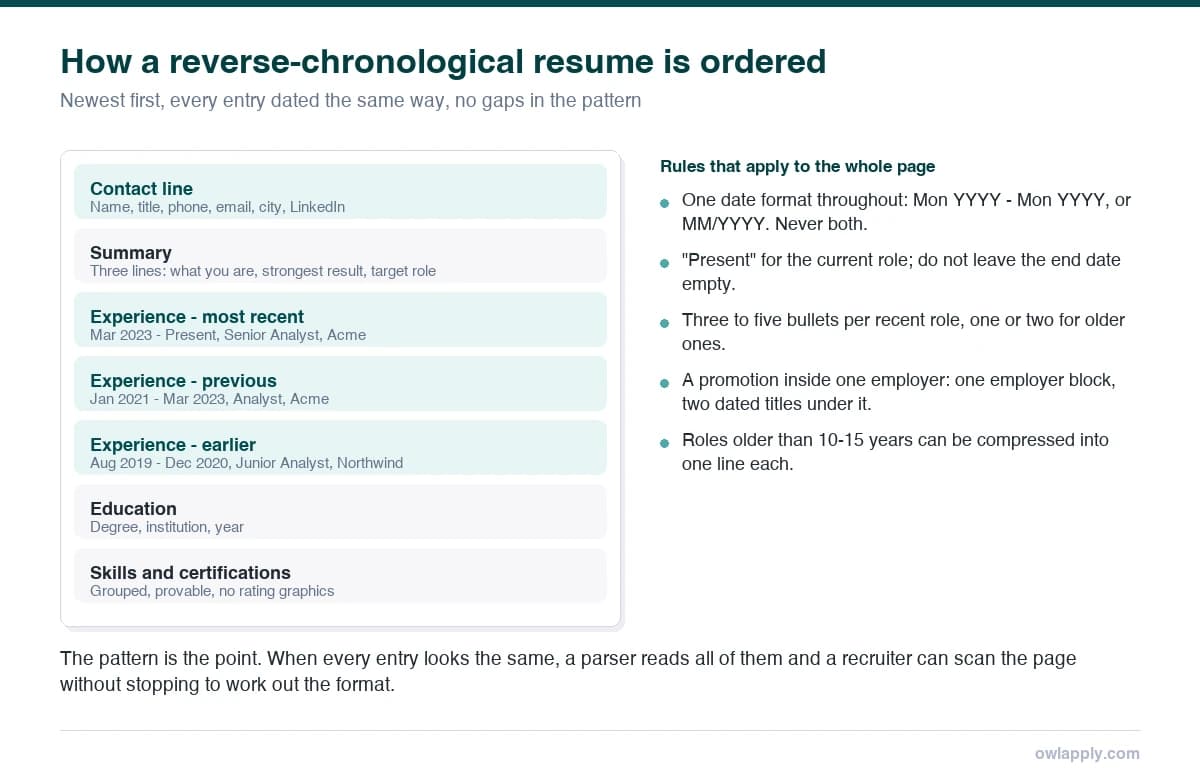
Everything sits in one column. The job title is on its own line above the company and dates so both a recruiter and a parser find it first. Dates use one format throughout. Bullets start with a verb and end with a number. That is the whole template; the free ATS-friendly resume templates are this structure with typography, each tested on Workday, Greenhouse, Lever and Taleo.
Chronological resume example
All three are reverse-chronological documents with the date pattern held consistently. Open one and replace the entries with yours; the structure stays intact. The professional resume templates use the same reverse-chronological structure with conservative type.

Operations Manager
Why this resume works:
- Oversaw daily operations for a 50-person team across 3 shifts and 2 manufacturing facilities
- Improved process efficiency by 30% and cut costs by 18% via Lean kaizen and SOP redesign
- Implemented KPI dashboards in Power BI adopted company-wide across 9 functional teams

Sales Manager
Why this resume works:
- Led regional sales team to 140% quota attainment at a mid-market SaaS company
- Grew territory revenue from $2.8M to $6.4M in 3 years through pipeline expansion and enterprise account development

Accountant II
Why this resume works:
- Owns complex reconciliations, accruals, and financial statement reviews
- Mentors junior accountants and reviews journal entries under SOX controls
- CPA licensure with SAP S/4HANA, Oracle, and NetSuite ERP proficiency
The rules that keep a chronological resume parseable
- Dates in text, never in a table or a right-aligned tab stop built with a table. 0.7% of resumes in our checker data use a table for layout, and dates are the usual reason; parsers read cells row by row and pair the wrong date with the wrong job.
- One date format everywhere. Jan 2024 - Mar 2026 throughout, or 01/2024 - 03/2026 throughout. 1.4% of resumes mix formats and parsers blank the ones that do not match the first.
- Job title first, then company, then dates, on one or two lines directly under each other.
- Standard headings: Work Experience (or Experience), Education, Skills. 3.0% of resumes use a heading the parser does not recognise.
- Ten to fifteen years in detail; older roles in one line each or an "Earlier experience" block with no bullets.
- Single column, standard font, PDF. The full rule set with the data behind it is in the ATS resume format rules.
Keeping the date pattern consistent by hand across six entries is where most drafts slip. Building in the CV builder holds the format for you, and the ATS resume checker flags any date the parser reads unreliably before you send the file.
Gaps and short stints in a chronological resume
A gap does not require abandoning the format. Cover it in one line in its place in the timeline ("Career break (family care) - 2023 - 2025") or in the summary, and move on; unexplained gaps are what recruiters probe, explained ones are not. Short stints that were contracts or company closures get a word in brackets after the dates ("contract", "company closed"). Two roles at the same employer stack under one company heading with their own dates, which shows progression instead of turnover. If the history still does not make the case after those three fixes, that is when the functional or combination format earns its place.
Chronological resume template for Word and Google Docs
The template above is plain text: paste it into a blank Word or Google Docs file, set one font (Calibri, Arial or Georgia at 11 pt, and see which fonts actually parse cleanly), bold the job titles and section headings, and export to PDF. Do not start from a downloaded .docx template unless you have checked it for tables (select all; if gridlines appear, it has them). If you would rather have the typography done for you, the free resume builder uses this structure in every template and is free to edit in; the PDF download is on Pro.
When the chronological layout does not fit: the functional resume guide covers the alternative and its ATS cost, the career change resume guide shows the hybrid used for a pivot, and the Canadian resume format guide covers the same layout with Canadian conventions.
Start from a chronological template that has already been tested
Single-column, standard headings, dates in text. Edit online free; download the PDF on Pro.