A biodata format for a job is a one-page document that lists personal details (name, date of birth, contact, sometimes nationality, marital status and languages), education, work experience and skills in a fixed, form-like order, ending with a declaration and signature. It survives in India, Bangladesh, Pakistan and parts of the Gulf for government posts, public-sector units, some schools and hospitals, and older private firms whose HR forms still say "attach biodata". For everything else in 2026, a resume is what recruiters and applicant tracking systems expect, and a biodata submitted in its place looks dated and parses badly. This page gives you a job biodata format you can copy, two filled samples (fresher and experienced), the fields to include and the ones to leave out, and a plain rule for when to send a biodata, a resume or a CV. It is about job biodata only; a marriage biodata is a different document and is not covered here.
Biodata vs resume vs CV: which one to send
Which document to send: a biodata where the form or the advert asks for one, a resume everywhere else.
If the advert says nothing, send a resume.
Document
Length
Lead with
Send it when
Biodata
1 page
Personal details, then education, then experience
The employer's form or advert explicitly asks for a biodata; government, PSU, some schools, hospitals and traditional firms
Resume
1-2 pages
A summary and quantified experience; personal details limited to a contact line
Private-sector jobs, portals (Naukri, LinkedIn, Indeed), company career sites, anything that passes through an ATS
CV
2+ pages
Education, publications, full career history
Academic, research, medical and some international applications
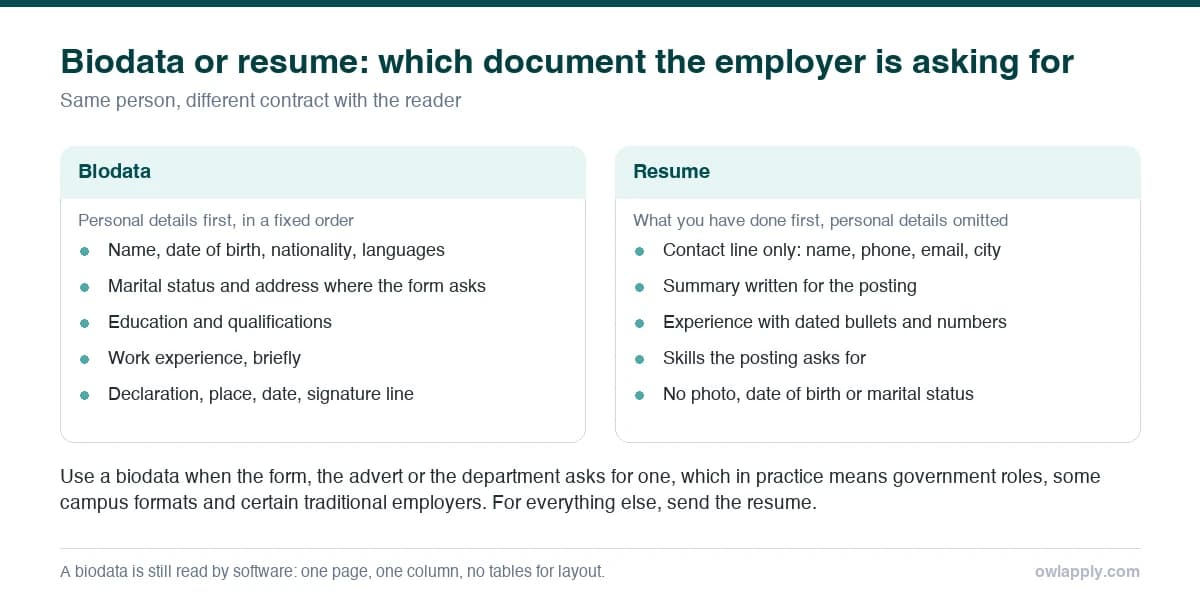
The practical difference is what goes first. A biodata leads with who you are (date of birth, nationality, sometimes parents' names); a resume leads with what you have done. Applicant tracking systems map a resume's sections by heading and expect Experience, Education and Skills; a biodata's Personal Details block at the top is read as noise, and its form-style two-column layout is often read across columns. If a portal is involved, convert the biodata to the fresher resume format or the ATS resume format; keep the biodata for the employer that asked for it.
If the employer wants a resume rather than a biodata, these open in the builder ready to edit, with the same facts arranged the way a parser expects; to start from a blank layout instead, pick one of the resume templates.
The anchor template for 'Entry-Level Accountant' or 'Accountant I' postings, a new-grad story with verifiable Excel, QuickBooks, and Xero tools plus a CPB certification, not oversold senior metrics.
Why this resume works:
Positions a recent accounting grad with realistic early-career reps and metrics
Balances GAAP fundamentals, Excel pivot tables, QuickBooks, and Xero proficiency
Pairs a Bachelor's in Accounting with an active CPB or CPA-candidate certification
Uses internship and accounting assistant bullets a junior can defend in an interview
This resume anchors every metric to a recognizable employer (Delta Air Lines) and uses specific numbers, 8M records, $1.2M impact, 40% time saved, that demonstrate real analytical value rather than generic claims.
Why this resume works:
Named employer (Delta Air Lines) and $1.2M revenue impact add instant credibility
Automation of 6 weekly hours demonstrates efficiency-focused thinking
SQL, Python, and Tableau trifecta matches the most common DA tool requirements
Highlights clear metrics, channel breadth, and tooling modern contact centers expect from entry- to mid-level CS hires, anchored to a recognizable 240-agent floor and 96% CSAT outcome.
Why this resume works:
Maintained a 96% CSAT across 2,400+ monthly interactions on phone, email, and live chat
Top 5% on first-contact resolution for 2 consecutive years across a 240-agent contact center
Bilingual English and Spanish with Zendesk and Salesforce expertise plus CCM certification
Biodata format for a job (copy and fill)
Job biodata format
BIODATA
Name: [Full name]
Date of birth: [DD Month YYYY]
Nationality: [Indian]
Marital status: [only if the form asks]
Languages known: [English, Hindi, Marathi]
Address: [City, State, PIN]
Phone: [+91 ...] | Email: [[email protected]]
CAREER OBJECTIVE
[Two lines: degree, two skills, the exact role, what you will contribute]
EDUCATION
[Degree, Institution, University, Year, Percentage/CGPA]
[12th, Board, Year, Percentage]
[10th, Board, Year, Percentage]
WORK EXPERIENCE (if any)
[Job title, Organisation, City, Dates]
- [Responsibility or result with a number]
- [Responsibility or result with a number]
SKILLS
[Technical skills, tools, certifications]
ACHIEVEMENTS / EXTRACURRICULAR
[Rank, award, competition, leadership role with a number]
DECLARATION
I hereby declare that the information given above is true to the best of my knowledge and belief.
Place: [City]
Date: [DD Month YYYY]
[Name]
Keep it to one page, single column, one font, no photo unless requested (if requested, a passport-size photo in the top-right corner as a real image, not a text box). Fill only the personal fields the form asks for; date of birth and nationality are commonly required for government posts, marital status and parents' names increasingly are not. The declaration wording and placement rules are in declaration in resume. Keep this format for the employers and forms that ask for it. If you are applying outside India, send a resume instead: US employers may not decide on the personal characteristics a biodata leads with (the EEOC), and European applications use the EU’s own Europass CV or a plain CV.
Biodata sample for a fresher (clerk / accounts assistant)
Biodata sample: fresher
BIODATA
Name: Priya Nair
Date of birth: 12 March 2004
Nationality: Indian
Languages known: English, Malayalam, Hindi
Address: Kochi, Kerala 682016
Phone: +91 97xxx xxxxx | Email: [email protected]
CAREER OBJECTIVE
B.Com graduate with Tally Prime, GST filing and advanced Excel skills from a six-month internship at a CA firm, seeking a Clerk / Accounts Assistant position where accuracy and record-keeping matter.
EDUCATION
B.Com (Finance and Taxation), St. Teresa's College, Kochi (MG University), 2026, 78.4%
Higher Secondary (Commerce), Kerala State Board, 2023, 89%
SSLC, Kerala State Board, 2021, 92%
INTERNSHIP
Accounts Intern, R. Menon & Associates (Chartered Accountants), Kochi, Dec 2025 - May 2026
- Posted 1,100+ purchase and sales entries per month in Tally Prime for 14 client companies with zero audit corrections at the March close
- Prepared GSTR-1 and GSTR-3B working files for 9 clients; all filed on time
SKILLS
Tally Prime, GST returns, bank reconciliation, MS Excel (VLOOKUP, pivot tables), MS Word, typing 40 wpm (English)
ACHIEVEMENTS
College topper in Cost Accounting, 2025 (94/100)
Treasurer, Commerce Association (annual budget of 1.2 lakh rupees)
DECLARATION
I hereby declare that the information given above is true to the best of my knowledge and belief.
Place: Kochi
Date: 14 September 2026
Priya Nair
Biodata sample for an experienced candidate (school teacher)
Biodata sample: experienced
BIODATA
Name: Rohan Sharma
Date of birth: 5 August 1994
Nationality: Indian
Languages known: English, Hindi
Address: Gurugram, Haryana 122001
Phone: +91 99xxx xxxxx | Email: [email protected]
CAREER OBJECTIVE
B.Ed. and M.Sc. Mathematics graduate with 6 years of secondary-school teaching (Classes 9-12, CBSE), seeking a PGT Mathematics position where curriculum design and board results are valued.
EDUCATION
B.Ed., Maharshi Dayanand University, 2019, 76%
M.Sc. Mathematics, University of Delhi, 2017, 71%
B.Sc. (Hons) Mathematics, Hansraj College, University of Delhi, 2015, 74%
WORK EXPERIENCE
PGT Mathematics, DPS Sector 45, Gurugram, Jul 2021 - present
- Teach 5 sections of Classes 11-12 (210 students); Class 12 board average 84%, up from 76% in 2021
- Head of the mathematics department since 2024 (6 teachers); redesigned the Class 9-10 curriculum now used across 3 branches
TGT Mathematics, Amity International School, Noida, Jul 2019 - Jun 2021
- Taught Classes 8-10; ran the school's mathematics olympiad programme (4 national qualifiers)
SKILLS
CBSE curriculum, lesson planning, formative assessment, Google Classroom, GeoGebra, Excel-based grade analysis, CTET qualified (2019)
DECLARATION
I hereby declare that the information given above is true to the best of my knowledge and belief.
Place: Gurugram
Date: 14 September 2026
Rohan Sharma
What to include and what to leave out
Do this
Name, date of birth, nationality, languages, city, phone, email
Education with board, year and percentage (government forms want all three)
Experience with dates and at least one number per role
Skills and certifications relevant to the post
Declaration with place, date and typed name, last
One page, one column, PDF (or the form's own format)
Avoid this
Parents' names, religion, caste, blood group, height and weight unless the form requires them
Salary drawn, reason for leaving
A scanned signature image
A photo unless requested
Hobbies with no relevance to the post
Tables and text boxes for layout (if the biodata will be uploaded, the parser reads them badly)
Biodata format in Word and PDF
The templates above are plain text: paste one into a blank Word or Google Docs file, set one font at 11 pt, bold the headings, and save as PDF unless the form asks for Word or a printed copy. If a printed copy is required, sign above your typed name on the print; do not paste a signature image into the file. For any application that goes through a portal or a company career site, rebuild the same content as a resume in the free resume builder and check the exported file with the free ATS resume checker; the biodata stays for the employer that asked for one.
The builder keeps the same details in a single-column resume format and takes about ten minutes; editing and importing are free, the PDF export is on the paid plan.
What is the difference between biodata and resume?
A biodata leads with personal details (date of birth, nationality, sometimes marital status) followed by education and experience in a fixed form-like order, and ends with a declaration. A resume leads with a summary and quantified experience and limits personal details to a contact line. Employers that ask for a biodata want the form; everyone else expects a resume.
Is biodata still used for jobs in 2026?
Yes, in a shrinking set of cases: government and PSU applications, some schools, hospitals and traditional private firms in India, Bangladesh, Pakistan and parts of the Gulf. Private-sector recruiters and every job portal expect a resume.
What is a simple biodata format for a job?
One page: personal details (name, date of birth, nationality, languages, contact), a two-line objective, education with board, year and percentage, experience with dates, skills, achievements and a one-line declaration with place, date and name. The copyable template above is exactly that.
Should a job biodata include a photo?
Only when the form or advert asks for one. If it does, place a passport-size photo in the top-right corner as a real image. For online submissions, avoid text boxes and tables around it so the file still parses.
Can I upload a biodata on Naukri or LinkedIn?
You can upload the file, but the parser will read the Personal Details block as noise and may misread a form-style layout. Upload a resume built from the same information instead; keep the biodata for employers that request it.
Is this the same as a marriage biodata?
No. A marriage biodata is a family and personal profile with a different set of fields. This page covers the biodata format for job applications only.