

A declaration in a resume is a one-line statement at the very end confirming that everything above it is true, followed by the place, the date and your name. It is a holdover from paper applications and government forms, and in 2026 you need it in exactly three situations: a government or PSU application that asks for it, a college placement template that includes it, and an employer whose form says "signed declaration required". For every other private-sector job, on Naukri, LinkedIn or a company career site, leave it out: recruiters skip it, applicant tracking systems ignore it, and on a one-page fresher resume it costs three lines that a project bullet would use better. Below: the standard wording, five variants, where to place it, and what to do about the signature.
Declaration in resume: format and standard wording
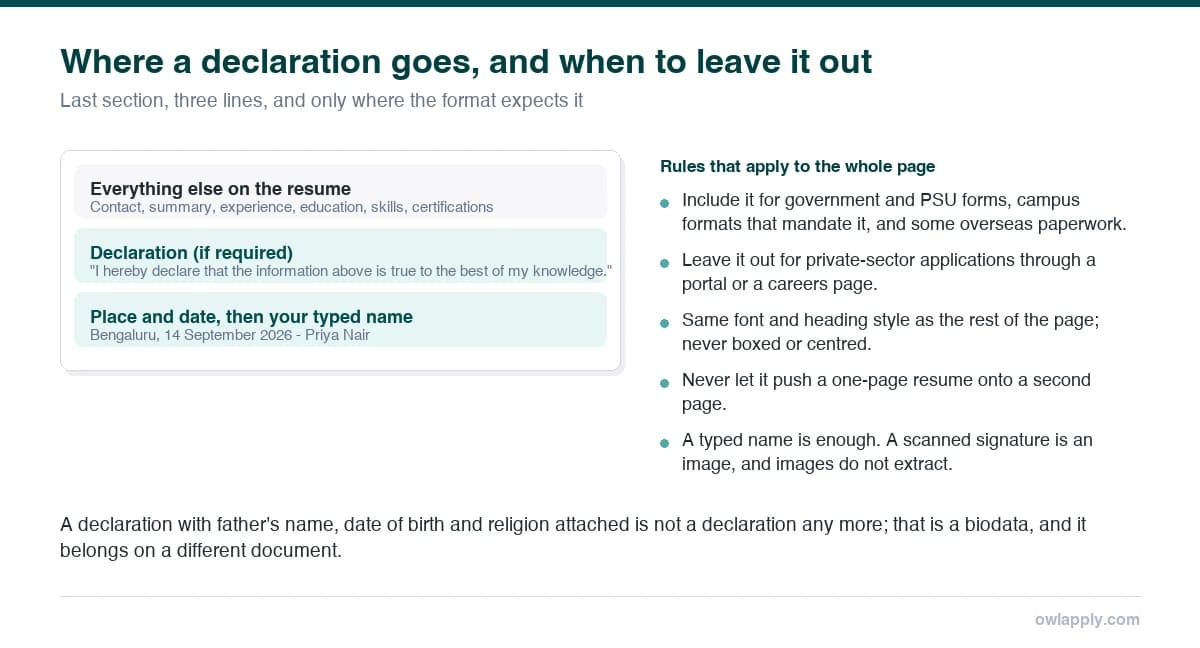
That is the whole format: a heading, one sentence, place, date and your typed name. Keep the heading in the same style as your other section headings, use the same font, and do not box it, centre it or add a signature image. If the form asks for a signature, sign the printed copy or use the portal's e-sign step; a pasted picture of a signature is an image the parser cannot read and a security habit worth dropping.
Five declaration examples for different situations
- Fresher, campus placement template: "I hereby declare that the above-mentioned information is correct to the best of my knowledge and I bear the responsibility for the correctness of the particulars."
- Government / PSU application: "I solemnly declare that the particulars furnished above are true, complete and correct to the best of my knowledge and belief, and that nothing material has been concealed."
- Short version (when space is tight): "I confirm that the details above are accurate and complete."
- Experienced candidate (only if requested): "I declare that the information provided in this resume is accurate, and I authorise verification of my employment and educational records."
- Cover letter closing (instead of a resume declaration): "The details in my attached resume are accurate and I am happy to provide documents for verification."
Where to put the declaration and how much space it takes
Last, after references or achievements, as the final section of the document. It should never push the resume onto a second page; if it does, drop it or use the short version. On a two-page experienced resume it goes at the bottom of page two. Never put it in the page footer: 4.1% of the resumes we check keep contact details or closing lines in the header or footer band, which many parsers do not read, and a declaration placed there disappears from the extracted text entirely.
Do you need a declaration in a resume in 2026?
| Situation | Include it? | Why |
|---|---|---|
| Private company via Naukri, LinkedIn, Indeed or careers page | No | Not read by recruiters; ignored by the ATS; uses space |
| Campus placement with a college-mandated format | Yes, if the template has it | The placement cell's format is usually non-negotiable |
| Government, PSU, bank or university application form | Yes | Forms often require a signed declaration; use the formal wording |
| Job abroad (US, UK, EU, Gulf, Australia) | No | Not a convention anywhere outside South Asia; can look dated |
| Employer explicitly asks for a signed resume | Yes | Sign the print or e-sign; do not paste a signature image |
| Freelance profiles, portfolios, LinkedIn | No | Not a document that carries a declaration |
Mistakes that make the declaration hurt more than help
Do this
- One sentence, same font, last section
- Typed name, place, date in a single block
- Short version when the page is full
- Drop it entirely for private-sector and overseas jobs
Avoid this
- A scanned signature image
- A boxed or centred block that pushes to page two
- "I hereby declare…" followed by father's name, DOB and religion (that is a biodata, not a resume)
- A declaration in the page footer, where parsers do not look
If your resume still carries father's name, date of birth, marital status and a declaration together, it is a biodata format; our resume format for freshers guide shows what to keep and what to cut, and the free ATS resume checker will show you whether the closing lines even survive extraction. Outside India that combination is also a liability rather than a formality: US employers are barred from deciding on the characteristics it exposes (the EEOC), so recruiters there prefer not to receive them at all.
Declaration in resume: quick answers
Is a declaration mandatory in a resume?
What is the correct declaration format for a resume?
Should I sign the declaration?
Do experienced professionals need a declaration?
Is a declaration used on resumes outside India?
Check what the parser actually reads from your resume
Upload your resume and see the extracted text line by line, including whether your closing section survives. Free, no account.