

ATS rejections are rarely about your qualifications. They are about whether the resume parsed cleanly, whether your wording matched the posting, and whether your bullets gave the system enough signal to rank you above the next 80 candidates. This guide walks through every step of that loop, formatting, keywords, scoring plus common fixes (and ends with a workflow you can run in 15 minutes per application.
The 7-step ATS workflow this guide will teach you
- •Scan the file for parsing risks, tables, columns, headers, and graphics that break extraction.
- •Score the resume's overall strength independently of any specific posting.
- •Match against the job description and identify missing requirements.
- •Optimize keywords by placing them in titles, skills, and bullets, never stuffing.
- •Fix weak bullets so each one has action, scope, tool, and an outcome.
- •Export in the format the employer asks for (and sanity-check parsing one more time).
- •Apply and track so you can tell which changes actually moved your callback rate.
Run the workflow on your resume right now
OwlApply's ATS Resume Scanner runs steps 1-3 in under two minutes, parsing check, strength score, and job-description match, so you know exactly where the gaps are before you rewrite anything.
Run ATS Resume ScannerHow ATS Works in 2026
An ATS (applicant tracking system) is software used to collect applications, parse resumes into structured fields (name, titles, employers, dates, skills), and help recruiters filter/search candidates. In practice, two things matter most:
- Parseability: Can the system reliably extract your information in the right order?
- Relevance: Do your titles, skills, and bullets match what the job description asks for?
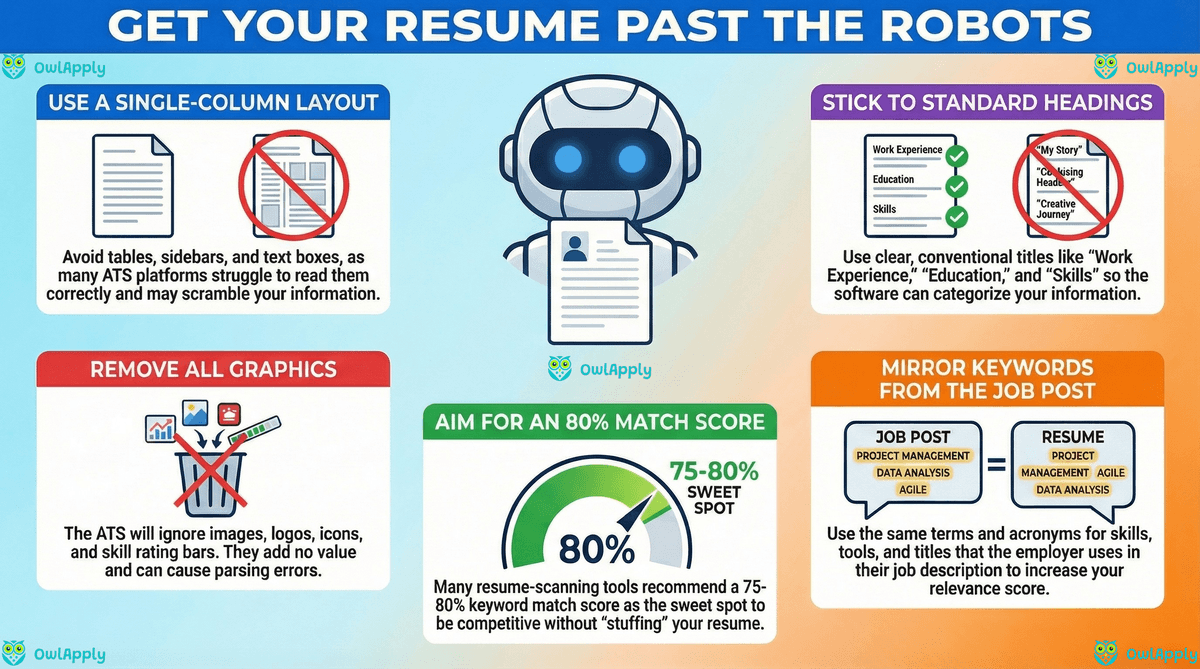
Modern ATS platforms are better than they used to be, but they still fail on common layout patterns: tables, columns, text boxes, header/footer text, and decorative graphics. Files that look "visually clean" but use these elements regularly produce scrambled output, names land in the wrong field, dates disappear, skills end up as one giant string. The safest mental model: treat the ATS like a strict reader of plain text and write the resume so that copy-pasting it into Notepad still produces a coherent document.
Fast parseability check
- •Open your resume PDF, select all, copy, paste into a plain-text editor.
- •If your name, job titles, dates, and bullets read top-to-bottom in order, you are parseable.
- •If anything is scrambled, duplicated, or missing, the ATS will see the same mess.
ATS-Friendly Formatting Rules (US resumes)
If you want one rule that holds up across most US ATS setups: use a simple, single-column layout with standard headings. Jobscan's guidance is blunt on this: many ATS struggle to read tables and columns accurately, so single-column formatting is safer.
US-safe structure
- Header: Name, phone (US format), email, city/state, LinkedIn (optional), portfolio (if relevant)
- Summary (optional): 2–3 lines tailored to the role (no mission statements)
- Skills: a compact list of relevant skills (grouped by category)
- Experience: reverse-chronological, measurable bullets
- Education: degree, school, graduation year (optional if you're experienced)
- Optional sections: Certifications, Projects, Publications, Volunteer (only if relevant)
Formatting rules that reduce parsing failures
- Single column. No sidebars.
- Avoid tables, text boxes, icons, charts, skill bars, and images/logos.
- Use standard headings: "Work Experience", "Education", "Skills", "Certifications".
- Use simple bullets (• or -), consistent indentation, consistent date format (MM/YYYY).
- Keep headers/footers empty (some ATS ignore them).
- Use common fonts (Arial, Calibri, Times New Roman) and readable sizes.
PDF vs DOCX in 2026
The old advice was "always DOCX" because 2010-era parsers struggled with PDFs. That has not been true since around 2018. Modern systems (Workday, Greenhouse, Lever, Ashby, iCIMS) handle PDFs as well as or better than DOCX, and PDF is the only format that guarantees your formatting will reach the recruiter unchanged. The practical 2026 rule: default to PDF, switch to DOCX only when the posting explicitly asks for it, and run both formats through an ATS scanner once to confirm parsing before you commit. Different employer ATS configurations can still produce edge cases, a single test takes a minute and rules them out.
Keyword Strategy That Improves Match Rate
ATS keyword matching is less about cramming exact phrases and more about proving you meet requirements in the same language the employer uses. A good keyword strategy has three parts:
- Extract: identify must-haves, tools, and "nice-to-haves" from the job description.
- Map: connect each requirement to evidence in your experience (a bullet, project, or certification).
- Place: add the right terms where ATS and humans both expect them: titles, skills, and bullets.
What counts as a "keyword" (in the real world)
- Role language: job title variants (e.g., "Customer Success Manager" vs "Client Success Manager")
- Hard skills/tools: software, frameworks, platforms, methods
- Domain terms: metrics, regulations, workflows (e.g., "GA4", "SOX", "HIPAA", "SaaS retention")
- Soft skills with proof: "stakeholder management" + a bullet that shows it
Understanding ATS Score Benchmarks
"ATS score" usually mixes multiple signals: keyword overlap with the job description plus section completeness (and formatting)/parseability. Scores are not standardized across tools, so treat them as directional, not absolute.
Pragmatic benchmarks (what to aim for)
- Match score: many matching tools recommend aiming around 75–80% as a practical target, with 80% often described as a "sweet spot" that avoids over-optimization.
- Parsing/format: aim for "no critical errors" (missing dates, scrambled roles, lost section headings).
What a low score usually means
- Missing required skills/tools from the job description
- Right experience, wrong wording (you did it, but you didn't name it the way they do)
- Formatting that prevents clean parsing (columns, tables, text boxes)
- Bullets that describe duties instead of outcomes (hard to "match" to requirements)
Score two different things, not one
- •Overall resume strength, completeness, formatting, bullet quality. Run once per refresh of your resume.
- •Job-specific match, keyword overlap and requirement coverage against a single posting. Run once per application.
- •A 90% strength score with a 45% job match still gets rejected. Both numbers have to clear the bar.
Fixing Low Scores & Rejections
Low ATS scores are usually a mix of three problems: the file is hard to parse, the wording does not match the posting, and the bullets describe duties instead of outcomes. The order below fixes them in cost-of-effort order. Parsing fixes take ten minutes and unlock everything else. Keyword fixes take twenty minutes and double your match rate on a typical posting. Bullet rewrites are the most time-expensive but deliver the highest ceiling, they are also the work most candidates skip because it requires honest editing of your own writing.
1) Fix parsing first (format & structure)
- Convert to a single-column layout; remove tables/columns; remove graphics.
- Use standard headings and simple bullets.
- Re-scan and confirm your dates, titles, and employers appear correctly.
2) Fix requirement coverage (missing keywords)
- Identify the top 10–20 requirements (hard skills + core responsibilities).
- Add missing items only if you can support them with evidence (project, work, cert).
- Mirror common terms and acronyms (e.g., "Search Engine Optimization (SEO)").
3) Fix bullets (make them matchable and credible)
Most weak bullets start with "Responsible for..." or "Helped with...", those framings hide what you actually did and produce no signal for either ATS keyword matching or human pattern-spotting. Replace them with a four-part formula: action verb + how (method or tool) + result (a number) + scope (team size, budget, volume, or geography). Compare these two versions of the same bullet:
Do this
- Rebuilt the checkout flow in React using A/B-tested variants, lifting conversion from 2.4% to 3.1% across 480K monthly sessions while leading a team of 5 engineers.
- Designed and shipped the company-wide OKR tracking dashboard in Looker, surfacing missed targets 6 weeks earlier on average across 12 product teams.
- Cut customer onboarding time from 14 days to 4 by automating account provisioning in Salesforce, recovering ~$120K in annualized CSM hours.
- Led 3-engineer migration off legacy MongoDB to Postgres, reducing p95 read latency from 380 ms to 95 ms with zero downtime over 6 weeks.
Avoid this
- Responsible for the checkout flow and helped improve conversion rates.
- Built dashboards in Looker to help product teams.
- Improved customer onboarding process using Salesforce automation.
- Migrated database to a new system.
The bullet-rewrite test (60 seconds per bullet)
- •Cover the right side of the bullet. Can you still tell what was done? If not, the verb is generic, replace it.
- •Cover the left side. Is there a number, percent, or scope marker (team size, budget, volume)? If not, add one.
- •Read aloud. If it sounds like a template ("led cross functional initiatives"), name the actual project and outcome.
- •If you can't fix all three in 60 seconds, drop the bullet, it's not earning its space.
Resume Length: What Works in the US
US resumes are typically shorter than CVs. In 2026 guidance, most candidates should keep it concise, with length depending on experience level and role.
- 0–5 years: 1 page is usually enough (focus on the most relevant experience).
- 5–15 years: 1–2 pages is common; use page 2 only if it adds relevant proof.
- Senior/executive: 2 pages is normal; 3 is possible in specific cases (but every line must earn space).
A simple guardrail: if page 2 is mostly older or unrelated roles, collapse it (or move details to LinkedIn).
Common ATS Mistakes to Avoid
- Tables/columns: often scramble content order or drop fields.
- Graphics and icons: frequently ignored by ATS.
- Non-standard section headings: "What I bring" instead of "Skills".
- Keyword stuffing: can backfire and reads poorly (and some systems detect it).
- Unstable file formatting: exporting from design tools without testing parsing.
- Generic bullets: duties with no tools, scope, or results.
The one mistake that is invisible until it costs you a callback: renaming standard section headings. "My Journey" instead of "Work Experience", "What I Bring" instead of "Skills", "Where I've Been" instead of "Education". The ATS pattern-matches against a fixed set of headers, with a creative rename drops the entire section into the void, recruiter searches return zero hits even though your content is on the page. If you only fix one thing on this list, use the standard headings.
Buzzwords to Avoid (2026) + Better Alternatives
Buzzwords don't fail ATS directly, but they waste space and make your resume blend in. Multiple 2026 buzzword roundups flag the same issue: vague "good vibes" words without proof.
Do this
- "Increased X by Y% by doing Z"
- "Partnered with Sales/Eng to ship X; reduced cycle time by Y"
- "Managed X weekly volume; hit SLA Y% for Z months"
- "Cut errors from X to Y by implementing checks in Z"
- "Built roadmap for X; prioritized Y initiatives; delivered Z outcome"
- "Identified X gap; proposed Y; executed Z; impact: ___"
- "cross functional alignment" (then show with a concrete example)
- "Owned X end to end; delivered Y under Z constraints"
- "Adapted to X change; maintained Y metric"
- "Built/led X initiative; shipped Y; measurable outcome Z"
Avoid this
- "Results-driven"
- "Team player"
- "Hard-working"
- "Detail-oriented"
- "Strategic thinker"
- "Go-getter"
- "Synergy"
- "Self-starter"
- "Dynamic"
- "Passionate"
Rule: if a word could describe anyone, replace it with scope + tool/method + metric.
Using AI Safely (without sounding generic)
AI is useful for speed plus consistency (and gap-finding. It also makes it easy to produce bland, repetitive phrasing. Use AI as an editor and analyst, not as an autobiography writer.
Guardrails that keep your resume credible
- No invented facts: only add tools/skills you can explain in an interview.
- Keep your "proof density" high: prioritize numbers, scope, and outcomes.
- Match the job, not the internet: optimize to the actual posting language.
- Do a "human pass": read aloud; if it sounds like template text, rewrite the first line of each bullet.
Sequence matters: find gaps before you rewrite
- •Run a match against the actual posting first, let the tool tell you what's missing.
- •Rewrite only the bullets tied to missing requirements, not the whole resume.
- •Re-check the match after each rewrite. If a change does not move the score, it was cosmetic, revert it.
- •AI is best at finding gaps and proposing first drafts. The final edit always has to be yours.
Skills Employers Expect (ATS-ready)
Your skills section should make it easy for both ATS and recruiters to confirm fit in 10 seconds. In 2026, employers continue to emphasize a mix of technology fluency and durable human skills. Which skills to list, and how many, is the part people get wrong most often: this breakdown of skills to put on a resume separates the ones that earn a line from the ones that waste one, and what to put on a resume covers the sections around it.
Core skills showing up across industries
- Analytical thinking and problem-solving
- AI/data literacy (role-appropriate; doesn't mean "ML engineer")
- Resilience, flexibility, agility
- Technological literacy and adapting to tools
- Leadership and social influence (at your level)
These five track the World Economic Forum’s Future of Jobs Report 2025, which surveyed more than 1,000 employers representing over 14 million workers across 55 economies: it puts AI and big data, networks and cybersecurity, technological literacy, creative thinking, resilience and flexibility, curiosity, leadership and social influence, talent management, analytical thinking and environmental stewardship in its top ten skills on the rise to 2030. Listing them in your skills section without proof in the bullets is empty; pairing each one with a concrete bullet that demonstrates it is what turns the section from filler into a credibility signal.
US "career readiness" competencies (useful for entry-level and early career)
- Communication
- Teamwork
- Critical thinking
- Professionalism
- Technology
- Leadership
- Career & self-development
- Equity & inclusion
If you are within five years of graduation, NACE’s career readiness competencies are worth mirroring: they are the vocabulary US campus recruiters and many graduate hiring rubrics are built on. Use the wording inside your bullets rather than listing the eight as a block. One caveat straight from NACE: the equity and inclusion competency is currently under review because of changes in US federal guidance, so treat that one as optional rather than expected.
ATS-ready skills formatting (simple, searchable)
- Group by category: "Data: Excel, SQL, Tableau" / "PM: Agile, Jira" / "Sales: Salesforce, Pipeline mgmt"
- Include both: acronym + full name at least once ("AWS (Amazon Web Services)")
- Don't rate yourself: avoid "Expert/Intermediate" bars; prove skill in bullets instead
The 15-Minute Application Workflow
Most candidates spend two hours on each application and still wonder why callbacks are inconsistent. The reason is usually that the work is happening in the wrong order, rewriting bullets before checking if the file even parses, or stuffing keywords without first knowing which ones the posting actually weighs. This loop solves that. It takes around 15 minutes per application once you have a clean baseline resume in OwlApply, and every step is measurable so you can tell what actually improved your match rate.
- Scan the PDF for parsing risk. If headers, dates, or job titles come out wrong, fix the file before you touch the wording, keywords cannot rescue an unparseable resume.
- Score the baseline strength of the resume, independent of any specific role. Aim for a 75+ overall before you start tailoring.
- Match the resume against the exact job posting. Save the missing-requirements list, that is your rewrite to-do.
- Optimize keywords by placing each missing requirement in three locations: skills block, the relevant role's title line, and the bullet that proves it.
- Fix bullets one at a time. Apply the action + tool + scope + outcome formula, and re-score after every 3-4 rewrites.
- Export in the format the employer asks for. If the posting does not specify, test PDF and DOCX in the scanner and submit the one that parses cleanly, in 2026 most ATSs handle PDFs as well as or better than DOCX.
- Apply & track through OwlApply's job tracker so you can correlate your changes with callback rate over 20-30 applications. Without tracking, you are guessing.
Why this order is non-negotiable
- •Parsing first, if the ATS misreads your file, every later step is operating on garbage data.
- •Score before match, a low strength score means your resume needs work regardless of the role, and fixing that first lifts every application that follows.
- •Match before keywords, you want to know which keywords matter before you place them, not after.
- •Bullets last, bullet rewrites are the most time-expensive step, so save them until you know exactly which ones need to change.
Run all seven steps in one place
OwlApply's resume tools, Scanner, Score, Match, Keyword Optimizer, AI Fixer, Builder, and Job Tracker, are designed to run as a single loop. Upload your resume once and the same profile flows through every step.
Start with the ATS Resume Scanner