

A LinkedIn resume builder turns the profile you already maintain into a resume file you can send. OwlApply's does it from a URL: paste your public LinkedIn profile link on the upload page, and your headline, experience, education, skills and certifications are pulled into a single-column, ATS-readable resume template that you edit in the browser. Importing and editing are free and work without an account; the finished PDF download is part of the paid plan. The import takes about two minutes, and it fixes the two things a LinkedIn "Save to PDF" export gets wrong: the layout (LinkedIn's PDF is a two-column design that parsers read out of order) and the length (a profile is written to be browsed, a resume to be scanned in seconds). This page explains how to make a resume from LinkedIn step by step, what gets imported, what you still have to edit, and when you are better off uploading LinkedIn's own PDF instead.
How to make a resume from LinkedIn in three steps
- Copy your profile URL. On LinkedIn, open your profile and copy the address (it looks like linkedin.com/in/your-name). The profile has to be public: Settings, Visibility, Edit your public profile, and make sure the sections you want imported are visible to everyone.
- Paste it on the upload page. Go to Upload resume, choose Import from LinkedIn, paste the URL, pick a template. Guest mode works with no account; the resume is built in your browser session.
- Edit, then check the file. The builder opens with your sections filled in. Rewrite the summary in the third person, trim each role to three to five bullets, add numbers, and download the PDF (part of Pro; there is no Word export).
Generate a resume from your LinkedIn profile now
Paste your public profile URL, pick an ATS-friendly template and edit in the browser. Free to start, no account needed.
What the LinkedIn import brings across, section by section
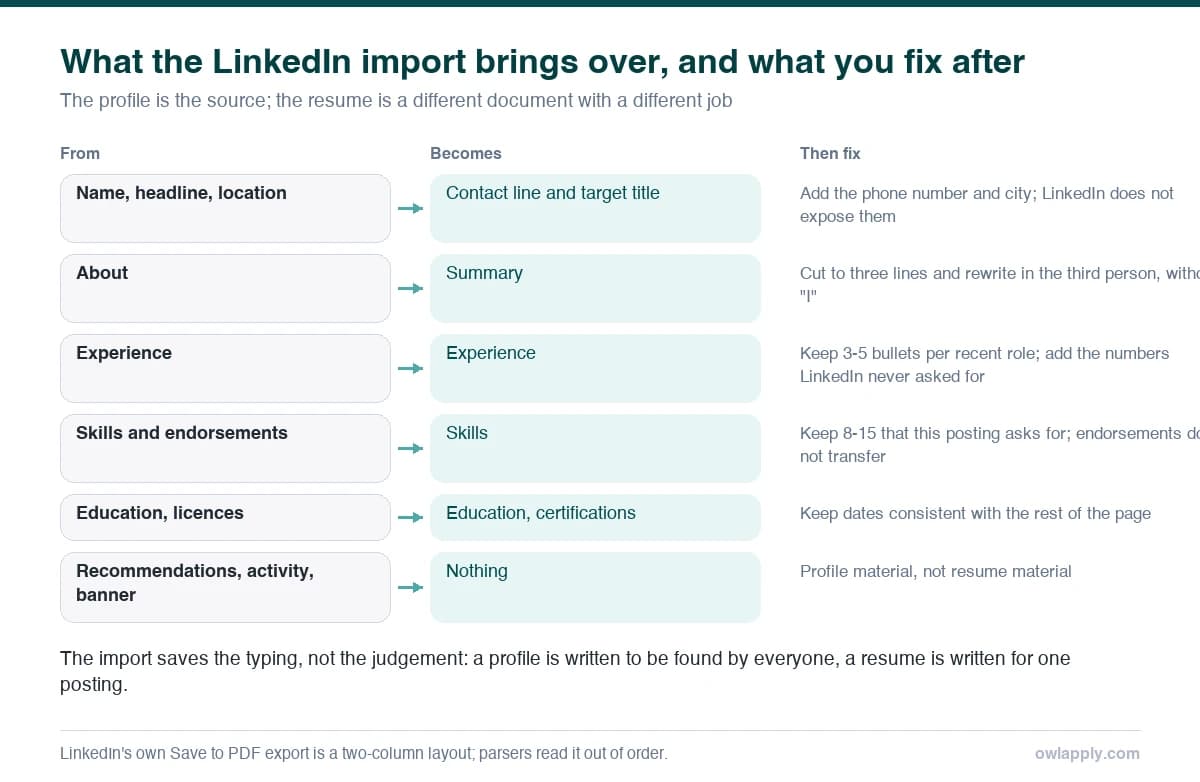
| LinkedIn section | Becomes | What to change after import |
|---|---|---|
| Name, headline, location | Contact line and title | Add phone and email (LinkedIn does not expose them); replace a slogan headline with a job title |
| About | Summary | Cut to three lines, third person, lead with a result; the About section is usually 150+ words in first person |
| Experience | Work experience entries with dates | Turn paragraphs into 3-5 bullets per role, each starting with a verb and ending with a number |
| Education | Education entries | Add GPA/percentage if strong; remove activities unless recent graduate |
| Skills | Skills list | Trim from LinkedIn's 50 to the 8-15 the target posting names; group them |
| Licenses and certifications | Certifications | Keep those with an exam or an issuing body; drop course-completion badges |
| Projects, publications, volunteering | Optional sections | Keep what supports the target role; the rest is LinkedIn material, not resume material |
Prefer to start from a finished document rather than an import? These open in the builder with the sections already filled in.

Project Manager
Why this resume works:
- Managed 12 concurrent enterprise transformation projects totaling $47M at Accenture with 96% on-time delivery
- Led cross functional teams of 35+ and reduced average project cycle time by 22% through PMO governance implementation
- PMO framework saved $3.2M in unplanned costs and cut scope creep incidents by 38% over 3 years

Software Engineer
Why this resume works:
- New-grad Software Engineer resume for 2026 FAANG / AI-first recruiting
- Programming languages, frameworks, and system design coursework
- LeetCode counts, GitHub star totals, and open-source contributions

Digital Marketing Manager
Why this resume works:
- Owns blended ROAS, MER and CAC across a multi-channel 2026 mix
- Manages $6M+ paid budget with agency partners (Tinuiti, Wpromote)
- Runs quarterly planning, MMM cadence and creative reviews
LinkedIn's own PDF vs importing the profile
LinkedIn lets you download your profile as a PDF (More, Save to PDF, documented on LinkedIn’s help page for it). It is a fair backup and it is not a resume: the layout is two-column with a wide left margin, the About text runs unedited, every position is included at full length, and the file carries LinkedIn's branding. In our data, two-column layouts are among the most damaging things a parser can meet, because the columns are read across each other and sections interleave. The import route produces a single-column document from the same information, in a template tested on Workday, Greenhouse, Lever and Taleo. If your profile is set to private and you would rather not change it, the alternative is to save LinkedIn's PDF and upload that file on the same page; the parser will extract the text and rebuild it in a clean template, and you edit from there.
Why your resume should not be a copy of your LinkedIn profile
Do this
- Resume: one target role, 8-15 matched skills, 3-5 bullets per job, one or two pages, third person, a number in most lines
- Resume: tailored per application; the file name and summary change with the posting
- Resume: no photo unless asked; contact details on line two
Avoid this
- LinkedIn: one profile for every viewer, 50 skills, full career narrative, first person, photo, banner, activity
- LinkedIn: written to be found by recruiters searching keywords, so more terms and more text is fine
- LinkedIn: endorsements and recommendations, which have no resume equivalent
The import gives you the raw material. The tailoring is what gets the interview: for each application, change the summary's first line to the posting's job title, reorder the skills to match the posting, and cut bullets that do not support the role. The job match score shows which of a posting's terms your resume already contains.
The resume you export from a profile is still a general-purpose document. Before you send it anywhere, the job match score compares it against the specific posting and names the terms it is missing.
Five things to fix after you generate a resume from LinkedIn
- First person to third person. "I led a team of six" becomes "Led a team of six". Every bullet, every line of the summary.
- Paragraphs to bullets. LinkedIn experience entries are often paragraphs. A resume role is three to five bullets, verb first, number last. The bullet point generator rewrites any line into that form.
- Headline to job title. "Helping brands grow | Coffee lover" is a LinkedIn headline; "Digital Marketing Manager" is a resume title.
- Fifty skills to fifteen. Keep the ones the posting names and that appear in a bullet; the checker asks 74.0% of resumes to demonstrate a skill they only list.
- Dates and gaps. LinkedIn shows months; make the resume consistent (Jan 2024 - Mar 2026) and decide how to present any gap before the recruiter finds it.
Check the file before you send it
A resume generated from LinkedIn is only as good as the file it produces. Upload the finished PDF to the free ATS resume checker to read the text a parser extracts and see the 34 checks with their fixes. The import already avoids the layout problems (tables, columns, headers); what the checker usually flags after an import is content: skills without evidence, bullets without numbers, a summary that is still a paragraph.
The profile and the resume feed each other: personal branding for job seekers covers what to change on LinkedIn itself, and the AI resume builder page describes the editor the imported profile lands in. The best AI resume builders comparison shows how the import compares with other builders' options.
LinkedIn resume builder: questions people ask
Is the LinkedIn resume builder free?
Do I need to make my LinkedIn profile public?
Can I convert my LinkedIn profile to a resume in PDF?
Does the import copy my LinkedIn photo?
Why does my LinkedIn PDF fail ATS checks?
Should my resume and LinkedIn profile match exactly?
Turn your profile into a tested, single-column resume
Paste your LinkedIn URL, choose a template, edit and download. Free, no account.